C scripts
Structure of a C script (Project functions, Action, Header file), the supported ANSI C subset, tag and object functions, and the unsupported aspects of the language.
Scope of the language
C scripts run in the product's own ANSI C engine. No real compiler or DLL is loaded: the C source is preprocessed, parsed and executed. The engine has been tested side by side with a real compiler (MSVC) (integer and floating-point operations, pointers and arrays, structures, strings, printf, control flow, preprocessor, initializers, functions, standard library, sscanf, ctype, time).
- The memory is a single memory area; the sizes follow the 32-bit layout:
char1,short2,int4,long4,float4,double8, pointer 4 bytes. - Strings are single-byte in memory (Windows-1254): Turkish letters take 1 byte, and
strlen("Karıştırıcı")returns 11. Characters other than Turkish and Western European letters become?. - Supported:
struct,union,enum,typedef, arrays, pointers,switch,for/while/do,goto,#defineincluding macros with parameters,#include,#ifdef/#ifndef,#pragma code. - Predefined headers:
apdefap.h,ap_glob.h,ap_pbib.h,stdio.h,stdlib.h,string.h,math.h,ctype.h,time.h,memory.h,malloc.h,stddef.h,stdarg.h,limits.h,float.h,errno.h,windows.h. New scripts begin with#include "apdefap.h"; the Live functions (such asGetTagFloat) come with this header.
Unsupported aspects
The following produce a compile error:
- bit fields (
int a : 3) __int64/long long(64-bit integer)- old-style (K&R) parameter declaration
gototo a label in an inner block- named initializer (
{ .a = 1 })
In addition, functions such as %a and %n for printf, scanf, gets, getchar, fscanf, freopen and tmpfile are not available. A real DLL file cannot be loaded; only the functions in the DLL equivalents list work (below).
Script types
- Project functions
- Holds functions and file-level variables. Functions and variables that are not
staticare shared by all C code; two scripts with a function of the same name cause an error in Studio (if the function is to be used only in that file, writestaticin front of it). If no function is selected in an event or task, the function with the same name as the script runs. File-level variables keep their value between calls; they are reset when Live closes. - Action
- This is the code that runs on every call. The entry function is looked up in this order:
gscAction, a function whose name starts withOn(e.g.OnClick),_main,main; if none exists and the source contains a single function, that function is used; if there is no function at all, the whole code is treated as the body. If there are several functions and the entry function cannot be determined, Studio reports an error. - Header file
- For shared constants and types: it is included with
#include "Ad.h"or#include "Ad". It cannot be run.
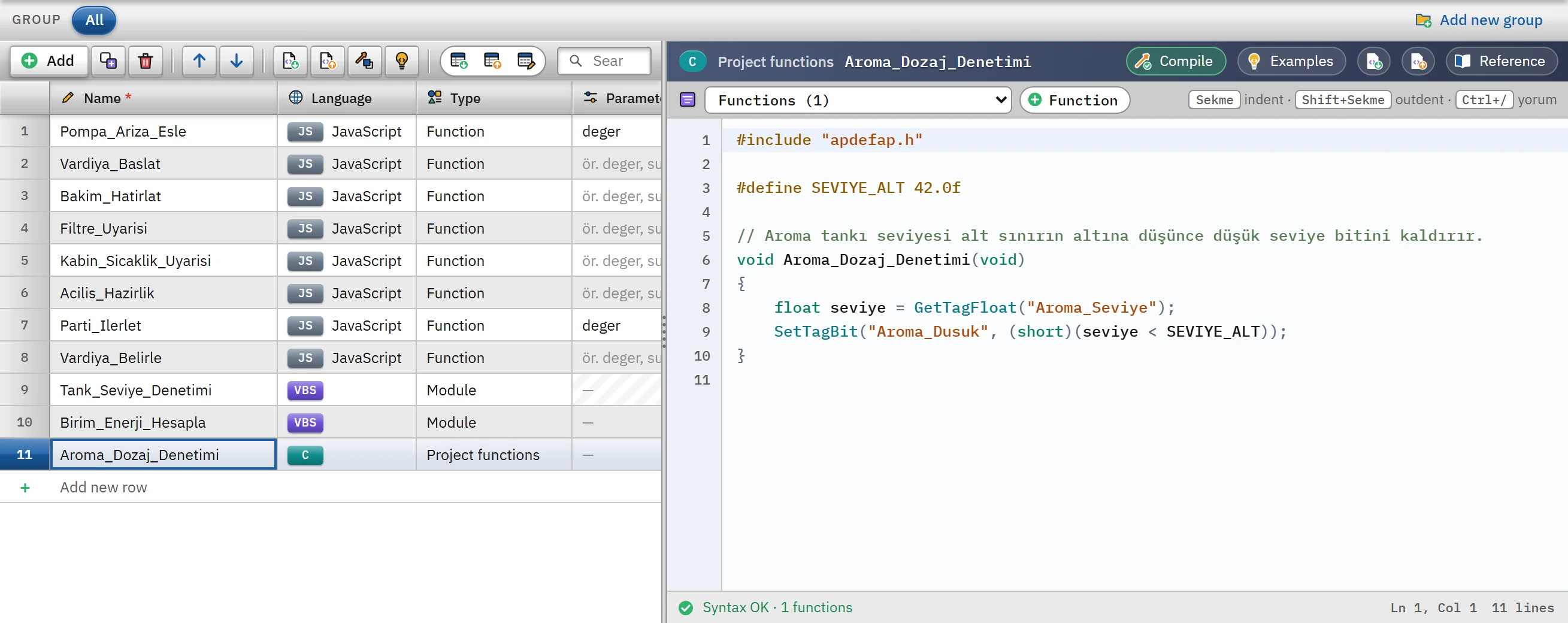 123
123- C — language badge; type: Project functions.
- Function — adds an empty C function at the end of the code.
- Status strip — number of functions and the syntax result.
A function run from an event takes three text parameters: void OnClick(char* lpszPictureName, char* lpszObjectName, char* lpszPropertyName). The first gives the screen of the event, the second the object of the event; the third is empty in events. In a tag-triggered task, the new value of the tag is passed to the first parameter of the function.
Examples
Project function (Aroma_Dozaj_Denetimi in Tanitim_Tesisi):
#include "apdefap.h"

#define SEVIYE_ALT 42.0f

// Aroma tankı seviyesi alt sınırın altına düşünce düşük seviye bitini kaldırır.
void Aroma_Dozaj_Denetimi(void)
{
    float seviye = GetTagFloat("Aroma_Seviye");
    SetTagBit("Aroma_Dusuk", (short)(seviye < SEVIYE_ALT));
}
Action:
#include "apdefap.h"

int gscAction(void)
{
    float miktar = GetTagFloat("Hedef_Miktar");

    if (miktar <= 0.0f) {
        SetTagChar("Hata_Metni", "Hedef miktar girilmedi");
        return 1;                       // erken çıkış
    }
    SetTagFloat("Toplam_Miktar", GetTagFloat("Toplam_Miktar") + miktar);
    SetTagChar("Hata_Metni", "");
    return 0;
}
Reading tags whose names end with a number using a loop:
#include "apdefap.h"

void C_Dongu_Cok_Tag(void)
{
    int i;
    char ad[32];
    float toplam = 0.0f;

    for (i = 1; i <= 5; i++) {
        sprintf(ad, "Silo_%d", i);      // Silo_1, Silo_2 ...
        toplam += GetTagFloat(ad);
    }
    SetTagFloat("Silo_Toplam", toplam);
}
Predefined functions
The detailed list is in the Script object model reference; the full list is in the Reference panel in the code area. Summary:
| Group | Functions |
|---|---|
| Tag | GetTag<Tip> / SetTag<Tip>: Bit, Byte, SByte, Word, SWord, DWord, SDWord, Float, Double, Char (text), Raw; …State (also returns the status code), …StateQC (status and quality), …Wait variants, GetTagMulti…, GetTagValue, GetTagDateTime |
| Object | GetPropBOOL / SetPropBOOL, …Char, …Double, …Word and property-specific functions such as GetVisible, SetBackColor, SetText |
| Screen and system | OpenPicture, OpenPrevPicture, OpenScreeninPopup, ClosePopup, GetLanguage, SetLanguage, ShowLogonDialog, Logoff, GetComputername, printf, TraceText, ProgramExecute |
| C library | strlen, strcpy, sprintf, sscanf, atoi, atof, sqrt, pow, floor, memset, malloc, time, localtime, strftime, fopen (text mode) … |
| DLL equivalents | UseAdmin.dll (PWRTLogin, PWRTGetCurrentUser, PWRTSilentLogin …), kernel32.dll (Sleep, GetTickCount, GetLocalTime, WinExec), user32.dll (MessageBoxA), shell32.dll (ShellExecuteA) |
DLL equivalents are declared between the lines #pragma code("user32.dll") and #pragma code(), as is usual in code; if a DLL function that is not in the list is called, the script stops with an error.
Behavior rules
- A non-existent tag or object does not raise an error. The function returns
FALSE/0and a diagnostics line is written. Studio warns in advance about non-existent tags written with a fixed name. - State check:
GetTagFloatState("Ad", &durum)returns the value and the state together. State 0 is good;0x0001no connection,0x0080value not read yet,0x0200address error,0x0400no such tag. For quality, use…StateQC: 192 good, 84 value is outside the tag's lower / upper limit. - The …Wait functions give the same result as the ones without the suffix: a read returns the current value, a write waits until the value has been sent.
- Colors are a single number: red + 256 × green + 65536 × blue.
- File functions work in text mode only (there are no
"b"and"+"modes) and require the File access permission.ProgramExecute,WinExecandShellExecuteArequire the Program execution permission; the program is started, but it is not waited for to finish. - Alarm functions (
AXC_…), table and curve window functions (Tlg…), report jobs (ReportJob…) and user archive configuration functions are defined (the code compiles) but do nothing when called: a diagnostics line is written andFALSE/0is returned. - The output of
printfandTraceTextgoes to the script diagnostics list and the event log.
Limitations and points to note
- A call can compute for at most 30 seconds (
Sleepand window wait times are not counted); a longer loop is interrupted with an error. - For the same trigger, a call that arrives while the previous call is still running is skipped.
- Access to an invalid address and division by zero produce an error with the line number; the error is written to the event log in the form
Betik, işlev, satır N: ileti. - There is no support for 64-bit integers, bit fields or real DLLs; in code migrated from WinCC, these usages produce a compile error.
- Scripts do not run in monitoring mode from a browser or the TV.