See your plant live.
User Manual
Design your project in Studio and run your plant with Live. This manual covers every step with screenshots, from your first project to writing scripts, from alarms to reports.
Where to start?
Pick a path based on what you want to do.
Studio screen map
Click the numbered areas to jump to the related topic.
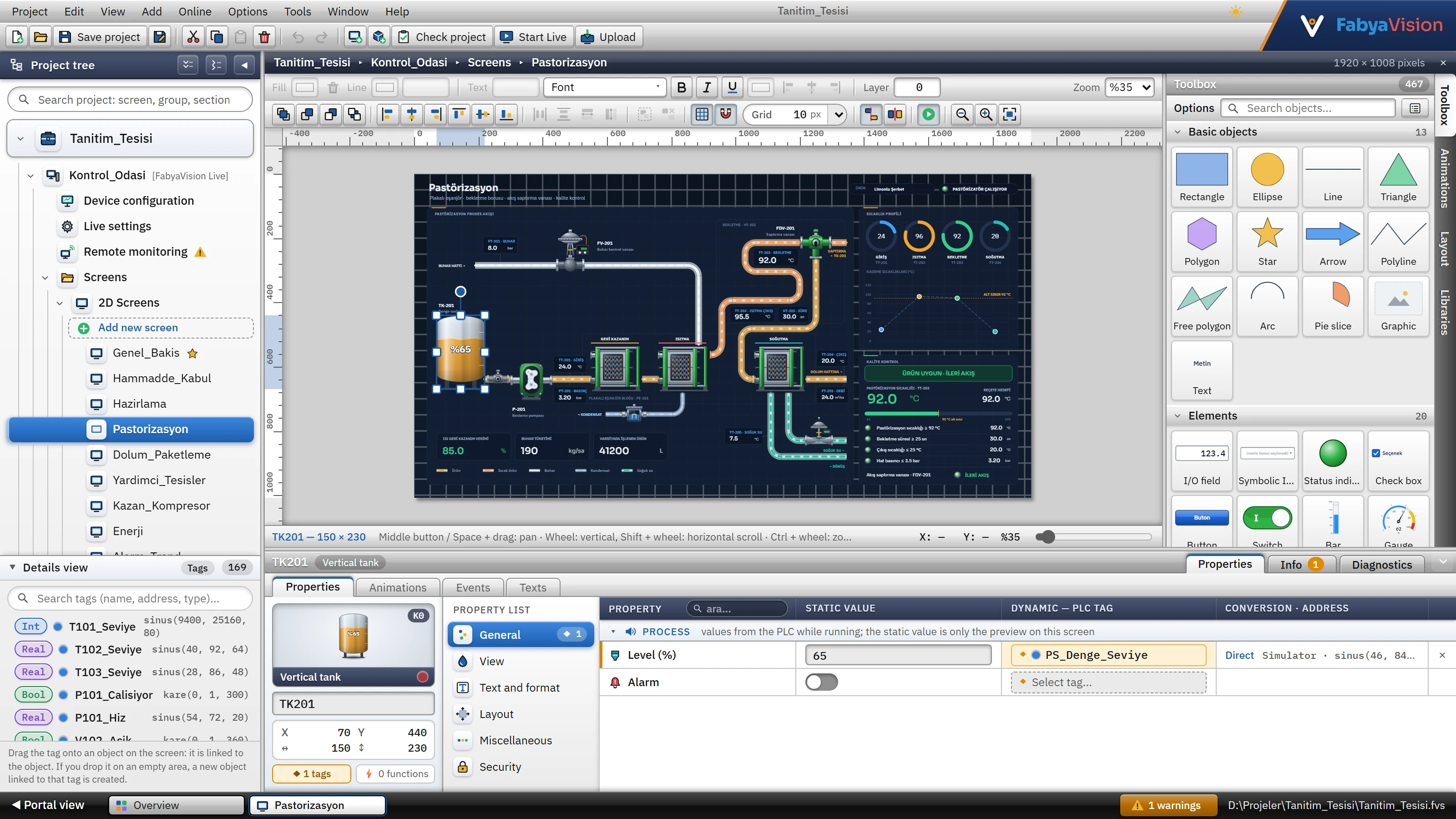
- 1Menu bar — Project, Edit, View, Add, Online, Options, Tools, Window, Help.
- 2Toolbar — frequently used commands.
- 3Project tree — all sections and screens of the project.
- 4Details view — tag list.
- 5Workspace — screen editor or table.
- 6Task cards — Toolbox, Animations, Layout, Libraries.
- 7Inspector — properties of the selected object.
- 8Status bar — open editors, number of problems, file path.
Manual sections
101 topics · 18 sections · 205 screenshots
Get to know FabyaVision, install it and run your first project.
The windows, tables, menus and settings of Studio.
Project files, revisions and uploading the project to Live.
Connections and drivers: data exchange with the PLC and other devices.
Tags, addresses, structures, scaling and read cycles.
2D / 3D screen design, objects, animations, events and controls.
Discrete and analog alarms, classes, the alarm view, and acknowledgment.
Data archives and the trend view.
Recipe design and the operator's use of recipes.
Report design, triggering, printing and approval.
Users, groups and the application of authorizations to objects.
Text / graphic lists and multilingual projects.
Writing scripts in VBScript, JavaScript, C and Python.
Running the plant with Live: settings, operator interface, remote monitoring.
Data exchange with Excel and SQL.
Error messages, logs, known limitations and frequently asked questions.
Glossary, shortcuts, object catalog and file locations.