HMI tags
A tag is the name of a value: a variable that is either bound to a PLC address (external) or lives only inside Live (internal). Tags are defined in the HMI tags section and bound to screen objects.
What is a tag
A tag is the name of a value in the project. A tank object on a screen, an alarm, a trend and a script always access the value by the tag name. There are two kinds of tags:
- External tag
- It is bound to a connection and corresponds to an address in the PLC (or another device). Live reads the value from the device and sends the written value to the device.
- Internal tag
- It has no connection and no address; its value lives only inside Live (such as a recipe name, a batch number or an intermediate calculation). In the table, select <Internal tag> in the <Internal tag> cell.
Tags are defined in the HMI tags section of the project tree. The tabs of the section are: Tags (this topic), Structure instances and Structures (UDT) (Structures), Scaling and quality (Scaling and quality).
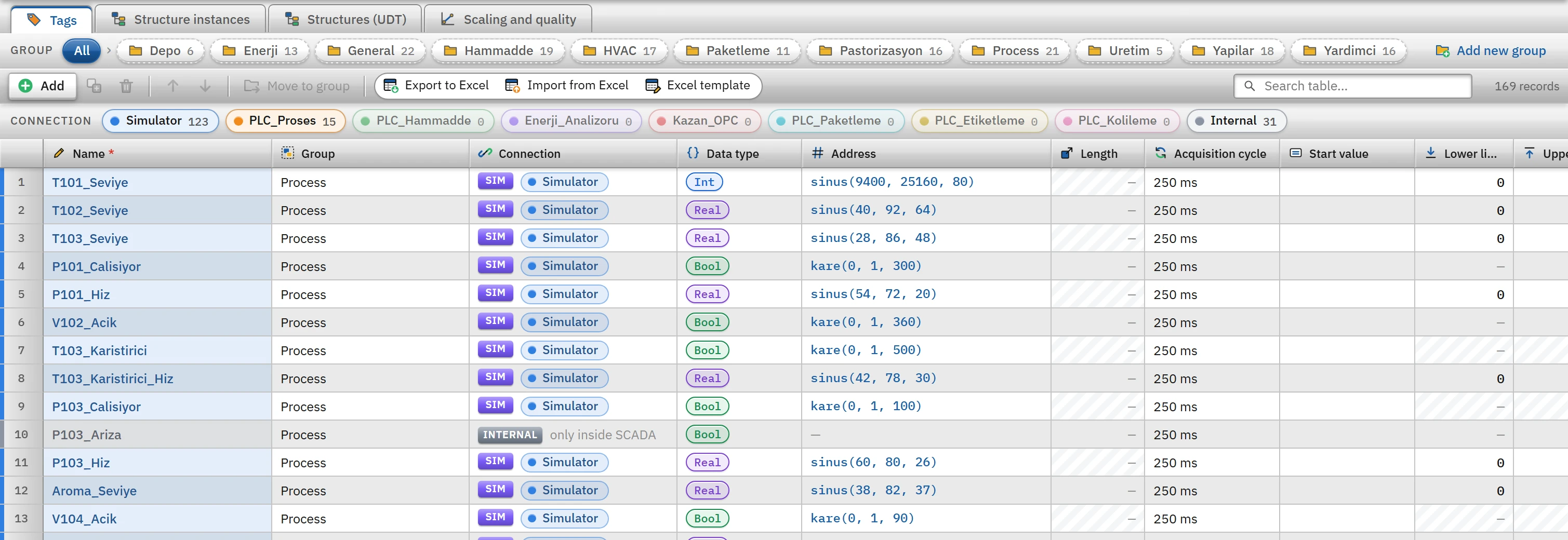 1234567
- Add — new tag row.
- Color indicator — clicking a connection filters the table to the tags of that connection.
- Name — unique tag name.
- Connection — PLC connection or internal tag.
- Data type — the types supported by the driver.
- Address — validated with the driver's rule.
- Read cycle — selected from the Cycles table.
Adding a tag
- Open the table
In the project tree, click the HMI tags section.
- Add a row
The Add button creates a new tag named Tag_1, Tag_2 …: bound to the first connection, of type
Bool, with a 1 s cycle. If there is no connection, it becomes an internal tag. - Give a name
The name begins with a letter or
_; it contains letters (including Turkish letters), digits and_and is unique in the project. A dot is also present in tags generated from a structure instance (Pompa_P101.Hiz). - Select the connection and type
Select the connection in the Connection cell, then the Data type; the type list is narrowed to the types supported by the connection's driver.
- Type the address
Enter the address in the device in the Address cell; the address is validated according to the connection's driver (Tag addresses).
- Select the cycle
Select the Acquisition cycle (Cycles).
Columns
| Column | Meaning and rules |
|---|---|
| Name | Required, unique. It is locked on a tag generated from a structure instance and carries the STRUCTURE badge. |
| Connection | The name of the connection in the project, or <Internal tag>. For a connection status tag, the STATUS badge and the connection name are shown, and the cell is locked. |
| Data type | Bool, Byte, SInt, Int, UInt, DInt, UDInt, Real, LReal, String, WString, DateTime; the driver narrows the list. |
| Address | PLC address. It is locked for an internal tag. An invalid address is not accepted into the table. |
| Length | Only String / WString: maximum number of characters, 1 – 254 (default 32). |
| Acquisition cycle | A cycle in the Cycles table; it determines how often the PLC tag is read. |
| Start value | The initial value of internal and simulator tags when Live starts (for a persistent internal tag, only at the first start). It has no effect on a PLC tag; the PLC supplies the value. Bool: 0, 1, true, false; for a numeric type, a number within the range of the type (an integer for integer types; the decimal separator may also be a comma). |
| Lower limit, Upper limit | Numeric types only. The operator cannot write a value outside this range; if a value from the PLC falls outside the range, the tag is considered out of limits (details). The upper limit must be greater than the lower limit. |
| Unit | Descriptive text (%, bar, °C). It is not used in calculations; in Live it is shown next to the value in the detail panel of the Alarm view. |
| Description | Free text. Used in the tag selector and in search. |
The table can be grouped: you organize the tags with the Group column and the folders in the project tree (Table editor: Move to group, duplicating, sorting, Excel).
Data types
| Type | Size and spacing |
|---|---|
Bool | 1 bit |
Byte / SInt | 1 byte: 0 – 255 / −128 – 127 |
Int / UInt | 2 bytes: −32768 – 32767 / 0 – 65535 |
DInt / UDInt | 4 bytes: −2147483648 – 2147483647 / 0 – 4294967295 |
Real / LReal | 4 / 8 byte floating-point number |
String / WString | Text / Unicode text |
DateTime | Date and time |
Color indicator and filtering
The color indicator above the table lists each connection as a chip in the connection color, and the Internal chip. Clicking a chip filters the table to the tags of that connection; clicking again removes the filter. The same color appears in the strip to the left of the row and in the dot in the Detail view.
Details view
The Details view below the project tree is the tag list: type badge, connection color, name and address. With the box above it you search by name, address, type or connection (at most 200 tags are drawn; narrow the search if there are more).
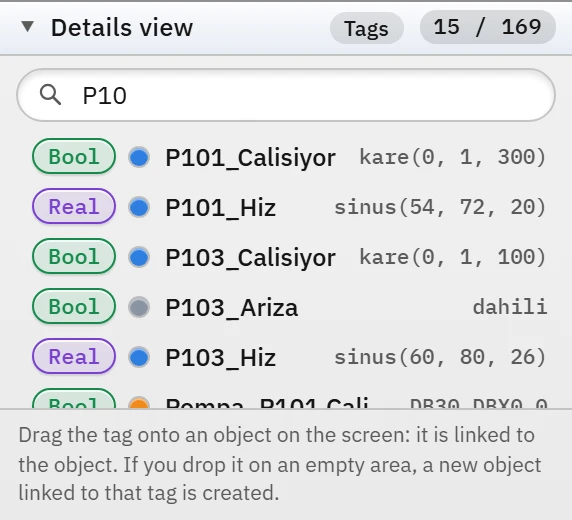 12
12- Search — by name, address, type or connection.
- Tag — type badge, connection color, name and address; it is dragged onto an object on the screen.
- Double-click shows the tag in the table.
- Right-click: Go to tag (show in table), Copy name, Copy address (an internal tag has no address).
- Drag and drop: if you drop a tag onto an object on the screen, it is bound to that object; if you drop it on an empty spot, a new object bound to that tag is created (a lamp for
Bool, a numeric field for other types). Drag and drop also works in the 3D scene.
The dropped tag is bound to the first suitable property of the object that can be bound directly to a tag (first those in the State group); if there is no suitable property, Studio reports the reason with a warning. Other properties are bound from the Animations tab (Dynamization).
Deletion and consistency
- A tag generated from a structure instance cannot be deleted on its own; delete the instance. You can delete the connection state tag; it is not regenerated.
- An object, alarm or function bound to a deleted tag produces the error is bound to a deleted tag in the Check project list. A tag bound to a deleted connection appears as connection deleted.
- When the connection or type changes, the address is validated again; an address that does not fit stays red in the table.