Scaling and quality
Linear scaling that converts the raw number from the PLC (e.g. 0 – 27648) to an engineering unit, the substitute value for a tag of bad quality, persistence of internal tags and the effect of the lower / upper limit in Live.
When it is needed
Analog inputs are usually stored in the PLC as a raw number: for example, the range 0 – 27648 on Siemens. The operator should see not this number but °C, bar or %. The HMI tags tab of the Scaling and quality section does this conversion once, at the tag level. The same tab also sets the substitute value for a tag with bad quality and the persistence of an internal tag.
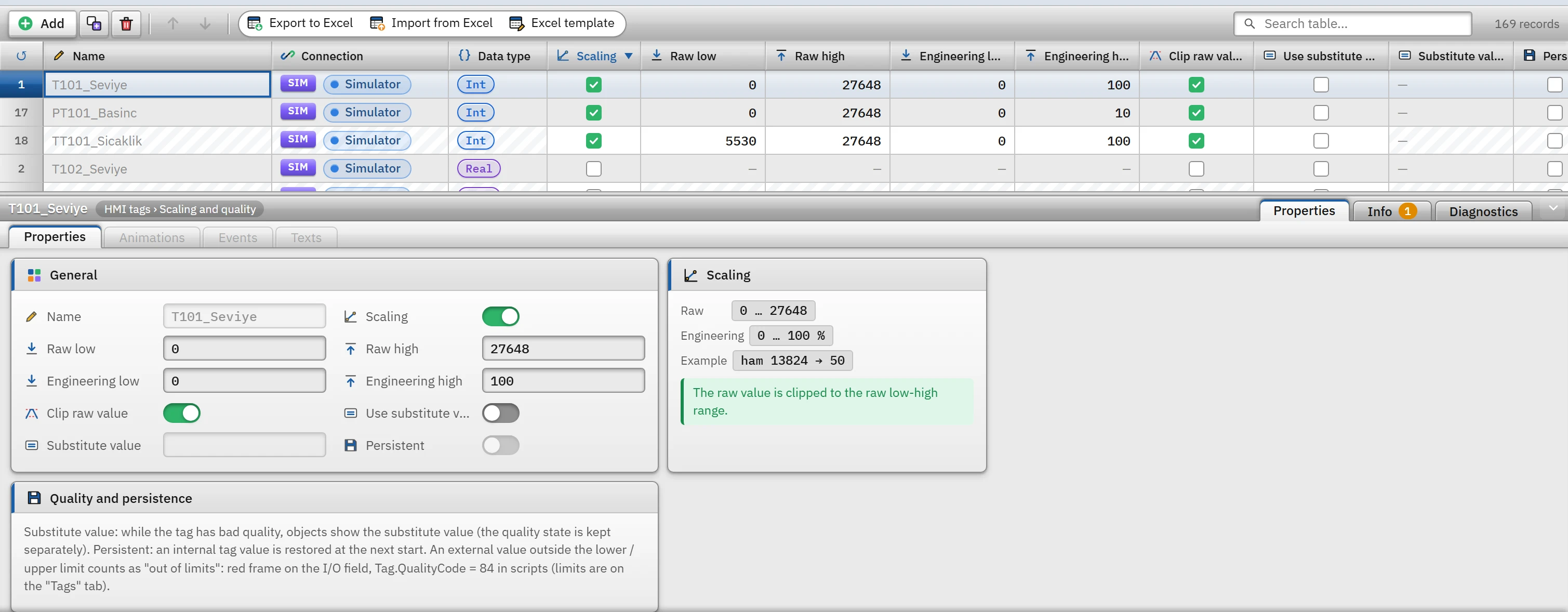 123456
- Scaling — when on, the raw value is converted to the engineering value.
- Raw low / high — the end points of the number range supplied by the driver.
- Engineering lower / upper — the real values that correspond to these ends.
- Substitute value — the value objects display while the tag has bad quality.
- Persistent — internal tags only.
- Scaling summary — the raw and engineering ranges with a sample conversion.
The rows of the tab are the tags on the Tags tab. Tags cannot be added or deleted on this tab (Tags cannot be added or duplicated on this tab); adding and deleting are done on the Tags tab. The Name, Connection and Data type columns are for information only.
Linear scaling
- Turn on scaling
In the tag row, select the Scaling check box. Empty fields are filled with the defaults: Raw low
0, Raw high27648, Engineering low0, Engineering high100. - Enter the ranges
Raw low / high are the end points of the number supplied by the driver; engineering low / high are the real values corresponding to these end points. Engineering high may be smaller than engineering low (inverted scale).
- Optional: cropping
If Clip raw value is on, the raw value is clamped to the raw lower-upper range; sensor-break or overflow values do not go outside the engineering range. If off (the default), the scaling line extends beyond the range.
Conversion formula: mühendislik = müh. alt + (ham − ham alt) × (müh. üst − müh. alt) / (ham üst − ham alt). Example: for raw 0 – 27648 → 0 – 100, the raw value 13824 becomes 50. In the sample project, T101_Seviye uses this setting to give the level in %, and TT101_Sicaklik converts the raw value 5530 – 27648 (4 – 20 mA analog input) to 0 – 100 °C.
- It is applied only to external, numeric tags. In an internal tag the value is already in engineering units (the box is locked); if the type or connection later breaks these conditions, scaling switches off automatically. A simulator connection counts as external; a simulator signal is treated as a raw value.
- The engineering value is used everywhere. Objects, trends and archives, alarms, reports, scripts and browser monitoring use the scaled value of the tag; no additional scaling is needed in any of them. The tag's Lower / Upper limit values are also in engineering units. The value of a scaled tag can be a decimal; the raw value is read in the data type of the tag (e.g.
Int) and rounded. - Inverse scaling when writing. The engineering value entered by the operator is converted to the raw value and sent to the PLC; for integer types it is rounded. If the raw value does not fit in the range of the type, the write is rejected:
Tag_Adi: değer ham aralığın dışına çıkıyor: ham değer 40000, izin verilen aralık -32768 … 32767. - An invalid definition is not applied. If the raw low and raw high are equal, or the engineering low and high are equal, or one of the numbers is missing, Live does not apply scaling and the raw value is shown unchanged; Check project reports these as errors (also when the raw low / high is outside the range of the data type).
Substitute value and quality
The value of a PLC tag has bad quality in these cases: the connection is down, it has not been read at all yet, or there is a read error. Internal and simulator tags are good as long as a value is written.
- An object bound to a bad-quality tag is drawn faded and gray; a numeric field shows
####. - If Use substitute value is on, objects and scripts see the Substitute value instead of
####(in the engineering unit; 0 / 1 forBool; text for text). The quality flag is additionally preserved: the object is still drawn faded, and the quality remains bad in the script. - Alarm evaluation, the archive and reports do not see the substitute value; they skip a tag with bad quality anyway. When the quality improves, the real value is visible.
- If the substitute value is empty, Check project reports an error ("####" is still shown); if the value does not match the tag's type, it is again an error. The substitute value is never used on an internal or simulator tag (a warning is given).
Quality code in scripts
| Code | Meaning |
|---|---|
192 | Good. |
84 | The value is outside the lower / upper limit of the tag but is usable. |
8 | No connection (PLC tag, connection is not Connected). |
4 | Undefined (tag not found). |
0 | Bad (the connection exists but the value could not be read or has not arrived yet). |
tag.QualityCode in VBScript, tag.quality in Python and the quality output of the …StateQC functions in C, such as GetTagFloatStateQC(…), return these codes. In C, status bits are also returned: 0x0001 no connection, 0x0080 waiting for the first value, 0x0200 address error, 0x0400 no such tag.
Lower and upper limits
Lower limit and Lower limit on the Upper limit tab serve two purposes:
- Limits the write. If an operator or a script writes a value outside the range, the write is rejected and the notification window says:
Tag_Adi: değer alt sınırdan (0) küçük olamaz./… üst sınırdan (100) büyük olamaz. - The value read is flagged. If a good-quality value from the PLC falls outside the range, the tag is regarded as out of limits: if the value binding of an object is bound to this tag, a red frame is drawn on objects that have a frame, such as the I/O field, and the quality in the script becomes
84. The value is still used; alarms and trends take this value.
Persistent internal tag
The Persistent box can only be enabled for an internal tag (locked for an external tag; the value of an external tag is read from the device on every startup). The value of a persistent tag is saved as it changes (batched at most every 2 s) and restored when Live is reopened; any pending change is also written when the program is closed. Start value is used only on the first startup, while no record exists yet.
- The values are stored on the Live computer in the project's data folder (
<Proje adı>.veri\depo\tag_kalici.json) by tag ID; if the tag has been deleted, its persistence has been turned off, or the record does not match the type or limits of the tag, it is ignored and the start value is used. - Use it for values that must not be lost during a power failure, such as the recipe name, a counter or the last shift.
- Persistence does not work in browser monitoring mode.
Check project rules
| Message (summary) | Level |
|---|---|
| Scaling is on but the type is not numeric | Error |
| Raw low and raw high are equal; engineering low and engineering high are equal; the fields are empty; the raw values are outside the range of the type | Error (no scaling is applied) |
| Scaling enabled on an internal tag | Warning (not applied) |
| Substitute value is on but no value has been entered or it does not match the type | Error |
| Substitute value on an internal or simulator tag | Warning |
| Persistent is on, but the tag is external or a connection status tag | Warning |
| The upper limit is not greater than the lower limit | Error |