Cycles
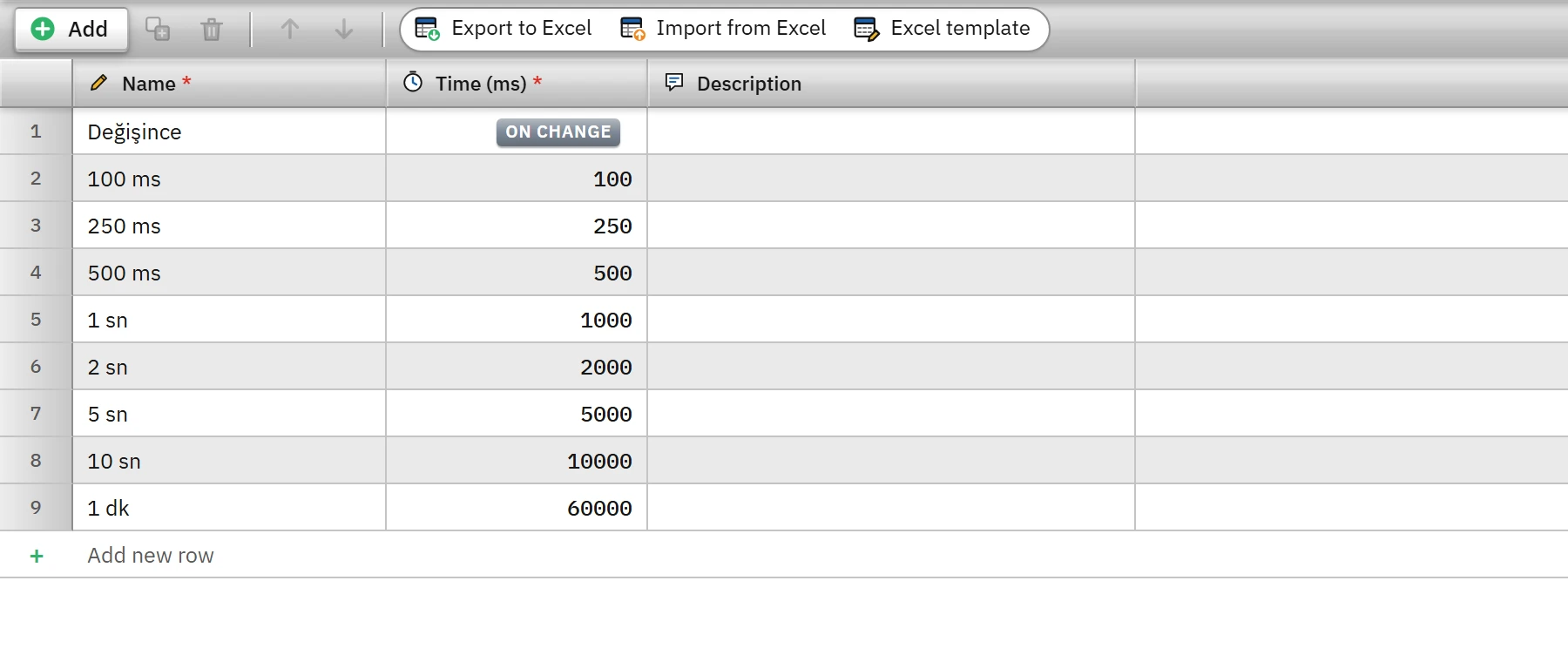
A cycle is a named time interval that specifies how often a job is performed: tag reading, archive logging, tasks, and screen updates are all selected from the same Cycles table.
What it is used for
A cycle is a record that has a name and a duration (in milliseconds). Instead of entering the duration separately everywhere, you define it once in the Cycles table, and tags, archives, tasks, and screens select that definition by its name. Changing the duration of a cycle changes everything that uses it at the same time.
 12
12- Name — the name selected in tags, logs, tasks and screens.
- Duration (ms) — 0 (On change) or 20 – 86400000.
Defining a cycle
- Open the section
In the project tree, click the Cycles section. A new project comes with these cycles: On change, 100 ms, 250 ms, 500 ms, 1 s, 2 s, 5 s, 10 s, 1 min.
- Add a row
Add creates a new cycle named Dongu_1 with a duration of
1000ms. - Enter the name and the duration
Name must be unique. Time (ms) can be
0or20–86400000(24 hours). A shorter value is not accepted: The time must be at least 20 ms (0 = on value change).
Where a cycle is used
| Location | Field | Effect |
|---|---|---|
| HMI tags | Acquisition cycle | How often a PLC tag is read from the device; how often the simulator signal is updated. |
| Historical data (archive) | Logging cycle | The sampling interval in the cyclic recording method (Historical data). |
| Scheduled tasks | Cycle | The run interval of a cyclic task (Scheduled tasks). |
| Screen properties | Update cycle | How often the tag bindings on the screen are applied in a batch. If it is empty (or On change is selected), changes are drawn immediately at 20 ms intervals. |
If you delete a cycle that is in use, the place that refers to it produces the error refers to a deleted entry in the Check project list.
How the tag read cycle works
- Live groups the tags of a connection by their read cycles. A group whose time has come is read in one pass; within the same group, addresses that are close to each other are merged into a single request. Different cycles are separate groups and make separate requests.
- If a read takes longer than the cycle time because the device responds slowly, the next read starts immediately: the actual rate is limited by the response time of the device.
- Only changed values are passed to the screens; batched, at most once every 100 ms per connection.
- Minimum 100 ms. Studio accepts times down to 20 ms, but Live applies a read cycle of at least 100 ms for PLC and simulator tags; shorter times run at 100 ms.
- A tag with no cycle selected, or whose duration cannot be found, is read at
1 sn. - Depending on the driver: OPC UA tags are polled in each cycle with a bulk Read. With MQTT the value arrives by subscription; the cycle only determines how often the stored last value is applied to the tag. With OPC DA, the Update rate is the refresh interval of the server and must not be greater than the read cycle of the tags.
- Connection status tags are not read according to a cycle; Live writes them when the connection status changes (Connection diagnostics).
Performance and selection tips
- One request (or a few) is sent for each group in every round; putting many tags in a short cycle increases the network and PLC load. Put fast-changing values that the operator watches in a short cycle (e.g. 250 – 500 ms) and slow-changing ones (temperature, level, counter) in a long cycle (1 – 5 s).
- Tags in the same cycle and the same data block are read with a single request; putting tags that appear together on a screen into the same cycle reduces the number of requests.
- There is no need to define many cycles; a few standard cycles are enough.
CSV and Excel
In CSV, you enter the time (1000) or the name of the cycle in the Cycle (ms) column; in Excel, the name of the cycle is entered in the Acquisition cycle column. In CSV, if the time / name does not match a cycle, the tag is silently bound to the 1 s cycle; in Excel, a name that is not in the list makes the row erroneous (Transferring tags with Excel).