Data archives
Defining the data archives that record the values of the selected tags over time: recording methods, storage (file, CSV, SQL Server), retention period and file locations.
The data archive defined in the Historical data section writes the values of the selected tags to a file with a timestamp while Live is running. The Trend view draws the historical curves from these records. An archive can contain several tags; each tag has its own logging method.
Defining an archive
- Add the log
In the project tree, click Historical data on the Data logs > Data logs tab. Type a name in the Name field (example:
Tank_Seviye_Arsivi). An archive for which Enabled is checked is written. - Add the tags
With an archive row selected, add a row to the Logged tags table at the bottom (or on the right) with Add, and select the tag from the Tag list.
- Select the recording method
Select a Logging method for each tag (table below). The optional Curve name and Curve color are used when a trend draws a curve automatically from this archive.
- Configure storage and retention
Fill in the Storage, Retention period (days) and Maximum size (MB) fields.
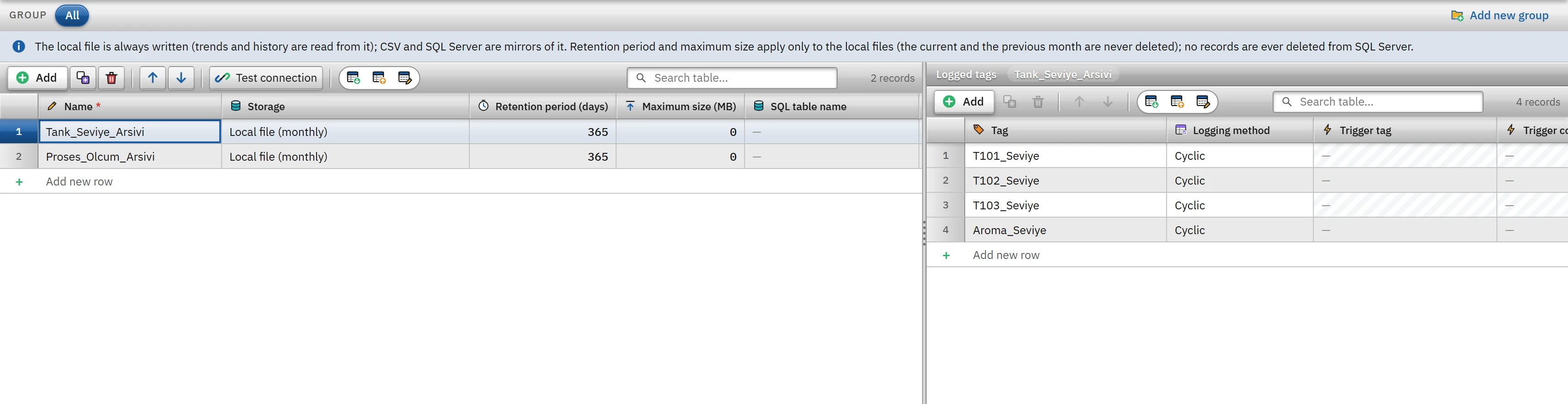 123456
- Storage — local file; CSV or SQL Server mirroring.
- Retention period (days) — 0 = never deleted.
- Maximum size (MB) — 0 = unlimited.
- Tag — the tag to be logged.
- Recording method — cyclic, on change or with a trigger tag.
- Trigger tag — only for the trigger method.
Logging methods
| Method | When a record is written | Related fields |
|---|---|---|
| Cyclic | When the duration of the selected cycle elapses (at most every 100 ms). | Logging cycle (from the Cycles table). If the Değişince (0 ms) cycle is selected, the archive records once every 1 s. |
| When the value changes | When the value of the tag changes; if the difference from the previous recorded value is greater than the Deadband value. | Deadband (0 = every change). |
| By trigger tag | When the trigger tag meets the condition, the current value is saved once. | Trigger tag and Trigger condition: Rising edge (0 → 1) or On change. If no trigger tag is selected, no record is written at all. |
No cyclic or on-change records are written for a tag whose quality is bad (connection lost) or whose value has not been read yet. When a tag becomes bad-quality in the archive, a single marker row is written; the trend breaks the line at that point. Text tags (String, WString, DateTime) are written to the archive but cannot be drawn as a trend curve.
Storage
The local monthly file is always written; trend and history reading is done from this file. CSV and SQL Server are its mirror.
| Storage option | What is written |
|---|---|
Local file (monthly) | Local log file only: <Proje>.veri\gunluk\arsiv_<arşiv kimliği>_yyyyMM.log. |
Local file + CSV (opens in Excel) | In addition, gunluk\arsiv_<arşiv adı>_yyyyMM.csv: UTF-8 (BOM), delimited by ;, decimal point, with a header row; the month is the local month of the row. If the file is open in another program, the rows are held in memory and written when it is closed. |
Local file + SQL Server (mirroring) | In addition, it is written in bulk to a SQL Server table (below). |
SQL Server mirroring
This option makes the SQL table name and SQL connection string fields available. Sample string: Server=SUNUCU\SQLEXPRESS;Database=Uretim;Integrated Security=true. If the table name is empty, FV_Arsiv_<arşiv adı> is used; it may contain only letters, digits and _ (and optionally şema.tablo).
- If the table does not exist, it is created on the first record: the columns
zaman(datetime2, local time),tag,deger(float),metin,kalite(0 good, 1 bad) andistasyon. - If the connection drops, the rows are kept first in memory and then on disk (
gunluk\arsivsql_<kimlik>.bekleyen, up to 200 MB); they are sent when the connection returns. The retry interval grows from 5 s to 1 min. No row is missing from the local file. The drop and the recovery are written to the event log. - No records are deleted from SQL Server; the retention period applies only to local files.
 1234
1234- Test connection — tries the SQL Server connection, does not write.
- Storage — “Local file + SQL Server (mirroring)”.
- SQL table name — if empty, FV_Arsiv_<log name>.
- SQL connection string — the password is not visible.
The Test connection button tests the connection string of the selected archive in Studio: it connects to the server and checks the state of the table and permissions; it does not write or create anything. The result is shown in a window.
Retention period and maximum size
At startup (after about 20 s) and then once a day, Live deletes old monthly files:
- Retention period (days): if the whole month is older than this period, that month's file is deleted.
0= never deleted. The default is 365. - Maximum size (MB): if the local files of the archive (log and CSV) exceed this size, they are deleted starting with the oldest month.
0= unlimited.
File locations
| File | Location |
|---|---|
| Archive record | <Proje>.veri\gunluk\arsiv_<arşiv kimliği>_yyyyMM.log (each line is a single JSON: time, tag ID, value) |
| CSV mirror | <Proje>.veri\gunluk\arsiv_<arşiv adı>_yyyyMM.csv |
| SQL pending records | <Proje>.veri\gunluk\arsivsql_<kimlik>.bekleyen |
The <Proje>.veri folder is created by Live next to the project file on the first write (Files and folders of Live).
Limitations and points to note
- Logging is written in batches by the main program (Live) every 5 seconds; if a crash occurs, the samples of the last few seconds may be lost.
- Reading a long range in the trend is limited to at most 12 pages per archive (50 000 rows per page); older data does not appear in the trend and stays in the file (Trend view).
- If Data logging is switched off on the Live settings›Startup sequence tab, nothing is written to the archive; trends show only the values in memory.
- In browser monitoring (read-only), nothing is written to the archive; writing is done only by the main Live program.
- The ways to pass archive data to other programs are the CSV file and the SQL Server mirror; the trend also reads the record files (Working with Excel).