Database access (ODBC and SQL)
How Live works with databases: mirroring the archive to SQL Server and querying / writing from scripts via ODBC; permissions, connection string, limits and security.
In FabyaVision, the database is accessed in two separate ways, and the two are independent of each other:
| Archive SQL mirroring | ODBC from scripts | |
|---|---|---|
| What it is for | Writes the records of the data archive to an SQL Server table. | A script reads from or writes to any ODBC data source (batch record, recipe lookup …). |
| Database | Microsoft SQL Server only. | Any database that has an ODBC driver. |
| Direction | Write only (mirroring). | Read and write (your code decides). |
| Where it is set | Historical data › Storage (Data archives). | Script code + Live settings › Script permissions. |
| Permission | Not required. | The Database connection permission must be on. |
Details of archive mirroring are in the topic Data archives; this topic describes ODBC access from scripts.
ODBC from scripts
Prerequisites
- Define the ODBC data source
On the Live computer, create a DSN (data source name) or use a
Driver={...}connection string. Live is a 32-bit (x86) program: on 64-bit Windows, define the DSN in the 32-bit ODBC administrator (C:\Windows\SysWOW64\odbcad32.exe) and use a 32-bit driver. - Turn on the permission
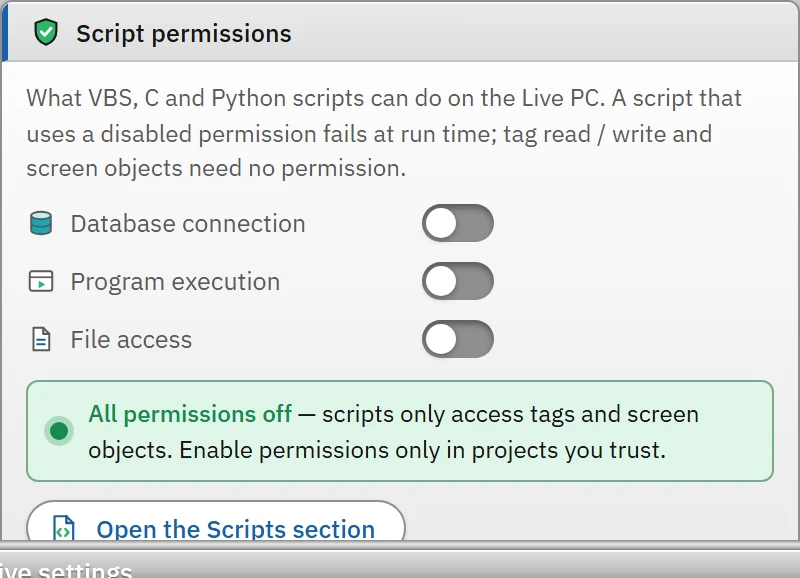
Switch on the Live settings›General›Script permissions›Database connection switch. While the permission is off, the script gives an error when it runs; Studio warns about the use beforehand in the Problems list. There are three permissions (database, running programs, file access), and by default all of them are off.
- Write the script
In VBS,
ADODB.Connection,ADODB.CommandandADODB.Recordsetare used; in Python,scada.db.connectorpyodbc.connect. Ready-made examples are in the Sample code… window in the Scripts section (Database query (parameterized),Adding a record to the database (INSERT)and their Python equivalents). - Connect the script
Bind the script to a button event or to a scheduled task (example: adding a record when the batch end tag changes).
Connection string
- The
DSN=Uretim_VT;UID=;PWD=;format, the data source name alone (Uretim_VT, treated as a DSN), or theDriver={...};Server=...;format is used. - The ADO-specific
Provider=MSDASQLkey is accepted and discarded; any other provider (SQLOLEDB,Microsoft.ACE.OLEDB…) is rejected: “Only ODBC connections are supported”. - The user name and password are given in the string or in the parameters of
conn.Open dize, kullanici, sifre. The password in the connection string is plain text in the script code (readable in the project file); if possible, prefer Windows authentication (Trusted_Connection=Yes).
Example: parameterized query (VBS)
Sub Veritabani_Sorgu()
    Dim conn, cmd, rs
    Set conn = CreateObject("ADODB.Connection")
    Set cmd = CreateObject("ADODB.Command")
    On Error Resume Next
    conn.Open "DSN=Uretim_VT;UID=;PWD=;"
    Set cmd.ActiveConnection = conn
    cmd.CommandText = "SELECT RECETE_ADI, MIKTAR FROM RECETELER WHERE RECETE_KODU = ?"
    cmd.Parameters.Append cmd.CreateParameter("kod", 200, 1, 50, SmartTags("Recete_Kodu"))
    Set rs = cmd.Execute
    If Err.Number <> 0 Then
        HMIRuntime.Trace "Sorgu hatası: " & Err.Description & vbCrLf
        Exit Sub
    End If
    On Error GoTo 0
    If rs.EOF Then
        SmartTags("Recete_Adi") = "(bulunamadı)"
    Else
        SmartTags("Recete_Adi") = rs.Fields("RECETE_ADI").Value
        SmartTags("Hedef_Miktar") = rs.Fields("MIKTAR").Value
    End If
    rs.Close
    conn.Close
End Sub
Instead of Uretim_VT, enter the name of your own data source, the tag names and the table / column names. Pass the value with the ? parameter instead of inserting it into the SQL text: this prevents both format problems and SQL injection.
Example: inserting a record (Python)
import pyodbc

def Py_Veritabani_Kayit_Ekle():
    con = pyodbc.connect("DSN=Uretim_VT;UID=;PWD=;")
    imlec = con.cursor()
    imlec.execute("INSERT INTO PARTI_KAYIT (PARTI_NO, RECETE, MIKTAR, ZAMAN) VALUES (?, ?, ?, ?)",
                  scada.read("Parti_No"), scada.read("Recete_Adi"), scada.read("Toplam_Miktar"), scada.now())
    con.commit()
    con.close()
    scada.write("Kayit_Tamam", True)
Operating rules and limits
| Topic | Behavior |
|---|---|
| Time limit | 15 seconds for opening a connection and executing a command. |
| Row limit | A query returns at most 5000 rows; any excess is truncated (the result carries a “truncated” marker). |
| The connection is stateless | Each command opens and closes its own connection (taken from the pool). Temporary tables (#tablo), SET settings and the transaction are not preserved between commands; perform a multi-step operation in a single SQL command (stored procedure or batch script). |
| Stale connection | If the server has restarted, the stale connection in the pool causes an error on the first command; Live clears the pool and retries the command once. |
| Error message | It has the form “Database error (SQLSTATE): driver message” (driver prefixes are removed). |
| Parameters | The ? placeholders are filled in order; numeric, text, bool, date / time and binary (bytes) values are supported. |
| The interface is not blocked | Database jobs run in the background; the interface does not freeze. The script waits until the result arrives. |
Testing the archive SQL connection
If you have defined SQL Server mirroring for an archive, the Data logs button in the Test connection table tests the connection on the Studio computer: it connects to the server, reads the server and database name, checks whether the table exists and the write / create permission; it writes nothing. This test does not check the network access and credentials on the Live computer; if Studio and Live are on different computers, verify the connection on the Live computer as well. Archive mirroring errors (lost connection, a row that cannot be written) go to Live's event log (Data archives).
Limitations and points to note
- Database passwords in script code or in an archive connection string are stored as plain text in the project file; protect the file from unauthorized persons.
- Long-running queries from within a script hold up the script; if a script triggered by a tag change is triggered again while its previous call is still running, that call is skipped (Scheduled tasks).
- ODBC access has been tested during development verification only with a mock bridge; run the first test with a real database on a backup table.