Drivers
The protocols FabyaVision can speak, the data types, address format and prerequisites of each driver, and which driver to choose for which device.
Which driver to choose
The driver determines which protocol a connection uses to communicate. The choice depends on which protocol the device offers; it is selected in the Communication driver cell when the connection is defined (Connections table).
| Device | Driver | Guide |
|---|---|---|
Siemens S7-1500 / S7-1200 (with the absolute address DB1.DBX0.0) | Siemens S7-1500, Siemens S7-1200 | S7 |
| Siemens S7-300 / 400 | Siemens S7-300 / 400 | S7 |
| Siemens data blocks with optimized (symbolic) block access; any device with an OPC UA server | OPC UA | OPC UA |
| Device that communicates over Modbus TCP (energy analyzer, drive, gateway) | Modbus TCP | Modbus TCP |
| ControlLogix, CompactLogix, Micro800 | Allen-Bradley EtherNet/IP | Allen-Bradley |
| Mitsubishi MELSEC-Q / L, iQ-R, iQ-F | Mitsubishi MC Protocol | Mitsubishi MC |
| Omron CJ / CS / CP / NJ | Omron FINS | Omron FINS |
| Classic OPC (DA) server | OPC DA | OPC DA |
| MQTT server (broker) | MQTT | MQTT |
| No device: testing, presentation, training | Simulator | Simulator |
Comparison
| Driver | Protocol / transport | Default port | Address format (example) |
|---|---|---|---|
| Siemens S7-1500, S7-1200, S7-300 / 400 | S7 (PUT/GET), TCP | 102 | Absolute: DB1.DBX0.0, MW20 |
| OPC UA | OPC UA client (opc.tcp) | 4840 | NodeId: ns=3;s="DB_Motor"."Hiz" |
| Modbus TCP | Modbus TCP | 502 | Modicon: 40001, 00001 |
| Allen-Bradley EtherNet/IP | EtherNet/IP (CIP), TCP | 44818 | Tag name: Tank_Seviye, Program:Ana.Sayac |
| Mitsubishi MC Protocol | MC Protocol 3E frame, TCP | 5007 | Device + number: D100, M10 |
| Omron FINS | FINS / TCP or FINS / UDP | 9600 | Area + number: D100, CIO100.00 |
| OPC DA | OPC DA 2.05a, COM / DCOM | none | Item ID: Kanal1.Cihaz1.Tag1 |
| MQTT | MQTT 3.1.1, TCP (optional TLS) | 1883 (TLS: 8883) | Topic: fabrika/hat1/sicaklik, konu#json.yolu |
| Simulator | Inside Live, no network | none | Signal: sinus(0, 100, 10) |
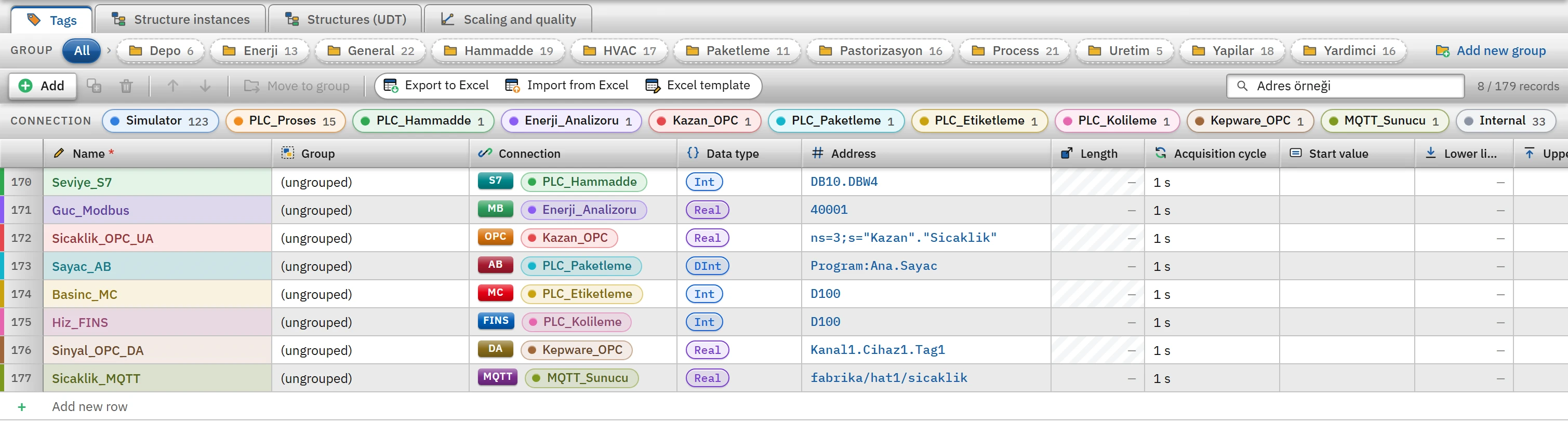 12
12- Connection — determines by which driver rule the address is resolved.
- Address — the own format of each driver.
Supported data types
The Data type options of a tag are limited to the types supported by the driver of its connection. If the driver or the type is changed later, the address is validated again against the new rule; an address that does not match stays red in the table and is added as an error to the Check project list.
| Driver | Data types |
|---|---|
| S7-1500, S7-1200 | Bool Byte SInt Int UInt DInt UDInt Real LReal String WString DateTime |
| S7-300 / 400 | Bool Byte Int UInt DInt UDInt Real String DateTime |
| OPC UA, OPC DA, MQTT | Bool Byte SInt Int UInt DInt UDInt Real LReal String DateTime |
| Allen-Bradley | Bool Byte SInt Int UInt DInt UDInt Real LReal String |
| Modbus TCP, Mitsubishi MC, Omron FINS | Bool Int UInt DInt UDInt Real LReal String |
| Simulator | Bool Byte SInt Int UInt DInt UDInt Real LReal |
Common behavior of the drivers
The following apply to all PLC drivers; for details and messages, see Connection diagnostics.
- Reading is per connection. Each connection runs in its own thread. Tags are grouped by Read cycle, and addresses that are close to each other are read in a single request (S7, Modbus, Mitsubishi, Omron). If a device rejects a block, the block is read again tag by tag and only the faulty tag gets an error.
- Only the changed value is transmitted. Changes reach the screens in batches at most once every 100 ms per connection. Whenever a connection is (re)established, all values are transmitted once more.
- Writes are queued. The write request is executed between reads; the tag that was written is read back immediately. While the connection is down, the write is rejected with the message
Bağlantı kopuk: <bağlantı adı>. - Reconnection. If the connection cannot be established or is lost, the driver retries after 1 s, 2 s and 5 s, then every 10 s.
- A tag that cannot be read. Its error is reported once, it is removed from the read set (other tags are not affected) and it is retried every 30 s.
- Value conversion. If a fractional value is written to an integer tag, it is rounded to the nearest integer; if the range of the type is exceeded, the write is rejected (
Değer Int aralığının dışında: -32768 ile 32767 arasında olmalıdır.). If Real and LReal values are read as NaN or infinite, 0 is passed to Live.DateTimevalues are transferred in the local time of the PLC, in ISO 8601 format without a time zone suffix (2026-10-08T14:30:00.000). For aStringtag, the Length field is the maximum number of characters (default 32, at most 254).
Limitations and points to note
- The S7 driver works only with absolute addresses; the CPU must have the PUT/GET permission, and Optimized block access must be turned off in the block. For symbolic access, use OPC UA.
- In Live, a read cycle of at least 100 ms is applied to PLC and simulator tags (Cycles).
- The S7, Modbus, Allen-Bradley, Mitsubishi and Omron drivers have no authentication or encryption (Connection security).