Modbus TCP driver
Reading and writing coils and registers from devices that communicate over Modbus TCP (energy analyzer, drive, gateway) using Modicon addresses; unit ID and 32-bit byte order settings.
When to use it
Use this driver if your device is a Modbus TCP server (Modbus over TCP). Addresses are written in Modicon notation: 40001 is the first holding register, and its address in the protocol is 0. Serial lines (RTU / ASCII, RS-232 / RS-485) are not supported; for serial devices a gateway that converts to Modbus TCP is required.
Prerequisites on the device side
- The Modbus TCP server must be enabled on the device (default port
502). - Find out the device's unit ID (Unit ID, slave address) and its address map. Each device behind a gateway is distinguished by its own unit ID; for a single device it is usually
1. - Does the address in the device documentation give a 1-based Modicon address (
40001) or a 0-based protocol address (0)? If it is the latter, enter the table digit and documentation address + 1 in Studio: a holding register with protocol address100becomes40101. - Find out the order in which 32-bit values are held in the two registers (32-bit byte order below).
Setting up a connection
- Add a connection
In the Connections section: Add, driver Modbus TCP. Enter the IP address; port
502is filled in. - Unit ID and byte order
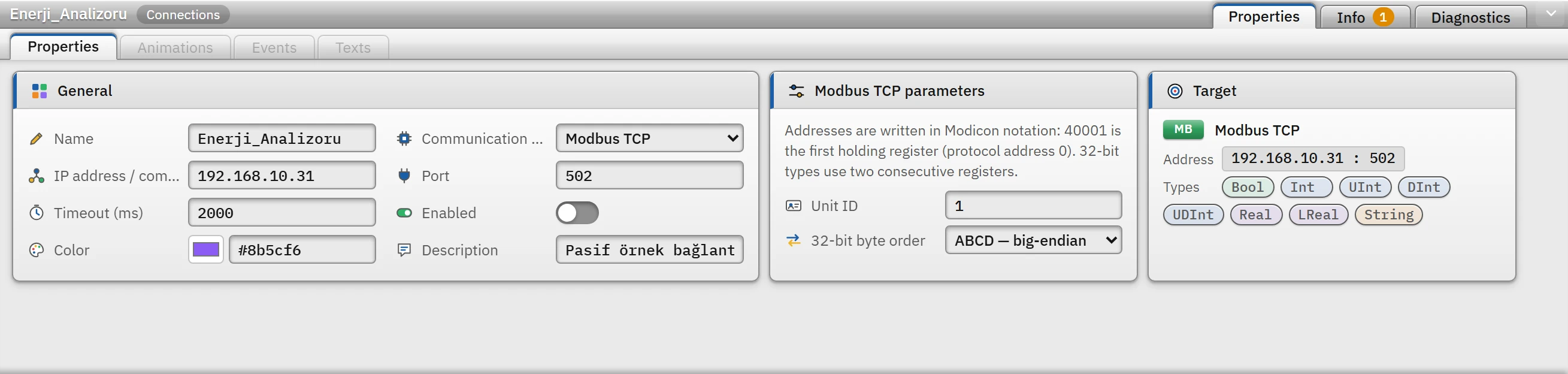
Parameters of the Modbus TCP connection: unit ID and 32-bit byte order. Unit ID 0 – 255 (default
1). Options of 32-bit byte order: ABCD — big-endian (default), CDAB — word swapped, BADC — byte swapped, DCBA — little-endian. 16-bit values are always big-endian, as in the Modbus standard. - Add a tag
Enter the Modicon address as the tag address. The address is validated against the data type of the tag (Tag addresses).
- Test the byte order
If the value of a 32-bit
RealorDInttag differs greatly from what is expected (e.g. a very large or very small number), change the byte order. To do this, store a known value (e.g.1.0) in the device and try the options until the correct value appears.
Address ranges and register usage
| Format | Table | Data type | Write |
|---|---|---|---|
0xxxx (e.g. 00001) | Coil | Bool | Performed |
1xxxx (e.g. 10001) | Discrete input | Bool | Read-only |
3xxxx (e.g. 30001) | Input register | register types | Read-only |
4xxxx (e.g. 40001) | Holding register | register types | Performed |
4xxxx.b (e.g. 40001.5) | Bit of the register (b = 0 – 15) | Bool | Performed (the register is read, the bit is changed and the register is written back) |
4xxxxx (e.g. 400001) | Six-digit notation: 400001 – 465536 | register types | Performed |
The first digit gives the table; the remaining four or five digits give the sequence number (1 – 65536). Each type occupies the following number of registers; the address of the tag is the first register:
| Type | Number of registers |
|---|---|
Bool, Int, UInt | 1 |
DInt, UDInt, Real | 2 (e.g. 40001 and 40002) |
LReal | 4 |
String | 2 characters per register: half the number of characters in the Length field (rounded up); default length 32, maximum 254 |
No bit number is written in coil and discrete input addresses; if Bool is given for a register address, the bit number is mandatory. The Byte and SInt types do not exist in the Modbus driver.
Read and write
- Nearby tags in the same table are read in a single request: at most 125 registers or 2000 coils; gaps of at most 8 registers (64 for coils) between them are merged. If the device rejects a read with gaps, the driver from then on merges only adjacent tags.
- If the device rejects a request, the tags in that block are read one by one; only the problematic tag gets an error.
- Writing is done with a write single coil request for a coil, a write single register request for a single register, and a write multiple registers request for multi-register values.
Driver reference
Modbus TCP
Addresses are written in Modicon notation: 40001 is the first holding register (protocol address 0). 32-bit types use two consecutive registers.
- Driver ID
modbus(name in the project file)- Connection
- An IP address / computer name and a port are required (default port
502) - Data types
BoolIntUIntDIntUDIntRealLRealString
Connection parameters
Appears in the Inspector window when a connection is selected.
| Parameter | Type | Default | Description |
|---|---|---|---|
| Unit ID | number (0 – 255) | 1 | |
| 32-bit byte order | choice | ABCD — big-endian | ABCD — big-endian · CDAB — word-swapped · BADC — byte-swapped · DCBA — little-endian |
Address formats
| Format | Meaning |
|---|---|
0xxxx | Coil — Bool |
1xxxx | Discrete input — Bool, read-only |
3xxxx | Input register — read-only |
4xxxx | Holding register |
4xxxx.b | Bit of a register (b = 0 – 15) — Bool |
4xxxxx | Six-digit notation: 400001 – 465536 |
Sample addresses
| Data type | Examples |
|---|---|
Bool | 00001 10001 40001.0 |
| Other types | 40001 30001 400001 |
Common errors
The marker at the start of each line tells where the message will appear in Live: [connection] in the Connections section of the system menu; [write] in the notification window of the operator who performed the write; [Studio] in the address cell in Studio. [tag] is a tag error during reading: the tag is left with bad quality, the text of the message is not shown in Live in this version (Tag errors); read the text to understand the cause.
| Message | Cause and solution |
|---|---|
[tag] Cihazda bu adres yok (Modbus istisnası 02: geçersiz adres). | The device does not recognize this register or coil. Check the address map and the 0-based / 1-based difference. |
[tag] Cihaz bu işlevi desteklemiyor (Modbus istisnası 01). | The device does not offer this type of access (e.g. writing a coil). |
[write] Cihaz değeri kabul etmedi (Modbus istisnası 03: geçersiz değer). | The value written is not within the range the device allows. |
[tag] Ağ geçidi hedef cihaza ulaşamadı (Modbus istisnası 0A). (or 0B) | The gateway cannot reach the device with the unit ID; check the unit ID and the serial line. |
[write] Giriş yazmacı salt okunurdur; yazılamaz. · Ayrık giriş salt okunurdur; yazılamaz. | 1xxxx and 3xxxx addresses cannot be written to; use 4xxxx for a value that has to be writable. |
[Studio] Bool tipi için yazmacın biti belirtilmelidir (ör. 40001.0) ya da bobin adresi (0xxxx) kullanılmalıdır. | Studio address cell: the register address for a Bool tag was given without a bit number. |
[connection] Cihaz 2000 ms içinde yanıt vermedi (192.168.0.20:502). … · Cihaz yanıt vermedi (zaman aşımı). | Network, port or device; for devices behind a gateway, increase the Timeout. |
[connection] Geçersiz Modbus yanıtı (…) | The device's response does not conform to the Modbus TCP frame; the connection is closed and re-established. |