Tag addresses
The address that indicates where the tag is in the PLC is validated against the rule of the connection's driver and converted to the correct notation; error messages, type mismatch and example addresses.
How to write an address
In the Address cell of the tag, the address in the device is entered in the format of the connection's driver: DB10.DBX0.0 for Siemens, 40001 for Modbus, the tag name for Allen-Bradley, NodeId for OPC UA. The rule that interprets the address depends on the connection of the tag; therefore Connection and Data type are selected first, then the address is entered. An internal tag has no address; the cell is locked.
Validation while typing
- Open the cell for editing
Double-click the address cell, or select it and press Enter. Below the cell, the badge of the driver, its name, the data type and example addresses for that type are shown.
- Type the address
The address is checked on every keystroke; the result is shown instantly below the cell: if valid, the decoding of the address (Data block 10 · byte 0 · bit 0 · 1 bit), if invalid, the error.

While an address cell is being edited, the examples of the driver and the reason for the error are shown; an invalid address is not accepted with Enter. - Confirm
Confirm with Enter or Tab. A valid address is written to the table in its correct notation; an invalid address is not entered in the table, editing stays open, and the reason is shown below the cell. Esc cancels.
Conversion to the canonical form
| Driver | What you wrote | Goes into the table | Rule |
|---|---|---|---|
| S7 | db10.dbx0.0, %MW20, E0.1 | DB10.DBX0.0, MW20, I0.1 | Uppercase; the leading % is dropped; E → I, A → Q |
| Modbus | 4 0001 | 40001 | Spaces are discarded |
| Mitsubishi | d0100 | D100 | Uppercase; leading zeros of the number are dropped |
| Omron | d100.3, dm100, 100 | D100.03, D100, CIO100 | The bit is two digits; DM → D; an address without an area is CIO |
| OPC UA | NS=2;S=Kanal1.Cihaz1.Tag1 | ns=2;s=Kanal1.Cihaz1.Tag1 | Prefix and type letter in lower case |
| MQTT | hat1/durum#$.motor.hiz | hat1/durum#motor.hiz | The $. in the JSON path is dropped |
| Simulator | Sinus(0,100,10) | sinus(0, 100, 10) | Lowercase, a space between numbers |
When the connection or type changes
When the Connection or Data type cell of a tag is changed, the existing address is checked again against the new rule: if it matches, it is converted to its correct notation; if not, it stays red in the table and is added as an error to the Check project (F7) list; correct the address manually. The data type options are limited to the types of the connection's driver; if the type does not exist in the driver, the following error appears in the check: Modbus TCP sürücüsü Byte tipini desteklemez.
Common messages
Below the error message it also shows the name of the driver and examples for the type (Siemens S7-1500 — example for Int: DB1.DBW4 MW20 IW64 QW80).
| Message | Meaning |
|---|---|
Int tipi word (2 bayt) adresi ister; "DB1.DBX0.0" bir bit adresidir. | In S7, the size letter does not match the type (Bool → X, Byte → B, Int → W, DInt / Real → D). |
Bit numarası eksik: bit adresi "bayt.bit" biçiminde yazılır (ör. DB1.DBX0.0). | The bit address has no bit number (bit 0 – 7). |
String tipi için başlangıç baytı verilir: DB1.DBX24.0. | In S7, long types (LReal, String, WString, DateTime) are written without a size letter, with the start byte. |
The data block number must be between 1 and 65535. | The DB number is outside the range. |
Bool tipi için yazmacın biti belirtilmelidir (ör. 40001.0) ya da bobin adresi (0xxxx) kullanılmalıdır. | In Modbus, a register address has been given to a Bool tag without a bit number. |
Bobin (coil) yalnızca Bool tipinde okunur; Int için yazmaç adresi (4xxxx / 3xxxx) kullanın. | In Modbus, a 0xxxx / 1xxxx address has been given to a numeric tag. |
Int tipi word aygıtı ister (D, W, R, ZR ...); M bir bit aygıtıdır. | In Mitsubishi, the type and the device type do not match. |
X aygıtının numarası sekizlik (0 – 7 rakamları) yazılır; "18" geçersiz. | On the iQ-F series the X / Y numbers are octal; also check PLC series. |
A timer / counter value can only be read as Int or UInt. | The type is wrong for an Omron T / C address. |
"Durum.5" bir bit adresidir; Int tipi için bit numarası yazılmaz. | In Allen-Bradley, a bit address applies only to a Bool tag. |
Logix tag adında art arda iki "_" olamaz ve ad "_" ile bitemez: "a__b". | Logix naming rule. |
"Tag1" bir OPC UA düğüm kimliği (NodeId) değil. Biçim: ns=<ad alanı>;s=<metin> | The OPC UA address must be in the form ns=…;s=… / i=…. |
Konu joker karakter (+ ya da #) içeremez: tag tek bir konunun değeridir. … | Wildcards cannot be used in an MQTT address; for a JSON field, write konu#yol. |
The "min" value must be smaller than the "max" value. | In the simulator signal, the range is reversed. |
Adres girilmedi. | The address of the PLC tag is empty (a Check project error; Live does not read this tag). An empty address is valid in the simulator. |
Address cards of the selected tag
When a tag row is selected, the Properties tab of the Inspector shows two cards: Address resolution (the resolution of the address, or the error) and Address format (the driver's note with all address formats). For a tag whose connection has been deleted, the warning This tag's connection has been deleted appears.
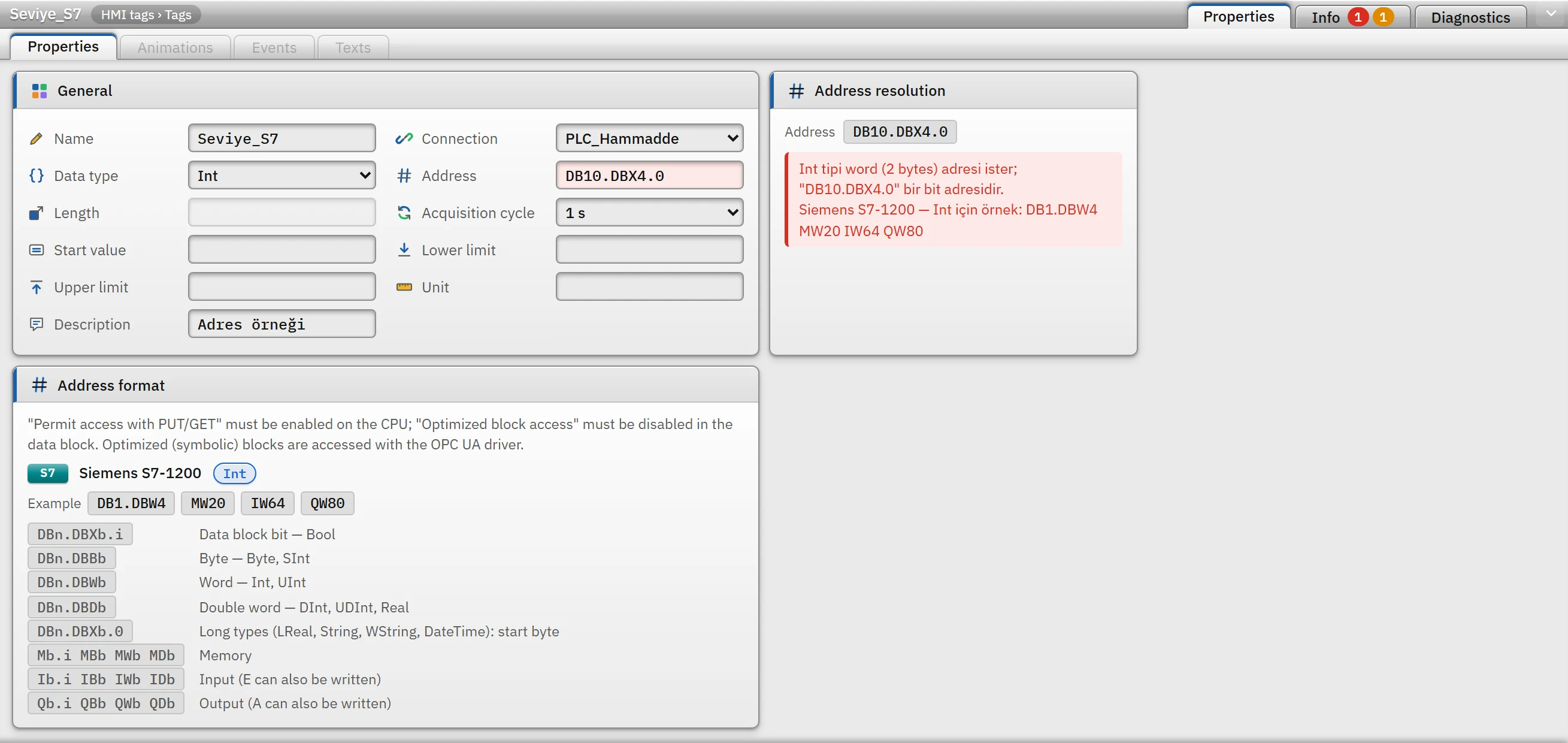 12
12- Address resolution — the error and the driver's example addresses.
- Address format — the driver's note and all formats.
Sample addresses
| Driver | Bool | Numeric and text types |
|---|---|---|
| Siemens S7 | DB1.DBX0.0 M10.3 I0.0 Q4.1 | DB1.DBB2 MB10 (Byte) · DB1.DBW4 MW20 (Int) · DB1.DBD8 MD30 (DInt, Real) · DB1.DBX16.0 (LReal) · DB1.DBX24.0 (String) |
| OPC UA | ns=3;s="DB_Motor"."Hiz" ns=2;s=Kanal1.Cihaz1.Tag1 ns=4;i=1001 | |
| Modbus TCP | 00001 10001 40001.0 | 40001 30001 400001 |
| Allen-Bradley | Motor_Calisiyor Durum.5 Program:Ana.Start | Tank_Seviye Motor.Hiz Program:Ana.Sayac Dizi[3] |
| Mitsubishi MC | M100 X1F Y20 B3A D100.5 | D100 W1F R200 ZR1000 |
| Omron FINS | CIO100.00 W10.05 H0.15 D100.03 | D100 CIO200 W50 H10 E0_100 |
| OPC DA | Random.Int4 Kanal1.Cihaz1.Tag1 Simulation.Tank1.Seviye | |
| MQTT | cihaz/role/durum cihaz/role/durum|cihaz/role/komut hat1/durum#motor.calisiyor | fabrika/hat1/sicaklik hat1/durum#motor.hiz hat1/olcumler#deger[2] |
| Simulator | kare(0, 1, 2) rastgele(0, 1) | sinus(0, 100, 10) rampa(0, 100, 30) rastgele(20, 80) sayac(0, 1000, 1) |
All formats for each driver are in the reference table in the topic of the relevant driver (Drivers).
String length
For String and WString tags, the Length field is the maximum number of characters (1 – 254, default 32). The field is enabled when the type is set to String and cleared when another type is selected. The driver uses this length to determine how many bytes / registers to read (in S7, n + 2 bytes for STRING[n]; in Modbus, n / 2 registers); enter the same value as in the definition in the PLC. Text that is read is truncated to this length; if text to be written exceeds this length, the write is rejected (Metin çok uzun: en çok 32 karakter yazılabilir (40 karakter verildi).).
Limitations and tips
- Studio verifies the format of the address; it does not check whether it exists on the device. A data block or node that does not exist is detected only in Live, when the tag is read (Connection diagnostics).
- The address of tags generated from a structure instance is calculated from the base address and the member's relative address and cannot be changed manually (Structures).
- Addresses imported from Excel and CSV are validated with the same rules according to the connection and type of the row; a faulty row is not imported (Transferring tags with Excel).