Mitsubishi MC Protocol driver
Connecting to MELSEC-Q / L, iQ-R and iQ-F PLCs with MC Protocol (3E frame, Ethernet) and reading and writing with device addresses (D100, M10, X1F).
When to use it
The MC Protocol driver communicates with Mitsubishi MELSEC-Q / L, iQ-R and iQ-F (FX5U) PLCs over Ethernet using the 3E frame (TCP, default port 5007). An address consists of a device letter and a number: D100, M10, X1F. Serial (FX / A protocol) connections and 1E / 4E frames are not supported.
Prerequisites on the PLC side
- In the Ethernet settings of the PLC, a TCP connection must be opened for MC Protocol (SLMP); the port number in the connection is the same as the Port in Studio.
- If Binary or ASCII is selected in the PLC for the Data code (Communication Data Code), the Data code in Studio must be the same. If they do not match, the driver reports it with a message.
- To write while the PLC is in RUN state, Enable online change must be enabled in the Ethernet setting; if it is disabled, the write is rejected.
- It cannot be accessed if the PLC is locked with a remote password.
Setting up a connection
- Add a connection
In the Connections section: Add, driver Mitsubishi MC Protocol; enter the IP address and match the port to the connection in the PLC (default
5007). - Enter the parameters
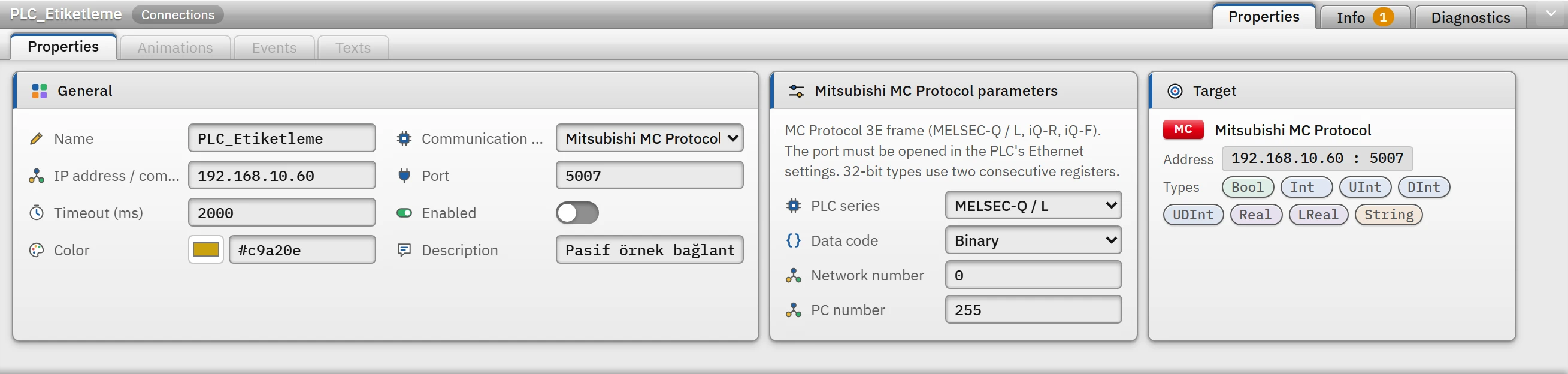
Parameters of the Mitsubishi MC connection: PLC series, data code, network and PC number. - PLC series
- MELSEC-Q / L (default), MELSEC iQ-R or MELSEC iQ-F (FX5U). In the iQ-F series the
X/Ynumbers are written in octal, in the others in hexadecimal. - Data code
- Binary (default) or ASCII; it must match the PLC setting.
- Network number
- 0 – 239.
0= directly connected PLC. - PC number
- 0 – 255.
255= directly connected PLC.
- Add a tag
Enter the device and the number as the address (Tag addresses).
Devices and addresses
| Devices | Type | Number notation |
|---|---|---|
X input, Y output, B link relay, SB special link relay | Bit | Hexadecimal (X1F); on iQ-F, X / Y are octal |
M internal relay, L latch relay, F annunciator, V edge relay, S step relay, SM special relay, TS / TC timer contact / coil, CS / CC counter contact / coil | Bit | Decimal (M100) |
D data register, R file register, ZR continuous file register, SD special register, TN / CN timer / counter value, Z index register | Word | Decimal (D100) |
W link register, SW special link register | Word | Hexadecimal (W1F) |
D100.5: bit of the word device (0 – F, hexadecimal); used for aBooltag. No separate bit number is written for bit devices.- A
Booltag is linked to a bit device (M,X,Y…) or to a word-bit address; numeric types require a word device. - For ambiguous notations such as
SB10, the two-letter device (SB) is tried first. Int/UIntoccupy 1 word,DInt/UDInt/Realoccupy 2 words (low word first),LRealoccupies 4 words.Stringholds 2 characters per word (the low byte of the word is the first character); the default Length is 32, maximum 254.- The upper limit of the device number varies with the series and the data code; a number that is too large is rejected in Studio with the message The device number is larger than this frame can carry.
Read and write
- Nearby tags on the same device are read in a single request: at most 960 points in word units, at most 3584 points in bit units (half of that in ASCII code); gaps of at most 32 words (256 for bits) between them are merged.
- If the PLC rejects a block (device out of range), the block is read tag by tag; only the problematic tag gets an error.
- When a bit of a word is written, the word is read, the bit is changed and the word is written back.
Driver reference
Mitsubishi MC Protocol
MC Protocol 3E frame (MELSEC-Q / L, iQ-R, iQ-F). The port must be opened in the PLC's Ethernet settings. 32-bit types use two consecutive registers.
- Driver ID
mc(name in the project file)- Connection
- An IP address / computer name and a port are required (default port
5007) - Data types
BoolIntUIntDIntUDIntRealLRealString
Connection parameters
Appears in the Inspector window when a connection is selected.
| Parameter | Type | Default | Description |
|---|---|---|---|
| PLC series | choice | MELSEC-Q / L | On the iQ-F series, X / Y numbers are written in octal, on the others in hexadecimal. MELSEC-Q / L · MELSEC iQ-R · MELSEC iQ-F (FX5U) |
| Data code | choice | Binary | Binary · ASCII |
| Network number | number (0 – 239) | 0 | |
| PC number | number (0 – 255) | 255 |
Address formats
| Format | Meaning |
|---|---|
X Y B SB | Bit devices — number in hexadecimal (X1F) |
M L F V S SM | Bit devices — number in decimal (M100) |
D R ZR SD Z | Word devices — number in decimal (D100) |
W SW | Word devices — number in hexadecimal (W1F) |
TN CN | Timer / counter value |
D100.5 | Bit of a register (0 – F) — Bool |
Sample addresses
| Data type | Examples |
|---|---|
Bool | M100 X1F Y20 B3A D100.5 |
| Other types | D100 W1F R200 ZR1000 |
Common errors
The marker at the start of each line tells where the message will appear in Live: [connection] in the Connections section of the system menu; [write] in the notification window of the operator who performed the write; [Studio] in the address cell in Studio. [tag] is a tag error during reading: the tag is left with bad quality, the text of the message is not shown in Live in this version (Tag errors); read the text to understand the cause.
| Message | Cause and solution |
|---|---|
[connection] PLC MC protokolü isteğine yanıt vermedi (zaman aşımı). Port numarasını, PLC'nin Ethernet ayarında açılan bağlantıyı (MC Protocol / SLMP, TCP) ve veri kodunu (Binary / ASCII) kontrol edin. | No response at all came from the PLC: port, a connection not opened in the PLC, or a data code mismatch. |
[connection] PLC Binary kodla yanıt veriyor; bağlantının "Veri kodu" ayarını Binary yapın. · PLC ASCII kodla yanıt veriyor; … | The data code does not match the PLC setting. |
[tag] Aygıt numarası PLC'deki aralığın dışında (MC bitiş kodu C056). | The address is outside the device range defined in the PLC. |
[tag] PLC bu aygıta erişemiyor (aygıt bu CPU'da yok) (MC bitiş kodu C05B). | The device does not exist in this CPU model. |
[tag] PLC bu komutu desteklemiyor; bağlantıdaki PLC serisi seçimini kontrol edin (MC bitiş kodu C059). | The PLC series has been selected incorrectly (the frames of Q / L and iQ-R differ). |
[tag] İstek hedef istasyonda yürütülemiyor; ağ / PC numarasını kontrol edin (MC bitiş kodu C05F). | The network or PC number is wrong. For a directly connected PLC use 0 / 255. |
[write] PLC çalışırken (RUN) yazmaya izin vermiyor: Ethernet ayarında "Enable online change" açılmalı (MC bitiş kodu 0055). | Enable the PLC setting. |
[tag] PLC uzak şifreyle kilitli; şifre açılmadan erişilemez (MC bitiş kodu C200). | The remote password must be unlocked (the driver does not send a password). |
[tag] PLC tek istekte bu kadar nokta okumaya / yazmaya izin vermiyor (MC bitiş kodu C051 – C054). | Many points in a single request; limited by the PLC model. |