OPC DA driver
Connecting to classic OPC (Data Access 2.05a) servers via COM / DCOM and reading and writing tags by item ID; settings for ProgID, local / remote server, DCOM identity and update rate.
When to use it
OPC DA is the classic, Windows-specific OPC interface (COM / DCOM). The driver connects as a client to an OPC DA 2.05a server; the server can be on this computer or on another computer on the network. Use this driver if a device is accessible only through an OPC DA server; if the server also supports OPC UA, prefer the OPC UA driver.
This driver is new and has no connection in the demo project. At the time this manual was written, it had not been tried in the field with a real commercial OPC server, nor with remote DCOM using a user name / password.
Prerequisites
- The OPC Core Components (OPC Foundation) must be installed on the Live computer. If they are not installed, the error IOPCServer interface is not available is returned when connecting to the server.
- The OPC server must be installed and running. Find out its ProgID (e.g.
Matrikon.OPC.Simulation.1,Kepware.KEPServerEX.V6) from the server's documentation or from an OPC client tool. - If the server is 64-bit, it must also be accessible with a 32-bit client: Live runs as 32-bit (x86).
- If the server is on another computer, DCOM on that computer must grant launch and access permission to the user who runs Live (or to the user entered in the connection); the firewall must allow DCOM / RPC traffic (Connection security).
Setting up a connection
- Add a connection
In the Connections section: Add, driver OPC DA. This driver has no port; the cell is locked.
- Specify the location of the server
Leave the IP address / computer name cell empty: the server is on this computer. If the server is on another computer, enter its name or IP address (DCOM).
- Enter the parameters
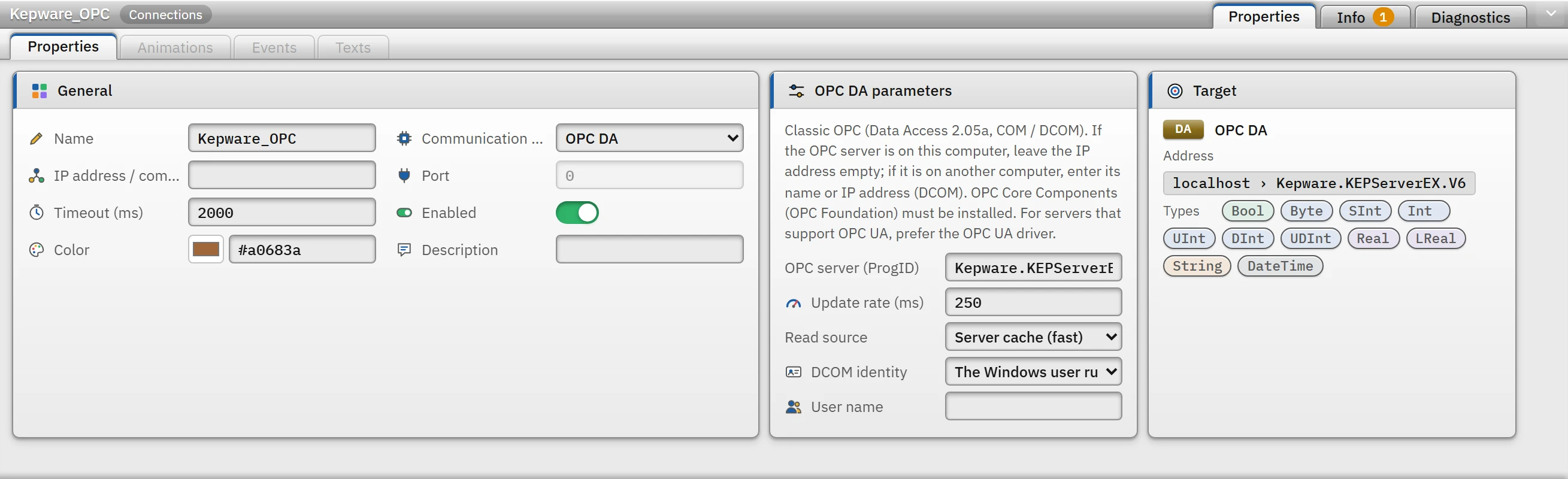
Parameters of the OPC DA connection; the Target card appears in the form bilgisayar › ProgID.- OPC server (ProgID)
- Required. If empty, Check project reports an error and Live cannot connect.
- Update rate (ms)
- 10 – 60000, default
250. This is the interval at which the server refreshes its values; it should not be greater than the read cycle of the tags. - Read source
- Server cache (fast) (default) or Device (goes to the device on every read; slow).
- DCOM identity
- The Windows user running Live (default) or User name and password. Required only for a server on another computer.
- User name
- It can also be written in the form
ALAN\kullanıcı. The password is not written to the project file; it is entered in Live.
- Add a tag
Enter the full name of the item on the server (ItemID) as the address.
Address and operating principles
- The syntax of the item ID is determined by the server (
Random.Int4,Kanal1.Cihaz1.Tag1). Studio only checks that it is not empty, contains no control characters and does not exceed 1024 characters; the actual validation is done by the server. A wrong ID appears in Live as a tag error. - The driver opens a single active OPC group and adds one item per tag (at most 250 items per request); reading is done in bulk (at most 500 items per request). A write is made as a single value, converted to the data type of the item on the server.
- Quality: if the server reports the quality as good or uncertain, the value is used; if it is bad, the tag gets an error (the message gives the reason: configuration error, not connected to the device, device / sensor fault, communication error …); while the server is waiting for the first data, the tag stays in the waiting state instead of an error state.
WStringis not supported; useString(OPC DA strings are already Unicode).- The connection address and port rule is relaxed for OPC DA: several OPC DA connections can be defined to the same computer (each with a different ProgID).
Driver reference
OPC DA
Classic OPC (Data Access 2.05a, COM / DCOM). If the OPC server is on this computer, leave the IP address empty; if it is on another computer, enter its name or IP address (DCOM). OPC Core Components (OPC Foundation) must be installed. For servers that support OPC UA, prefer the OPC UA driver.
- Driver ID
opcda(name in the project file)- Connection
- There is no port; the address is optional (empty = this computer)
- Data types
BoolByteSIntIntUIntDIntUDIntRealLRealStringDateTime- Same address
- Multiple connections can be defined to the same address.
Connection parameters
Appears in the Inspector window when a connection is selected.
| Parameter | Type | Default | Description |
|---|---|---|---|
| OPC server (ProgID) | text | — | The OPC server's program ID (ProgID), e.g. Matrikon.OPC.Simulation.1 or Kepware.KEPServerEX.V6. It is shown in the server's documentation or in an OPC client tool (OPC Scout, OPC Expert). |
| Update rate (ms) | number (10 – 60000) | 250 | Update rate of the OPC group: the server refreshes values at this interval. It should not be larger than the tags' read cycle. |
| Read source | choice | Server cache (fast) | Server cache (fast) · Device (goes to the device on every read; slow) |
| DCOM identity | choice | The Windows user running Live | Needed only for a server on another computer; if the server is on this computer, leave "Windows user". The Windows user running Live · User name and password |
| User name | text | — | Can also be written as DOMAIN\user. The password is not written to the project file; it is entered on the Live computer. |
Address formats
| Format | Meaning |
|---|---|
ItemID | Full name of the item on the OPC server (depends on the server; e.g. Channel1.Device1.Tag1) |
Bool, Byte … LReal | Numeric items; read as the server's item type, converted to the item's type when written |
String, DateTime | Text and date items |
Sample addresses
| Data type | Examples |
|---|---|
| Other types | Random.Int4 Kanal1.Cihaz1.Tag1 Simulation.Tank1.Seviye |
Common errors
The marker at the start of each line tells where the message will appear in Live: [connection] in the Connections section of the system menu; [write] in the notification window of the operator who performed the write; [Studio] in the address cell in Studio. [tag] is a tag error during reading: the tag is left with bad quality, the text of the message is not shown in Live in this version (Tag errors); read the text to understand the cause.
| Message | Cause and solution |
|---|---|
[connection] Bağlantıda OPC sunucusunun adı (ProgID) yazılmamış. … | Fill in the OPC server (ProgID) field. |
[connection] OPC sunucusu "…" bu bilgisayarda kayıtlı değil. Sunucunun kurulu olduğunu ve ProgID'nin doğru yazıldığını kontrol edin. | The ProgID is wrong or the server is not installed (on a remote server the message says … is not registered on the computer). |
[connection] OPC sunucusuna bağlanılamadı: sunucunun OPC DA arayüzü (IOPCServer) kullanılamıyor. OPC Core Components … kurulu olmalıdır; … | OPC Core Components are not installed, or the server / client bit width does not match. |
[connection] OPC sunucusu "…" erişimi reddetti (DCOM izinleri). … | There is no launch / access permission in DCOM; also check the user name and password on the remote server. |
[connection] … bilgisayarındaki OPC sunucusuna ulaşılamıyor (RPC sunucusu kullanılamıyor): … güvenlik duvarı (DCOM / RPC portları) ayarlarını kontrol edin. | The remote computer is off, or there is a network or firewall block. |
[connection] OPC sunucusu arızalı durumda (OPC_STATUS_FAILED) · OPC sunucusunda yapılandırma yok (OPC_STATUS_NOCONFIG) | The server's own configuration is missing or faulty. |
[tag] OPC sunucusu öğeyi kabul etmedi ("…"): … | The item ID does not exist on the server or is invalid. |
[tag] OPC kalitesi kötü: cihaza bağlı değil (sunucu cihazla haberleşemiyor). | The problem is on the device side of the OPC server; check the server's own diagnostics. |
[write] OPC öğesi yazılabilir değil (salt okunur): … | The item has no write access on the server. |