OPC UA driver
Connecting to PLCs and gateways that have an OPC UA server using a security mode, certificate trust and authentication, and reading and writing tags by NodeId addresses.
When to use it
The OPC UA driver connects as a client to an OPC UA server. The server can be inside a PLC (e.g. the OPC UA server of an S7-1500), in a gateway or on another computer. The tag address is the NodeId of the node on the server. The driver is the way to access Siemens data blocks with Optimized block access enabled by symbolic name, and it is the only driver that offers signed / encrypted communication.
The driver does not use subscriptions: in each read cycle it reads the tags with a bulk Read request (it respects the number of nodes the server allows in a single request; if the server finds the request too large, the request is split in half). A write goes to a single node.
Prerequisites on the server side
- The OPC UA server must be running. On the S7-1500, the server is enabled in the CPU settings; the address you connect to has the form
opc.tcp://<IP adresi>:<port>/<uç nokta yolu>(the port is usually4840; the path is empty on most PLCs). - The server must offer an endpoint that matches the Security setting you selected in Live. The secure modes work only with the Basic256Sha256 policy.
- For authentication, an anonymous login or a user must be defined on the server.
- Find out the NodeIds of the nodes with an OPC UA client tool; Studio has no node selection (browse) from the server, and the NodeId is entered manually.
Setting up a connection
- Add a connection
In the Connections section: Add, with OPC UA as the driver. Port
4840is filled in. - Type the address
Enter the IP address or the computer name of the server. If you paste it in the form
opc.tcp://192.168.0.5:4840/yol, the address, port and Endpoint path are placed in separate fields. - Set the parameters
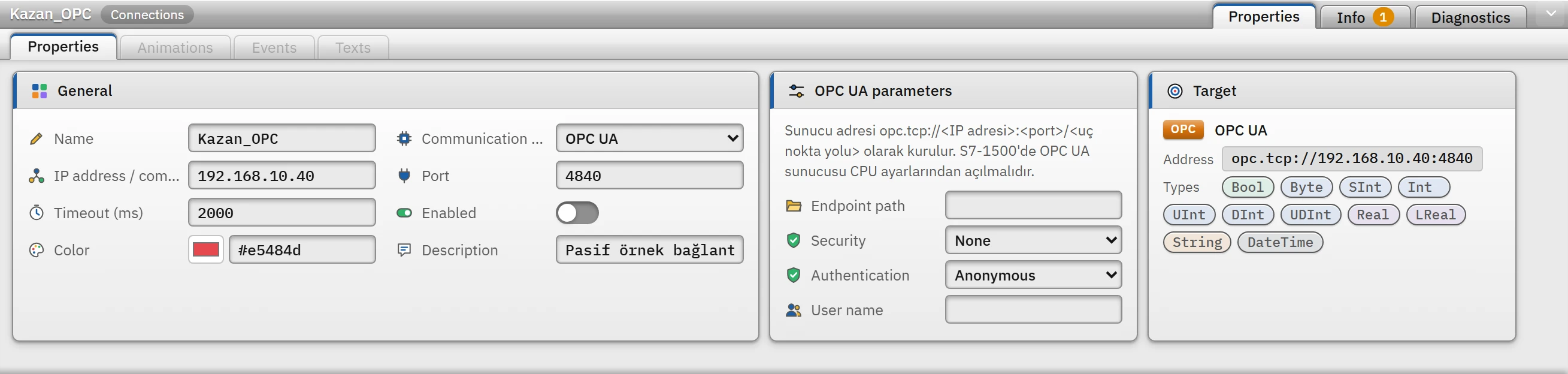
Parameter card of the OPC UA connection: endpoint path, security and authentication; the Target card at the bottom shows the full address. Endpoint path: the part of the server address after the port (empty on most PLCs). Security: None, Basic256Sha256 — signed or Basic256Sha256 — signed and encrypted. Authentication: Anonymous or User name and password; in the latter case, enter the User name.
- Enter the password in Live
The password is not written to the project file. When Live starts, it is entered with the Enter password button under Enter password in the system menu (Connection security).
- Add a tag
Enter the NodeId as the tag address (Tag addresses).
Security and certificate trust
In secure mode (signed, or signed and encrypted), Live creates an application certificate for this computer (RSA 2048, SHA-256, self-signed, valid for about 20 years) and trusts the server's certificate as follows:
- Trust on first use. On the first secure connection to a server (address and port), the server's certificate is accepted and saved to the file
%LOCALAPPDATA%\FabyaVision\OpcUa\sunucular\<adres>_<port>.der. On later connections only this certificate is accepted; an expired certificate or a name that does not match the IP address is not an obstacle. - If the certificate changes, the connection is rejected. If the server presents a different certificate, the message gives the path of the file to be deleted. If the certificate was renewed on purpose, delete that file; the driver applies trust again the first time it sees the certificate.
- Manual trust. Certificates placed in the
%LOCALAPPDATA%\FabyaVision\OpcUa\pki\trustedfolder (and the certificates signed by them) are always trusted. - The server trusting Live. Many servers reject a client they do not recognize. The certificate of this computer is in the folder
%LOCALAPPDATA%\FabyaVision\OpcUa\pki\own\certs; add the.derfile to the server's list of trusted clients. - With Security: None and anonymous login, the certificate is not checked at all. If a user name / password is used with None, the password is sent encrypted with the server's certificate (the certificate is checked according to the rule above), but the rest of the channel is unencrypted.
Address and data type notes
ns=3;s="DB_Motor"."Hiz": a data block variable in an S7-1500. Obtain the namespace number (ns) from the server; the text identifier may contain;and=, and everything afters=is the identifier.- An address without a namespace (
i=2258,s=Ad) is treated as namespace 0.nsu=http://ornek/ua;s=Adgives the namespace by its address instead of its number; the number is queried from the server in every session. WStringis not supported; OPC UA strings are already Unicode, so useString. Array and structure nodes cannot be read as a single-value tag.- The value read is converted to the tag type by rounding; if it does not fit into the range of the type, the tag gets an error (it is not clipped). When writing, the value is converted to the type of the node, not of the tag: an
Inttag can be written to aDoublenode. - If the server sends a
UTCdate, it is reflected in theDateTimetag in the local time of this computer.
Driver reference
OPC UA
The server address is built as opc.tcp://<IP address>:<port>/<endpoint path>. On an S7-1500, the OPC UA server must be enabled in the CPU settings.
- Driver ID
opcua(name in the project file)- Connection
- An IP address / computer name and a port are required (default port
4840) - Data types
BoolByteSIntIntUIntDIntUDIntRealLRealStringDateTime
Connection parameters
Appears in the Inspector window when a connection is selected.
| Parameter | Type | Default | Description |
|---|---|---|---|
| Endpoint path | text | — | The part of the server address after the port; empty on most PLCs. |
| Security | choice | None | None · Basic256Sha256 — signed · Basic256Sha256 — signed and encrypted |
| Authentication | choice | Anonymous | Anonymous · User name and password |
| User name | text | — | The password is not written to the project file; it is entered on the Live PC. |
Address formats
| Format | Meaning |
|---|---|
ns=<ad alanı>;s=<metin> | Node with string identifier (most common) |
ns=<ad alanı>;i=<sayı> | Node with numeric identifier |
ns=<ad alanı>;g=<GUID> | Node with GUID identifier |
nsu=<adres>;s=<metin> | With the namespace URI instead of the namespace index |
Sample addresses
| Data type | Examples |
|---|---|
| Other types | ns=3;s="DB_Motor"."Hiz" ns=2;s=Kanal1.Cihaz1.Tag1 ns=4;i=1001 |
Common errors
The marker at the start of each line tells where the message will appear in Live: [connection] in the Connections section of the system menu; [write] in the notification window of the operator who performed the write; [Studio] in the address cell in Studio. [tag] is a tag error during reading: the tag is left with bad quality, the text of the message is not shown in Live in this version (Tag errors); read the text to understand the cause.
| Message | Cause and solution |
|---|---|
[connection] Sunucu "Basic256Sha256 — imzalı" güvenlik seçeneğini sunmuyor (sunduğu seçenekler: …). | This security policy is disabled on the server. Change the Security setting of the connection to match what the server offers, or enable the option on the server. |
[connection] Sunucu anonim girişe izin vermiyor; … "Kullanıcı adı ve şifre" yapın. and Sunucu bu güvenlik seçeneğinde kullanıcı adı ve şifreyle girişi kabul etmiyor; … "Anonim" yapın. | The authentication type does not match the permission on the server. |
[connection] Sunucu kullanıcı adını ya da şifreyi kabul etmedi (bu bağlantı için şifre girilmemiş) | The password has not been entered in Live or is wrong: in the system menu, use Enter password. |
[connection] Sunucu güvenli bağlantıyı reddetti: büyük olasılıkla bu bilgisayarın sertifikasına güvenmiyor. … | Add the certificate of Live to the server's list of trusted clients (the folder above). |
[connection] Sunucunun sertifikası değişmiş (kayıtlı parmak izi …); bağlantı reddedildi. … şu dosyayı silin: … | The server certificate has changed. If it was renewed on purpose, delete the file named in the message. |
[connection] Sunucu uç nokta adresini tanımadı; bağlantının "Uç nokta yolu" ayarını kontrol edin | The path is wrong, or it is empty although it is required. |
[connection] Sunucunun oturum sınırı dolu: başka istemciler kapatılmalı … | The server limits the number of simultaneous sessions. |
[tag] Düğüm sunucuda yok (NodeId bulunamadı) · Ad alanı sunucuda yok: … | The NodeId or the namespace is wrong. Verify it with an OPC UA client tool. |
[tag, write] Düğüm yazılamaz (salt okunur) · Bu kullanıcının düğüme erişim izni yok | The node has no write access; correct the node properties or the user permissions on the server. |
[connection] OPC UA sunucusu bağlantı isteğine yanıt vermedi (zaman aşımı). | The server does not respond; address, port, firewall. |