Siemens S7 driver
PLC settings, connection steps and common errors for connecting to S7-1500, S7-1200 and S7-300 / 400 CPUs via PUT/GET and reading and writing tags with absolute addresses (DB, M, I, Q).
When to use it
The three drivers (Siemens S7-1500, Siemens S7-1200, Siemens S7-300 / 400) use the same protocol: S7 communication, PUT/GET, TCP port 102. Tags are given with an absolute address (DB1.DBX0.0, MW20). The S7-1500 and S7-1200 drivers have the same set of parameters, addresses and data types; only their IDs differ (s7-1500, s7-1200). The S7-300 / 400 driver has no LReal and SInt types, and its default slot is 2.
If the data block has Optimized block access enabled (symbolic) or if you need secure communication, this driver is not suitable; use the OPC UA driver.
Prerequisites on the PLC side
- Allow PUT/GET access
The CPU properties must allow access by a remote partner through PUT/GET communication (in TIA Portal: CPU properties › Protection and security › Connection mechanisms; menu names may vary depending on the TIA version). If it is off, the CPU rejects the requests and Live reports a PUT/GET error.
- Turn off "Optimized block access" in the data block
Optimized block access must be cleared in the properties of every data block you want to read, so that the byte addresses of the variables are fixed. Recompile the block and load it to the CPU. Take the bit, byte and word addresses from the Offset column of the block.
- Find out the rack and slot
On S7-1200 / 1500, the CPU is in rack
0, slot1. On S7-300, the slot is2. On S7-400, take the rack and slot in which the CPU is installed from the hardware configuration. - Network access
The Live computer and the PLC must be on the same network, and any firewall between them must allow TCP port
102.
Setting up a connection
- Add a connection
In the Connections section, click Add and, as the Communication driver, select the S7 driver that matches your CPU.
- Address and port
Enter the IP address of the CPU in the IP address / computer name cell. The port remains
102. - Rack and slot
In the Inspector, enter the Rack (0 – 7) and Slot (0 – 31) fields. Slot tooltip: The slot the CPU is plugged into: 2 for S7-300, 1 for S7-1200 / 1500.
- Add a tag
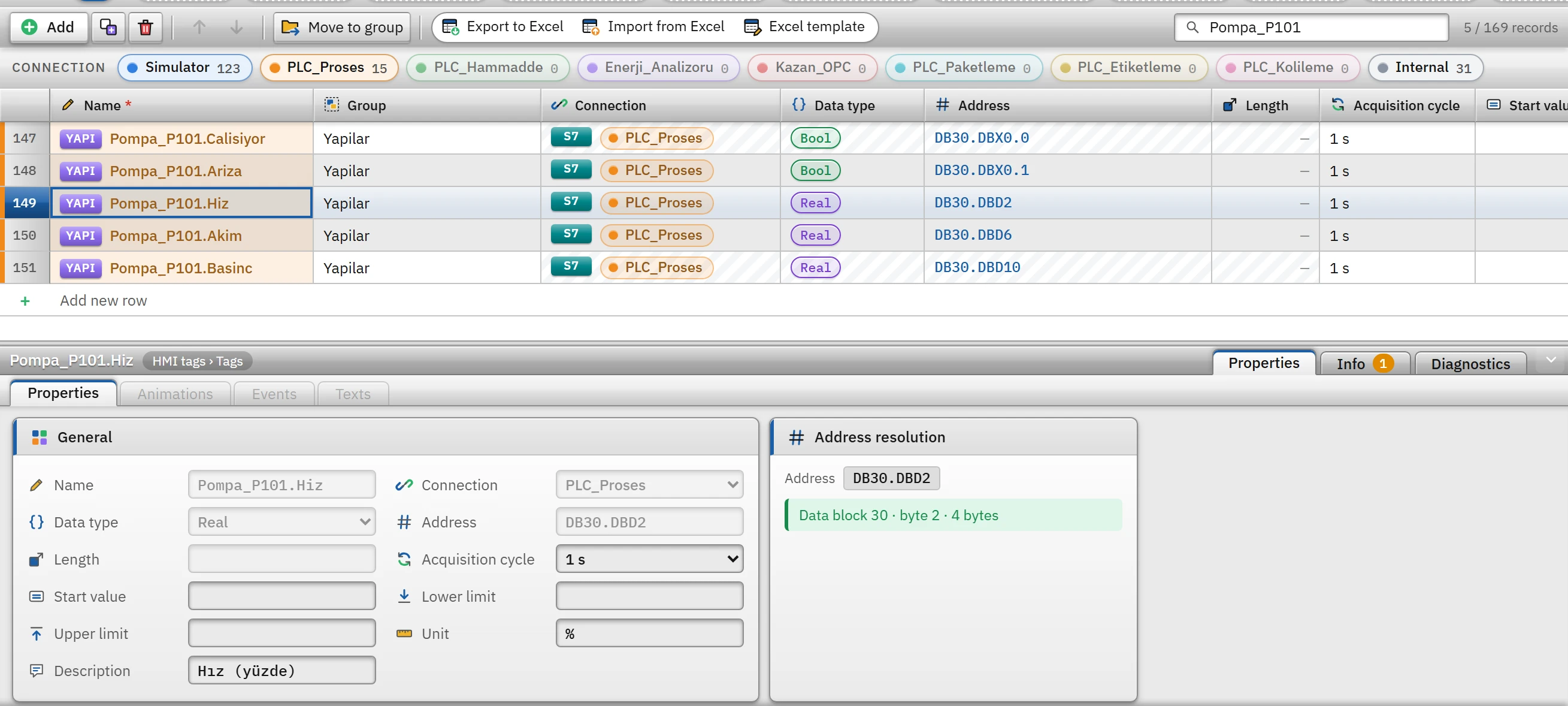
In the HMI tags section, create tags bound to this connection. The address cell validates the address as you type and shows its resolution below the cell (Tag addresses).
 1234
1234Tags of the PLC_Proses connection: bit, word and double word addresses are written according to the type; the address resolution of the selected tag is shown in the Inspector. - Connection — the PLC connection the tag is bound to.
- Data type — determines the size letter of the address.
- Address — absolute S7 address (DB30.DBD2).
- Address resolution — the resolution of the address or an error.
- Test
Online›Test connections… only shows that TCP port
102is open; the S7 session and the PUT/GET permission are tried only in Live, when a tag is read (Connection diagnostics).
Address and data type notes
- The size letter must match the type:
Bool→DBX/M10.3,ByteandSInt→DBB/MB,IntandUInt→DBW/MW,DInt,UDIntandReal→DBD/MD. - Long types (
LReal,String,WString,DateTime) take no size letter; the start byte is given in the formDB1.DBX24.0(DBBis also accepted). These types can be held only in a data block and in the bit memory area. Stringhas theSTRING[n]format of the PLC (2 byte header + n characters, Windows-1254 encoding). The Length field of the tag is the maximum number of characters to read (default 32, maximum 254); it must be the same as the definition in the PLC. A text longer than the maximum length in the PLC cannot be written.WStringoccupies2n + 4bytes as UTF-16.DateTimeis read asDTL(12 bytes) on S7-1200 / 1500 and asDATE_AND_TIME(8 bytes) on S7-300 / 400.- The address is not case-sensitive and may start with
%; the German notationsE(input) andA(output) are also accepted. - Tags that are close to each other (with a gap of at most 32 bytes in the same area) are read in a single request; the read is split into multi-variable requests according to the PDU size negotiated with the PLC.
Driver reference
The parameter, address format and example tables below are generated from the driver definition in Studio. For S7-1200, the S7-1500 section applies.
Siemens S7-1500
"Permit access with PUT/GET" must be enabled on the CPU; "Optimized block access" must be disabled in the data block. Optimized (symbolic) blocks are accessed with the OPC UA driver.
- Driver ID
s7-1500(name in the project file)- Connection
- An IP address / computer name and a port are required (default port
102) - Data types
BoolByteSIntIntUIntDIntUDIntRealLRealStringWStringDateTime
Connection parameters
Appears in the Inspector window when a connection is selected.
| Parameter | Type | Default | Description |
|---|---|---|---|
| Rack | number (0 – 7) | 0 | |
| Slot | number (0 – 31) | 1 | The slot the CPU is plugged into: 2 for S7-300, 1 for S7-1200 / 1500. |
Address formats
| Format | Meaning |
|---|---|
DBn.DBXb.i | Data block bit — Bool |
DBn.DBBb | Byte — Byte, SInt |
DBn.DBWb | Word — Int, UInt |
DBn.DBDb | Double word — DInt, UDInt, Real |
DBn.DBXb.0 | Long types (LReal, String, WString, DateTime): start byte |
Mb.i MBb MWb MDb | Memory |
Ib.i IBb IWb IDb | Input (E can also be written) |
Qb.i QBb QWb QDb | Output (A can also be written) |
Sample addresses
| Data type | Examples |
|---|---|
Bool | DB1.DBX0.0 M10.3 I0.0 Q4.1 |
Byte | DB1.DBB2 MB10 IB0 QB4 |
SInt | DB1.DBB3 MB11 |
Int | DB1.DBW4 MW20 IW64 QW80 |
UInt | DB1.DBW4 MW20 IW64 QW80 |
DInt | DB1.DBD8 MD30 |
UDInt | DB1.DBD8 MD30 |
Real | DB1.DBD12 MD40 |
LReal | DB1.DBX16.0 |
String | DB1.DBX24.0 |
WString | DB1.DBX280.0 |
DateTime | DB1.DBX60.0 |
Siemens S7-300 / 400
The S7-300 / 400 family has no LReal type.
- Driver ID
s7-300(name in the project file)- Connection
- An IP address / computer name and a port are required (default port
102) - Data types
BoolByteIntUIntDIntUDIntRealStringDateTime
Connection parameters
Appears in the Inspector window when a connection is selected.
| Parameter | Type | Default | Description |
|---|---|---|---|
| Rack | number (0 – 7) | 0 | |
| Slot | number (0 – 31) | 2 | The slot the CPU is plugged into: 2 for S7-300, 1 for S7-1200 / 1500. |
Address formats
| Format | Meaning |
|---|---|
DBn.DBXb.i | Data block bit — Bool |
DBn.DBBb | Byte — Byte, SInt |
DBn.DBWb | Word — Int, UInt |
DBn.DBDb | Double word — DInt, UDInt, Real |
DBn.DBXb.0 | Long types (LReal, String, WString, DateTime): start byte |
Mb.i MBb MWb MDb | Memory |
Ib.i IBb IWb IDb | Input (E can also be written) |
Qb.i QBb QWb QDb | Output (A can also be written) |
Sample addresses
| Data type | Examples |
|---|---|
Bool | DB1.DBX0.0 M10.3 I0.0 Q4.1 |
Byte | DB1.DBB2 MB10 IB0 QB4 |
SInt | DB1.DBB3 MB11 |
Int | DB1.DBW4 MW20 IW64 QW80 |
UInt | DB1.DBW4 MW20 IW64 QW80 |
DInt | DB1.DBD8 MD30 |
UDInt | DB1.DBD8 MD30 |
Real | DB1.DBD12 MD40 |
LReal | DB1.DBX16.0 |
String | DB1.DBX24.0 |
WString | DB1.DBX280.0 |
DateTime | DB1.DBX60.0 |
Common errors
The marker at the start of each line tells where the message will appear in Live: [connection] in the Connections section of the system menu; [write] in the notification window of the operator who performed the write; [Studio] in the address cell in Studio. [tag] is a tag error during reading: the tag is left with bad quality, the text of the message is not shown in Live in this version (Tag errors); read the text to understand the cause.
| Message | Cause and solution |
|---|---|
[connection] Cihaz 2000 ms içinde yanıt vermedi (192.168.10.20:102). IP adresini ve ağ bağlantısını kontrol edin. | The TCP connection to the port cannot be established: IP address, network, cable or firewall. |
[connection] S7 bağlantısı açılamadı (…, raf 0 / yuva 1): … CPU tipini, raf / yuva numarasını ve CPU'da PUT/GET erişim iznini kontrol edin. | The CPU was reached but the S7 session was not opened: the driver (CPU type), the rack / slot or the PUT/GET permission is incorrect. |
[tag] PLC isteği reddetti: CPU'da "PUT/GET erişimine izin ver" açılmamış. and PLC isteği reddetti (CPU'da PUT/GET erişim izni kapalı olabilir). | PUT/GET permission is disabled. Enable the CPU setting and load it to the CPU. |
[tag] PLC erişime izin vermedi (CPU'da PUT/GET izni açık, blokta "Optimize blok erişimi" kapalı olmalı). | The data block uses optimized access. Turn off optimized access or use OPC UA. |
[tag] Veri bloğu PLC'de yok. | The DB number in the address does not exist in the PLC. |
[tag] Adres alanın dışında (PLC'deki veri bloğu daha kısa). | The byte address is greater than the length of the data block. |
[connection] PLC yanıt vermedi (zaman aşımı). / PLC ile bağlantı koptu (ağ, kablo ya da PLC kapalı olabilir). | The connection was established but dropped; the driver retries automatically. |
[write] Metin PLC'deki STRING[32] alanına sığmıyor (40 karakter). | The text written is longer than the string in the PLC. |
[Studio] Int tipi word (2 bayt) adresi ister; "DB1.DBX0.0" bir bit adresidir. | In Studio the address does not match the type; the address cell shows this message and does not accept the value. |