Allen-Bradley EtherNet/IP driver
Connecting to ControlLogix, CompactLogix and Micro800 controllers via EtherNet/IP and reading and writing using the tag names in the PLC program (symbolic address).
When to use it
The driver communicates with Logix family controllers (ControlLogix, CompactLogix) and Micro800 via EtherNet/IP explicit messaging (TCP, port 44818). The tag name in the PLC program is entered as the address; there is no memory address. The driver requires no additional library.
Prerequisites on the PLC side
- The Ethernet port of the controller (or the EtherNet/IP module) must be reachable from the Live PC.
- The External Access setting of the tags to be read and written must be enabled for reading (for writing, for read / write). If it is disabled, the PLC returns the error access denied.
- Find out the slot number of the CPU in the ControlLogix chassis. On CompactLogix and Micro800 the slot is
0. - The key switch position of the controller (RUN / PROG) may not allow writing.
Setting up a connection
- Add a connection
In the Connections section: Add, driver Allen-Bradley EtherNet/IP. Port
44818is filled in. - Select the family and the slot
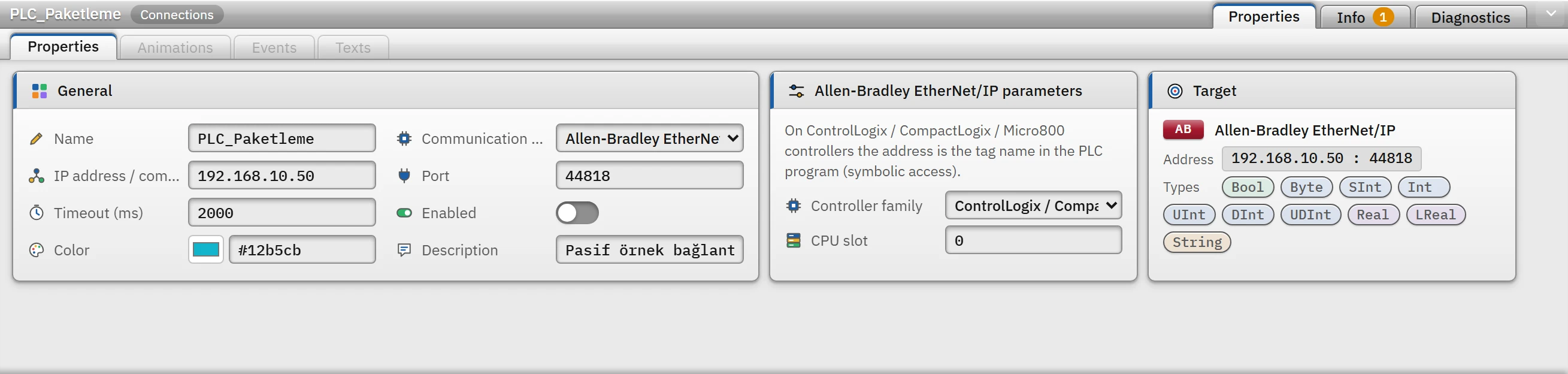
Parameters of an Allen-Bradley connection: controller family and CPU slot. Controller family: ControlLogix / CompactLogix or Micro800. CPU slot: the slot of the CPU in the ControlLogix chassis;
0for CompactLogix and Micro800. - Add a tag
Enter the name of the tag in the PLC as the tag address (Tag addresses). The data type in the PLC is not written in the address; the driver learns it from the PLC on the first read and converts the value to that type when writing.
Differences by family
| ControlLogix / CompactLogix | Micro800 | |
|---|---|---|
| Diverting | The request is forwarded over the backplane to the CPU in the CPU slot | No routing; the request goes directly to the controller |
| Read | Many tags are read in a single request (bulk packet) | Because the controller does not support batch requests, each tag is read with a separate request |
| Writing a bit | In a single step in the PLC (read-modify-write service) | Read, bit modified, written back |
Address rules
Tank_Seviye: controller tag.Program:Ana.Sayac: tag of theAnaprogram.Motor.Hiz: member of a structure (UDT).Dizi[3],Dizi[1,2]: array element (up to 3 dimensions, index 0 – 99999).Durum.5: bit 5 of an integer tag (0 – 63); requires theBooltype. An element of aBoolarray (Bitler[40]) can also be used; the driver detects on the first read that it is based on 32-bit words and automatically rebuilds the address as word and bit.- The tag name is not case-sensitive (as in Logix). The name starts with a letter or
_, contains only letters, digits and_, and has at most 40 characters; it cannot contain two consecutive_and cannot end with_. - The
WStringandDateTimetypes are not supported.
Driver reference
Allen-Bradley EtherNet/IP
On ControlLogix / CompactLogix / Micro800 controllers the address is the tag name in the PLC program (symbolic access).
- Driver ID
ab(name in the project file)- Connection
- An IP address / computer name and a port are required (default port
44818) - Data types
BoolByteSIntIntUIntDIntUDIntRealLRealString
Connection parameters
Appears in the Inspector window when a connection is selected.
| Parameter | Type | Default | Description |
|---|---|---|---|
| Controller family | choice | ControlLogix / CompactLogix | ControlLogix / CompactLogix · Micro800 |
| CPU slot | number (0 – 16) | 0 | Slot of the CPU in the ControlLogix chassis; 0 for CompactLogix and Micro800. |
Address formats
| Format | Meaning |
|---|---|
TagAdi | Controller tag |
Program:ProgramAdi.TagAdi | Program tag |
Yapi.Uye | Structure (UDT) member |
Dizi[3] Dizi[1,2] | Array element |
TagAdi.5 | Bit of an integer — Bool |
Sample addresses
| Data type | Examples |
|---|---|
Bool | Motor_Calisiyor Durum.5 Program:Ana.Start |
| Other types | Tank_Seviye Motor.Hiz Program:Ana.Sayac Dizi[3] |
Common errors
The marker at the start of each line tells where the message will appear in Live: [connection] in the Connections section of the system menu; [write] in the notification window of the operator who performed the write; [Studio] in the address cell in Studio. [tag] is a tag error during reading: the tag is left with bad quality, the text of the message is not shown in Live in this version (Tag errors); read the text to understand the cause.
| Message | Cause and solution |
|---|---|
[connection] Cihaz EtherNet/IP oturum isteğine yanıt vermedi (zaman aşımı). Port numarasını (44818) ve cihazın EtherNet/IP desteklediğini kontrol edin. | The port or the device is wrong; EtherNet/IP is turned off. |
[connection] Yuva 0 içindeki CPU'ya ulaşılamadı; bağlantıdaki CPU yuvası (slot) numarasını kontrol edin (CIP durum …). | The slot number is incorrect on ControlLogix. |
[connection] Cihaz isteği arka panele yönlendirmeyi desteklemiyor; denetleyici Micro800 ise bağlantıda "Micro800" ailesini seçin (CIP durum 08). | The controller is a Micro800; change the family. |
[tag] Tag PLC'de bulunamadı (ad yanlış ya da tag bu kapsamda yok) (CIP durum 04). | The name is wrong, or the tag is inside a program: use the Program:Ana.Tag format. |
[tag] Tag ya da üyesi PLC'de bulunamadı (dizi indisi sınırın dışında olabilir) (CIP durum 05). · Adres tag'in sonunu aşıyor (dizi indisi sınırın dışında). | The member name or the array index is wrong. |
[tag] Tag tek pakete sığmıyor: yapının / dizinin tamamı okunamaz, üye ya da eleman adresi verin (CIP durum 06). | A structure or array address was given. |
[tag, write] PLC erişime izin vermedi (tag'in "External Access" ayarı okumaya / yazmaya kapalı) (CIP durum 0F). | Enable the External Access setting of the tag in the PLC. |
[write] PLC'nin durumu isteğe izin vermiyor (anahtar konumu / çalışma kipi) (CIP durum 10). | The controller's key switch position or operating mode blocks the request. |
[write] Veri tipi PLC'deki tag ile uyuşmuyor … | The type of the tag in the PLC has changed; the driver learns the type again at the next read. |
[Studio] Allen-Bradley EtherNet/IP sürücüsü WString tipini desteklemez. | The address cell in Studio does not accept the type; use String. |