Omron FINS driver
Connecting to Omron CJ / CS / CP / NJ series PLCs via FINS/TCP or FINS/UDP and reading and writing using memory area addresses (D100, CIO100.00, W10); node numbers.
When to use it
The FINS driver reads and writes via the Ethernet unit of Omron CJ, CS, CP and NJ series PLCs using FINS/TCP (default) or FINS/UDP. The default port is 9600. An address consists of the memory area and the word number (D100, CIO100.00). The serial line (Host Link) is not supported.
Prerequisites on the PLC side
- FINS/TCP (or FINS/UDP) must be enabled in the Ethernet unit of the PLC and port
9600(or the port you use) must be open. - Find out the node number (FINS node) and the network number of the PLC. In a common installation, the node number is the last part of the IP address.
- With FINS/TCP, the number of simultaneous connections of the PLC is limited; when the limit is reached, a new connection is rejected.
Setting up a connection
- Add a connection
In the Connections section: Add, driver Omron FINS; enter the IP address of the PLC, and port
9600is filled in. - Set the transport and nodes
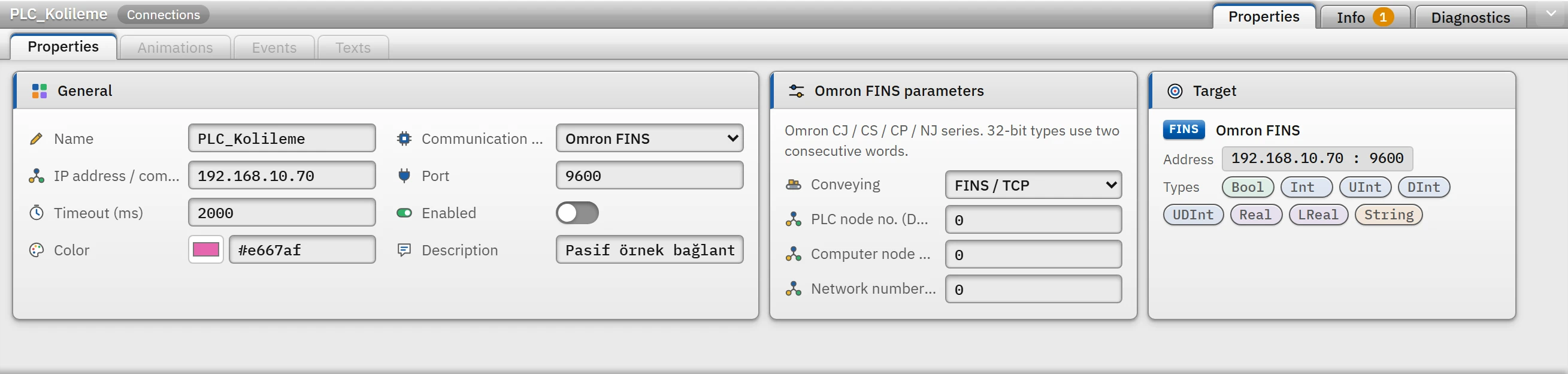
Parameters of the Omron FINS connection: transport type and node / network numbers. - Conveying
- FINS / TCP (default) or FINS / UDP.
- PLC node no. (DA1)
- 0 – 254. If the value is
0, TCP uses the number reported by the PLC during the handshake and UDP uses the last octet of the PLC's IP address. - Computer node no. (SA1)
- 0 – 254. If the value is
0, TCP uses the number assigned by the PLC and UDP uses the last octet of this computer's IP address. - Network number (DNA)
- 0 – 127.
0= local network.
- Add a tag
Enter the memory area and the number as the address (Tag addresses).
Memory areas and addresses
| Field | Address | Number range |
|---|---|---|
| CIO | CIO100 or just 100 | 0 – 6143 |
| Work (W) | W10 | 0 – 511 |
| Holding (H) | H10 | 0 – 1535 |
| Auxiliary (A) | A10 | 0 – 11535 |
| Data memory (DM) | D100 (DM100 can also be written) | 0 – 32767 |
| Extended memory (EM) | E100 (current bank) or E0_100 (bank 0 – C) | 0 – 32767 |
| Timer (T) | T10 | 0 – 4095 |
| Counter (C) | C10 | 0 – 4095 |
D100.03: bit of the word (00 – 15), for aBooltag. ABooltag requires a word bit; no bit number is written for timers and counters.T10/C10: aBooltag reads the done flag, anInt/UInttag reads the current value; no other type is accepted.Int/UIntoccupy 1 word,DInt/UDInt/Realoccupy 2 words (low word first),LRealoccupies 4 words.Stringholds 2 characters per word (the high byte of the word is the first character); the default Length is 32, maximum 254.
Read and write
- Nearby tags in the same area are read in a single request (at most 480 words; gaps of at most 16 words between them are merged); if the PLC rejects a block, the block is read tag by tag.
- Words are written with the word area code; a bit of a word is written with the bit area code, so only that bit changes in the PLC.
Driver reference
Omron FINS
Omron CJ / CS / CP / NJ series. 32-bit types use two consecutive words.
- Driver ID
fins(name in the project file)- Connection
- An IP address / computer name and a port are required (default port
9600) - Data types
BoolIntUIntDIntUDIntRealLRealString
Connection parameters
Appears in the Inspector window when a connection is selected.
| Parameter | Type | Default | Description |
|---|---|---|---|
| Conveying | choice | FINS / TCP | FINS / TCP · FINS / UDP |
| PLC node no. (DA1) | number (0 – 254) | 0 | 0 = the last part of the PLC IP address is used. |
| Computer node no. (SA1) | number (0 – 254) | 0 | 0 = the last part of this computer's IP address is used. |
| Network number (DNA) | number (0 – 127) | 0 |
Address formats
| Format | Meaning |
|---|---|
CIOn (or just n) | CIO area |
Wn Hn An | Work / holding / auxiliary area |
Dn | Data memory (DM) |
En Eb_n | Extended memory; b = bank (0 – C) |
Tn Cn | Timer / counter: Bool = flag, Int = value |
D100.03 | Bit of a word (00 – 15) — Bool |
Sample addresses
| Data type | Examples |
|---|---|
Bool | CIO100.00 W10.05 H0.15 D100.03 |
| Other types | D100 CIO200 W50 H10 E0_100 |
Common errors
The marker at the start of each line tells where the message will appear in Live: [connection] in the Connections section of the system menu; [write] in the notification window of the operator who performed the write; [Studio] in the address cell in Studio. [tag] is a tag error during reading: the tag is left with bad quality, the text of the message is not shown in Live in this version (Tag errors); read the text to understand the cause.
| Message | Cause and solution |
|---|---|
[connection] Cihaz FINS/TCP el sıkışmasına yanıt vermedi (zaman aşımı). Port numarasını ve PLC'de FINS/TCP'nin açık olduğunu kontrol edin. | The port is wrong or FINS/TCP is turned off. |
[connection] PLC FINS isteğine yanıt vermedi (zaman aşımı). Port numarasını, taşıma türünü (TCP / UDP) ve düğüm numaralarını kontrol edin. | The transport type or node numbers do not match. |
[connection] PLC'nin bütün FINS/TCP bağlantıları dolu (FINS/TCP hata kodu 20). | The PLC is using all connections reserved for other clients. |
[connection] Bu bilgisayar düğüm numarasıyla (SA1) PLC'ye zaten bağlı bir istemci var (FINS/TCP hata kodu 21). | Another client is connected with the same SA1; change the Computer node no. |
[connection] PLC bu bilgisayarın IP adresinden bağlantıya izin vermiyor (korumalı bağlantı) (FINS/TCP hata kodu 22). | The PLC allows only specific IP addresses. |
[tag] Hedef düğüm ağda yok; PLC düğüm numarasını (DA1) kontrol edin (FINS bitiş kodu 0201). | DA1 is incorrect. |
[tag] Bu bellek alanı PLC'de yok (FINS bitiş kodu 1101). · Adres PLC'deki alanın dışında (FINS bitiş kodu 1103). | The area does not exist on this CPU, or the number is outside the area. |
[write] Alan salt okunurdur; yazılamaz (FINS bitiş kodu 2101). · PLC bu çalışma kipinde isteği yürütemiyor (FINS bitiş kodu 22xx). | A field that cannot be written, or the PLC mode does not allow writing. |
[tag] Yönlendirme hatası; ağ numarasını (DNA) ve PLC'nin yönlendirme tablosunu kontrol edin (FINS bitiş kodu 05xx). | While routing to a PLC on another network, the DNA or the routing table is wrong. |