MQTT driver
Connecting to an MQTT server (broker) and receiving tag values by subscribing to topics, sending tag writes to a topic as a publish; TLS, user / password, QoS and JSON field addresses.
When to use it
The MQTT driver turns Live into an MQTT 3.1.1 client. Live connects to the server (broker) and subscribes to the topics of the tags; the last message published to a topic becomes the value of that tag. Writing to a tag means publishing the value to the topic. Devices, gateways and IoT systems usually share data this way.
This driver is new and has no connection in the demo project. It has not been tried in the field with a real MQTT server.
Prerequisites on the server side
- The MQTT server must be reachable from the Live computer (default port
1883, usually8883with TLS). - If authentication is used, a user must be defined on the server and the user must have read / write permission. Without permission, the server rejects the subscription.
- Find out the topic names that the devices publish and the payload format (plain value or JSON).
Setting up a connection
- Add a connection
In the Connections section: Add, driver MQTT; enter the address of the server, and port
1883is filled in. If you use TLS, set the port to8883or paste the address in the formmqtts://sunucu:8883(security switches to TLS). - Enter the parameters
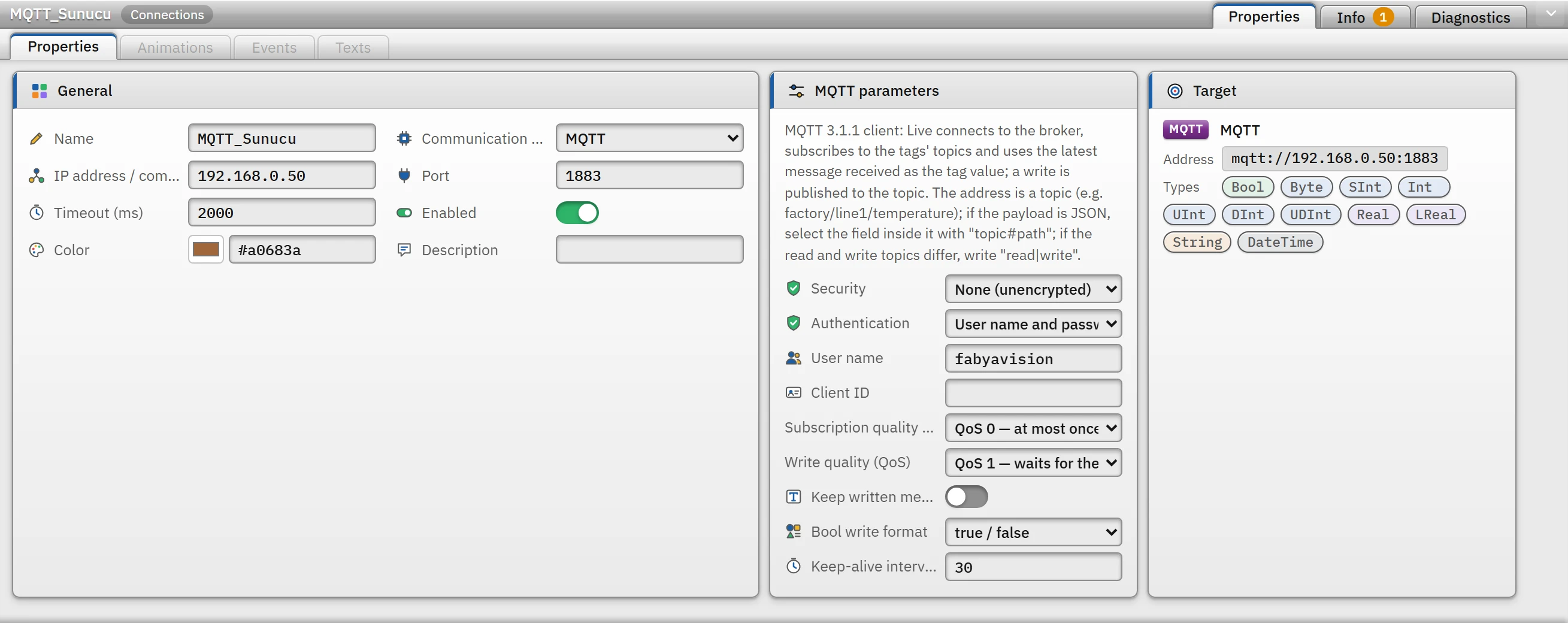
Parameters of the MQTT connection; the Target card shows the mqtt://ormqtts://address.- Security
- None (unencrypted), TLS (server certificate is verified) or TLS (certificate is not verified). TLS 1.2 is used.
- Authentication
- Anonymous or User name and password.
- User name
- The password is not written to the project file; it is entered in Live (Connection security).
- Client ID
- If empty, it is generated automatically in the format
fv-<bilgisayar>-<bağlantı>. If two clients connect with the same ID, the server disconnects the older one. - Subscription quality (QoS)
- QoS 0 — at most once (default) or QoS 1 — at least once.
- Write quality (QoS)
- QoS 0 — no response is awaited or QoS 1 — the server's acknowledgment is awaited (default).
- Keep written message on the broker (retain)
- If on, the published message is stored on the server and sent immediately to clients that subscribe later. Off by default.
- Bool write format
true / false(default),1 / 0orON / OFF.- Keep-alive interval (s)
- 0 – 3600, default
30. On a connection that stays silent, a ping is sent to the server at this interval; if nothing arrives within 1.5 times that time, the connection is considered lost.0= off.
- Add a tag
Enter the topic name as the tag address (Tag addresses).
Topic addresses
| Address | Meaning |
|---|---|
fabrika/hat1/sicaklik | The whole payload is the value of the tag (number, true / false, on / off, text, ISO date). |
hat1/durum#motor.hiz | The payload is a JSON document; the tag is the value inside the document (# separates the topic from the JSON path). |
hat1/olcumler#deger[2] | Element of the JSON array (the index starts at 0). |
cihaz/role/durum|cihaz/role/komut | Read and write use separate topics (separated by |). |
- A topic does not contain wildcard characters (
+,#); a tag is the value of a single topic. The topic and the JSON path are case-sensitive. The write topic cannot start with$. - A JSON path consists of field names separated by dots and array indexes (
motor.hiz,dizi[0].alan); the leading$.is optional; at most 16 steps.
Read and write behavior
- Reading: the driver subscribes to each topic once. The server sends the retained message to the subscription immediately. The tag of a topic for which no message has been published yet does not raise an error; it waits until a value arrives (it appears without a valid quality).
- Value conversion: for
Bool,true/false/1/0/on/off/yes/noare read. A value that does not fit the tag type is not truncated; the tag gets an error. ForDateTime, ISO 8601 or Unix seconds / milliseconds are accepted. The payload is UTF-8 text; a payload larger than 1 MB is not read. - Write: the value is published to the write topic of the tag. If it is the same as the read topic, the value is also applied to the tag without waiting for it to return from the server. If the connection is lost, the write is rejected.
- Writing a JSON field: only the relevant field of the document last received on the topic is changed; the other fields are kept. If there is no document on the topic yet, or if the write topic is separate and the previous document is not known, a new document containing only that field is published.
Driver reference
MQTT
MQTT 3.1.1 client: Live connects to the broker, subscribes to the tags' topics and uses the latest message received as the tag value; a write is published to the topic. The address is a topic (e.g. factory/line1/temperature); if the payload is JSON, select the field inside it with "topic#path"; if the read and write topics differ, write "read|write".
- Driver ID
mqtt(name in the project file)- Connection
- An IP address / computer name and a port are required (default port
1883) - Data types
BoolByteSIntIntUIntDIntUDIntRealLRealStringDateTime- Same address
- Multiple connections can be defined to the same address.
Connection parameters
Appears in the Inspector window when a connection is selected.
| Parameter | Type | Default | Description |
|---|---|---|---|
| Security | choice | None (unencrypted) | For TLS the port is usually 8883. For servers that use a self-signed certificate, add the certificate to Windows as trusted; "not verified" should be used only in closed networks. None (unencrypted) · TLS (server certificate is verified) · TLS (certificate is not verified) |
| Authentication | choice | Anonymous | Anonymous · User name and password |
| User name | text | — | The password is not written to the project file; it is entered on the Live PC. |
| Client ID | text | — | If empty, it is generated automatically (fv-computer-connection). When two clients connect with the same ID, the broker drops the older one. |
| Subscription quality (QoS) | choice | QoS 0 — at most once | QoS 0 — at most once · QoS 1 — at least once |
| Write quality (QoS) | choice | QoS 1 — waits for the broker's acknowledgement | QoS 0 — no reply is awaited · QoS 1 — the server's acknowledgment is awaited |
| Keep written message on the broker (retain) | on / off | off | The written message is stored on the broker and sent immediately to clients that subscribe later. |
| Bool write format | choice | true / false | true / false · 1 / 0 · ON / OFF |
| Keep-alive interval (s) | number (0 – 3600) | 30 | On a quiet connection a ping is sent to the broker at this interval; if nothing arrives for 1.5 times that time, the connection is considered lost. 0 = off. |
Address formats
| Format | Meaning |
|---|---|
topic | The whole payload is the tag value (number, true / false, on / off, text, ISO date) |
topic#alan.altalan | The payload is a JSON document; the tag is a value inside the document |
topic#dizi[2].alan | Element of a JSON array (the index starts at 0) |
readTopic|writeTopic | Read and write on separate topics (e.g. status | command) |
Sample addresses
| Data type | Examples |
|---|---|
Bool | cihaz/role/durum cihaz/role/durum|cihaz/role/komut hat1/durum#motor.calisiyor |
String | hat1/urun hat1/durum#ad |
| Other types | fabrika/hat1/sicaklik hat1/durum#motor.hiz hat1/olcumler#deger[2] |
Common errors
The marker at the start of each line tells where the message will appear in Live: [connection] in the Connections section of the system menu; [write] in the notification window of the operator who performed the write; [Studio] in the address cell in Studio. [tag] is a tag error during reading: the tag is left with bad quality, the text of the message is not shown in Live in this version (Tag errors); read the text to understand the cause.
| Message | Cause and solution |
|---|---|
[connection] MQTT sunucusu 2000 ms içinde yanıt vermedi (…). Adresi, portu ve ağ bağlantısını kontrol edin. | The server cannot be reached. |
[connection] MQTT sunucusu kullanıcı adını ya da şifreyi reddetti. Kullanıcı adını bağlantı parametrelerinden, şifreyi Live'daki bağlantı şifresi penceresinden kontrol edin. | The user or password is wrong; the password may not have been entered in Live. |
[connection] MQTT sunucusu bu istemcinin bağlanmasına izin vermedi (yetkisiz). … | There is no access definition on the server for this user or client. |
[connection] MQTT sunucusu istemci kimliğini reddetti (kimlik geçersiz ya da başka bir istemci aynı kimlikle bağlı). … | Change the Client ID. |
[tag] MQTT sunucusu bu konuya aboneliği reddetti (kullanıcının bu konuyu okuma yetkisi olmayabilir): konu | The user has no permission to read that topic. |
[connection] Sunucu sertifikasına bu bilgisayar güvenmiyor (kendinden imzalı ya da bilinmeyen sertifika otoritesi). … | Add the certificate to Windows as trusted; select TLS (certificate is not verified) only in closed networks. |
[connection] Sunucu sertifikasının adı "…" ile uyuşmuyor (adres olarak IP yerine sertifikadaki bilgisayar adını yazın …). | Enter the name in the certificate as the address. |
[tag] "…" Bool olarak okunamıyor (true / false, 1 / 0, on / off, yes / no beklenir). · "…" bir sayı değil; Int olarak okunamıyor. | The format of the payload does not match the tag type. |
[tag] Yük geçerli bir JSON belgesi değil (…). Adreste "#yol" yazdıysanız yük JSON olmalıdır. · JSON yolu "…" yükte bulunamadı (… alanı yok). | The payload is not JSON, or the path is not in the document. |
[write] MQTT sunucusu yayını onaylamadı (PUBACK gelmedi). | The server did not acknowledge the publish while the write quality was QoS 1. |