JavaScript scripts
The structure of a JavaScript script (Function and Global module), the predefined Tag, Sayfa, Bildir and Kullanici objects, parameter passing and differences to be aware of.
Structure
JavaScript scripts run in Live's own JavaScript environment; there is no separate engine. The script is compiled when Live opens. There are two types in the Scripts table.
- Function
- This is the code that runs on every call. Live wraps your code in the form
function (parametreler) { kod }: you can writereturnin the code, and the names you enter in the Parameters column (e.g.deger) become the parameters of the function. - Global module
- Runs once when the project is opened. Helpers that other scripts will use are added to
window(window.Ortak = { … }); thevarandfunctiondefinitions in the body remain local.
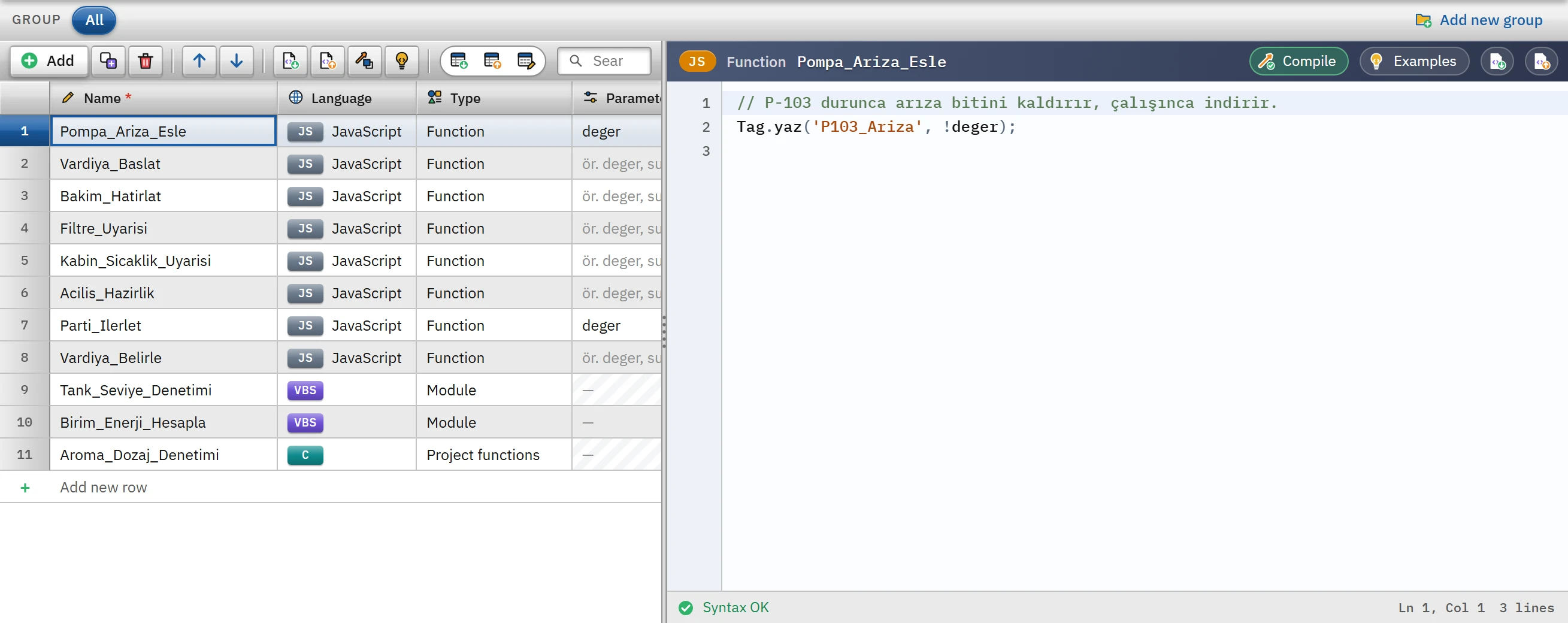 12
12deger is entered in the Parameters column; the code area has no tool row and no Reference panel.- Parameters — used only in JavaScript.
- Code — Live wraps this code in
function (deger) { … }.
A function script is called from an event or a task. In a task triggered by On tag change, the new value of the tag is passed as the first parameter; when it is called from an event, no parameter is passed (undefined). The Procedure / function field is not used in JavaScript scripts.
Predefined objects
| Object | What it does |
|---|---|
Tag.oku(ad) | Returns the current value of the tag. For a Bool tag the result is true / false, for a numeric tag a number, for a text tag text. If the tag does not exist, undefined is returned. The tag name is case-sensitive. |
Tag.yaz(ad, değer) | Writes the value and returns a Promise. If the write is rejected (the tag does not exist, the value is outside the lower / upper limit, a connection state tag), Live shows the operator the Operation failed window; the script does not stop. |
Sayfa.ac(ad), Sayfa.ac(ad, önek) | Changes the main screen. The second parameter gives the tag prefix for a structure (UDT) faceplate. |
Sayfa.geri() | Returns to the previous screen. |
Bildir(metin) | Shows the operator an information window in the center; the script continues without waiting. |
Kullanici.ad | The name of the logged-on user; empty text if there is no session. |
The standard JavaScript objects (Math, Date, JSON, String, setTimeout …) can be used in the script environment. The objects provided by the product are the four above; HMIRuntime, SmartTags and ScreenItems from VBS do not exist in JavaScript (Studio warns if they are used). The product provides no function for changing the properties of screen objects (color, text, visibility) from a JavaScript script; use VBS, C or Python for that.
Examples
Reading and writing tags:
var seviye = Tag.oku('Tank1_Seviye');
// Kalan boşluk (%) = 100 - seviye
Tag.yaz('Tank1_Bosluk', 100 - seviye);
Function with parameters. In the Pompa_Ariza_Esle script of Tanitim_Tesisi, the Parameters column contains deger; the task that runs when the P103_Calisiyor tag changes passes the new value of the tag to this parameter:
// P-103 durunca arıza bitini kaldırır, çalışınca indirir.
Tag.yaz('P103_Ariza', !deger);
User and notification, early exit with return:
if (!Kullanici.ad) {
  Bildir('Bu işlem için önce giriş yapın.');
  return;
}
Tag.yaz('Son_Islem_Yapan', Kullanici.ad);
Tag.yaz('Uretim_Sayaci', 0);
Global module and its use. Global module:
window.Ortak = {
  // Değeri iki sınır arasında tutar
  sinirla: function (deger, enAz, enCok) { return Math.min(enCok, Math.max(enAz, deger)); }
};
In another function script:
Tag.yaz('Motor1_Hiz', Ortak.sinirla(Tag.oku('Motor1_Hiz_Ayar'), 0, 100));For more examples (condition, loop, scaling, try / catch, setTimeout), see Script examples.
Order and timing
Tag.yazreturns without waiting. If you callTag.okuimmediately after writing to a PLC tag, the written value may not yet have arrived from the read cycle. If you need to do something after the write has finished, useTag.yaz(…).then(function () { … }).awaitcannot be used: the script function is notasync. Studio reports the error await cannot be used here; to wait for the result, use.then(…).- An operation delayed with
setTimeoutruns; the timer continues even after the script has finished.
Errors
A syntax error is shown in Studio by the live check and when compiling (F9); V8 messages are translated into the interface language (e.g. Unexpected token, Code ended unexpectedly). The error is reported the way Live compiles the code, with its line number.
An error that occurs at run time is written to the event log with the type betik as Betik_Adı: ileti, and the program keeps running. An error in the Before script / After script step of a recipe transfer counts as an error of the transfer. Use try / catch for your own error handling.
Limitations and points to note
- No functions for database, file or program execution are provided; use VBS, C or Python for these.
- The 30-second time limit and the rule that overlapping calls are skipped, which apply in VBS, C and Python, do not exist in JavaScript: a long-running or infinite loop can lock up the interface. Make sure loops have an exit condition; keep the script short in frequently triggered tasks.
- There is no reference panel, procedure list or autocomplete for JavaScript; for the reference, see Script object model reference.
- Scripts do not run in browser and TV monitoring mode.