Script examples
A topic map of the sample code gallery, an annotated listing of the scripts in the Tanitim_Tesisi project, and the same task written in four languages.
Sample sources
Samples are available from two places: the Sample code gallery of Studio and the ready-made scripts in the Tanitim_Tesisi sample project. The gallery samples are tested by actually running them in Live; each sample must give the expected result with its own scenario.
Gallery: topic map
Open the gallery with Sample code… in the toolbar of the Sample code… table (usage: Script editor). The number of examples by language and topic is as follows:
| Topic group | VBS | JavaScript | C | Python |
|---|---|---|---|---|
| Tag read / write | 4 | 1 | 4 | 6 |
| Condition and loop | 5 | 4 | 4 | 5 |
| Calculation and scaling | 3 | 3 | 4 | 4 |
| Date, time, waiting | 3 | 2 | 3 | 4 |
| Report record | 1 | 0 | 0 | 1 |
| Screen and objects | 4 | 1 | 4 | 6 |
| Operator interaction | 2 | 2 | 3 | 4 |
| Database, file, program | 4 | 0 | 3 | 7 |
| Script structure and diagnostics | 4 | 4 | 7 | 7 |
| Python language and library | — | — | — | 7 |
| Total | 30 | 17 | 32 | 51 |
Sample names are prefixed according to the language: JavaScript samples start with Js_…, C samples with C_…, Python samples with Py_…; VBS samples have no prefix (Tag_Oku_Yaz, Onay_Alarak_Yaz, Veritabani_Sorgu …). The gallery search box searches the name, description and code.
Scripts in Tanitim_Tesisi
The sample project binds all the scripts through Scheduled tasks. Open the Scripts and Scheduled tasks sections together to see which task runs each script.
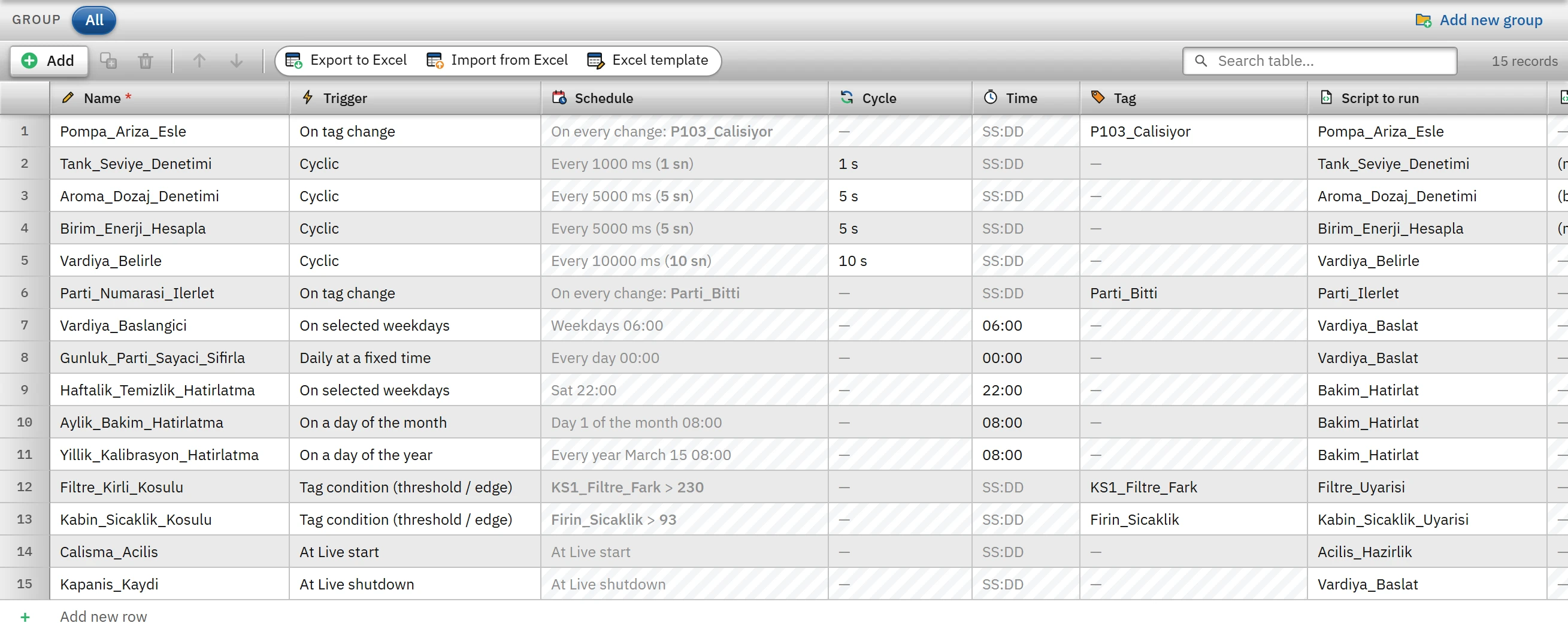 12
12- Trigger — cyclic, on tag change, timed …
- Script to run — the script the task runs.
| Script | Language / type | From which task | What it does |
|---|---|---|---|
Pompa_Ariza_Esle | JavaScript, Function (deger) | Pompa_Ariza_Esle: when the P103_Calisiyor tag changes | Sets the P103_Ariza bit when P-103 stops and clears it when it runs. |
Tank_Seviye_Denetimi | VBS, Module | Tank_Seviye_Denetimi: cyclic, 1 s | Sets the T101_Uyari bit when T101_Seviye drops below 40 or rises above 88. |
Aroma_Dozaj_Denetimi | C, Project functions | Aroma_Dozaj_Denetimi: cyclic, 5 s | Sets the Aroma_Dusuk bit when Aroma_Seviye drops below 42. |
Birim_Enerji_Hesapla | VBS, Module | Birim_Enerji_Hesapla: cyclic, 5 s | Calculates the specific energy (kWh / 1000 bottles) from the panel power and the line speed. |
Vardiya_Belirle | JavaScript, Function | Vardiya_Belirle: cyclic, 10 s | Determines the active shift according to the time of day (06 – 14 first, 14 – 22 second, 22 – 06 third). |
Parti_Ilerlet | JavaScript, Function (deger) | Parti_Numarasi_Ilerlet: when the Parti_Bitti tag changes | When the batch ends, increments the batch number by one and updates the shift batch counter. |
Vardiya_Baslat | JavaScript, Function | Vardiya_Baslangici (weekly, 06:00), Gunluk_Parti_Sayaci_Sifirla (every day 00:00), Kapanis_Kaydi (when Live shuts down) | Resets the shift batch counter. A script can be bound to more than one task. |
Acilis_Hazirlik | JavaScript, Function | Calisma_Acilis (when Live starts) | Prepares the shift batch counter. |
Bakim_Hatirlat | JavaScript, Function | Weekly, monthly and yearly reminder tasks | Writes the maintenance note to the Bakim_Notu tag. |
Filtre_Uyarisi, Kabin_Sicaklik_Uyarisi | JavaScript, Function | Tag-conditional tasks: KS1_Filtre_Fark > 230, Firin_Sicaklik > 93 | Clears the relevant warning bit. |
Writing one task in four languages
The following four scripts do the same task: when the tag P103_Calisiyor changes, they write the inverse value to the bit P103_Ariza. All of them run in a task triggered by On tag change; the new value of the tag arrives as the first parameter of the script.
VBS (Module; a Bool value arrives as the binary value 1 / 0):
Sub Pompa_Ariza_Esle(deger)
    SmartTags("P103_Ariza") = Not deger
End Sub
JavaScript (Function; Parameters column deger):
Tag.yaz('P103_Ariza', !deger);C (Project functions):
#include "apdefap.h"

void Pompa_Ariza_Esle(int deger)
{
    SetTagBit("P103_Ariza", (short)!deger);
}
Python (Module):
def Pompa_Ariza_Esle(deger):
    scada.write("P103_Ariza", not deger)
Steps for binding the sample
- Add the example
Select the example from the gallery and click Add to project. The script is added to the Scripts table.
- Compile
F9: the syntax and the tag, screen, and object names in the project are checked. Resolve the warnings or change the code to use your own names.
- Trigger it
Following the sample's How to bind it text, add a task in Scheduled tasks (cyclic, On tag change, timed …) or select the Run script function in the event of an object. For a VBS module, a C project function and a Python module, select Procedure / function if needed.
- Test
Open it in Live with Start Live. If the script produces an error, a
betikline appears in the event log (Log files).
Limitations and points to note
- For the database, file and program examples to work, Script permissions must be enabled. The gallery asks when you add an example that requires a permission; it does not enable the permission by itself.
- The DSN names, file paths and report names in the samples are for illustration only (
Uretim_VT,C:\Veri,Uretim_Raporu); change them to suit your own environment. - The database, file and program execution examples have been tested with a test bridge, not with a real database and file system; at the first trial in the field, with the permission enabled, try them in your own environment.