Python scripts
The structure of a Python script (Module and Action), the supported language and library, the scada object, differences from CPython, and permissions.
Scope of the language
Python scripts run in Live under the same rules as VBS and C (button event, scheduled task, tag-triggered task; in the background, without locking the interface). The language engine is written specifically for the product: no CPython installation and no internet access are required. The engine runs a subset of Python 3.12; its behavior and error messages have been tested by comparison with CPython 3.12.
Supported
- Types: unlimited-size
int,float,bool,str,bytes,bytearray,list,tuple,dict,set,frozenset,range, slices, multiple assignment and unpacking (a, *b = x), chained comparison,x if k else y. - Statements:
if / elif / else,forandwhile(else,break,continue),try / except / else / finally,raise … from,assert,with,match / case,global,nonlocal,del. - Functions: default values,
*args,**kwargs, keyword-only parameters,lambda, decorators, recursion (limit 1000), generators (yield,yield from), list / dictionary / set comprehensions. - Classes: multiple inheritance,
super(),@property,@staticmethod,@classmethod, special methods; f-strings ({x!r},{x:>10.2f},{x=}),str.format,%formatting. - The ready-to-use part of the standard library (imported with
import):math,random(the same number sequence as CPython),datetime,time,calendar,json,re,csv,statistics,collections,itertools,functools,string,textwrap,struct,base64,hashlib,decimal,fractions,enum,dataclasses,typing,io,uuid,heapq,bisect,contextliband others. The full list is on the Library tab of the Reference panel.
Unsupported
If any of the following is used, the script stops with a clear message (NotImplementedError) and Studio warns in advance:
async/await/asyncio(not needed: tag writes, waits, database and file operations are awaited automatically)eval,exec,compile,__import__,breakpoint,memoryview- complex numbers (
1j), the@operator (matrix multiplication), metaclasses and descriptors (exceptproperty) - threads and multiprocessing (
threading,multiprocessing), network access (socket,http,urllib.request,ssl),ctypes - third-party packages (
numpy,pandas,requests…): cannot be installed
Deliberate differences from CPython
- The number and text format is independent of the Windows regional settings:
str(1.5)is always'1.5'(unlike VBS). - Run-time errors carry the same message as Python's (
str(e)); syntax errors are reported in Turkish. - Circular imports between project modules are not reliable; move shared functions to a third module.
Script types
- Module
- Functions are defined with
def; they are brought into other Python code withimport Betik_Adı. Module-level code runs once when the project opens (in dependency order). If no function is selected in an event or task, the function with the same name as the module runs; the Procedure / function list shows the functions of the module with their signatures. - Action
- It runs from the beginning on every call. If the code contains
def action(), that one runs; if not,def main(); if neither exists, the whole code is the body (a top-levelreturnis allowed and is the return value).
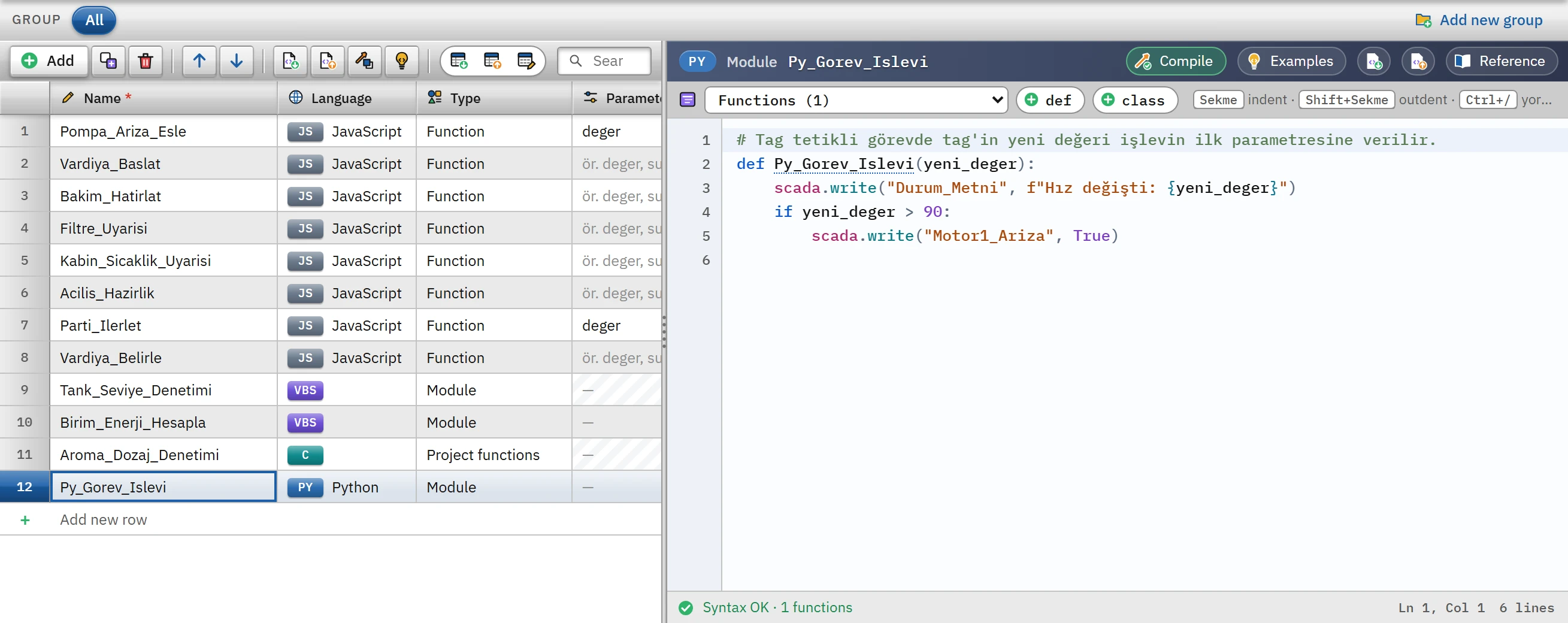 123
123- PY — Python badge; type: Module.
- def / class — inserts an empty skeleton.
- Status strip — number of functions and classes.
The Parameters cell is locked in Python; function parameters are written in the code. The start template of a new script contains a function with the same name as the script in a module (def Tank_Kontrol(): pass) and def action(): return 0 in an action.
For code written directly in the event, use the Run Python code function: the code runs like an action body and no def is needed. Predefined names: Item (the object of the event; for a screen event, the screen), ScreenItems, Layers, DataSet, Parent (the screen of the event).
In a task triggered by On tag change, the new value of the tag is passed to the first parameter of the function as a Python type (Bool → bool, integer → int, Real → float, text → str). A function written without parameters can also be called.
Tag values and errors
| State | Result |
|---|---|
| Reading Real / LReal tags | float: the value 50 arrives as 50.0; 1 and 1.0 are different types. |
| Reading a DateTime tag | str in ISO format (use tag.datetime to get a datetime). |
| Non-existent tag | KeyError (scada.read("Ad", varsayılan) returns the default value instead of an exception). |
| A number exceeding the limit | ValueError (the lower / upper limit of the tag or the range of the integer type). |
| A value that does not match the type (e.g. text into a numeric tag) | TypeError. |
| Disabled script permission | PermissionError (can be caught with try / except). |
An unhandled error stops the script and is written to the event log in the format Modül / işlev, satır 12: ZeroDivisionError: division by zero; the program continues.
Examples
Module function and tag read / write:
# Bir tag'i okur, hesaplanan değeri başka bir tag'e yazar.
def Py_Tag_Oku_Yaz():
    seviye = scada.read("Tank1_Seviye")
    # Kalan boşluk (%) = 100 - seviye
    scada.write("Tank1_Bosluk", 100 - seviye)
Tag-triggered task function (the new value of the tag is the parameter):
def Py_Gorev_Islevi(yeni_deger):
    scada.write("Durum_Metni", f"Hız değişti: {yeni_deger}")
    if yeni_deger > 90:
        scada.write("Motor1_Ariza", True)
Error handling:
def Py_Hata_Yakalama():
    try:
        sonuc = scada.read("Toplam_Miktar") / scada.read("Parti_Adedi")   # adet 0 ise ZeroDivisionError
        scada.write("Hata_Metni", "")
    except ZeroDivisionError as hata:
        scada.write("Hata_Metni", f"Hata: {hata}")
        sonuc = 0
    scada.write("Parti_Ortalama", sonuc)
Shared module and import. In the Module script named Py_Ortak_Hesap_Modulu:
def olcekle(ham, alt, ust, ham_ust=27648.0):
    """Ham değeri alt ... ust aralığına çevirir."""
    return alt + (ust - alt) * ham / ham_ust
In another Python script:
import Py_Ortak_Hesap_Modulu as ortak

def Py_Ortak_Kullanim():
    scada.write("Sicaklik", ortak.olcekle(scada.read("Sicaklik_Ham"), -50.0, 150.0))
Action:
def action():
    seviye = scada.read("Tank1_Seviye")
    scada.write("Tank1_Durum", "Yüksek" if seviye >= 80 else "Normal")
    return 0
For other examples (wait_for, scada.db, open, json, re, dataclass), see the topic Script examples.
Limitations and points to note
- 30-second limit: a call can compute for at most 30 seconds;
scada.sleepand other wait operations do not count toward this time. A longer loop is interrupted. - Overlapping calls are skipped: a second call that arrives while the same trigger is still running is not executed.
os,shutil,glob,tempfile,subprocess,pyodbcandpathlibare not built in; writeimportbefore using them. If they are not imported, aNameErroroccurs and Studio gives an undefined name warning.- When starting a program, there is no way to wait for it or to capture its output (
scada.run(bekle=True),subprocess.PIPE,check_output,Popen.wait,os.popen); there is notempfile.mkstemp. There are no transactions (BEGIN / COMMIT) and no temporary tables in the database. The project file and the program folder cannot be written to. HMIRuntime.Logging,AlarmLogs,DataLogs,Alarms,MenuToolBarConfigand writing object properties in a 3D screen are not supported.- Database, file and program execution has been tested only with a mock bridge; at the first trial in the field, with the permission enabled, try it in the real environment.
- Scripts do not run in monitoring mode from a browser or the TV.