Script and task problems
Where a script error appears, the format of the error messages (VBS, C, Python, JavaScript), common messages and their solutions, the states in the Tasks window and the compile warnings in Studio.
Where a script error appears
Script errors that occur at run time do not open a window for the operator. The error is written to the event log with the Script type and can be seen in the Event view object. It is not written to the program's logs file.
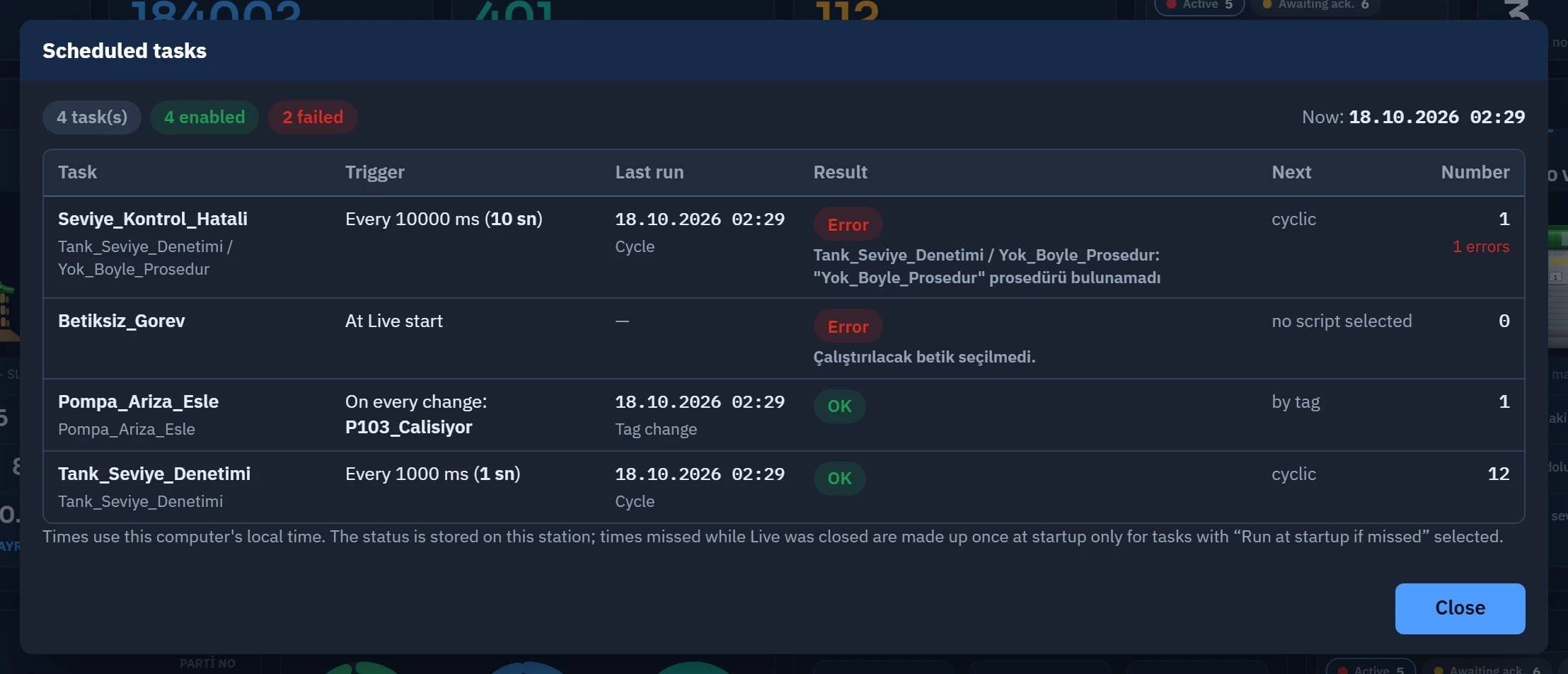 123
123- Error message — the task, the procedure and the cause.
- no script selected — the task has no script.
- Number of failed tasks
| Location | What it shows |
|---|---|
| Event view (Script type) | The runtime errors, warnings and traces of each language. Details: Log files. |
| Live › system menu › Tasks… | The last result of a scheduled task: OK, Error, Skipped. The error message is written below the row. |
| Studio › F9 and F7 | Problems that can be found before running: syntax, a non-existent tag, a disabled permission (Script editor). |
| Notification window Operation failed | Only in JavaScript, if Tag.yaz is rejected (value out of limits, connection state tag, authorization). |
Format of the error message
| Language | Format | Example |
|---|---|---|
| VBS | Modül / Prosedür, satır N: ileti (hata NO) | Seviye_Kontrol, satır 12: Tür uyuşmazlığı (hata 13) |
| C | Betik / işlev, satır N: ileti | Aroma_Dozaj_Denetimi / Doz_Hesapla, satır 8: sıfıra bölme |
| Python | Modül / işlev, satır N: İstisna: ileti | Py_Gorev_Islevi, satır 4: KeyError: Tag bulunamadı: Seviye |
| JavaScript | Betik adı: ileti (no line number) | Pompa_Ariza_Esle: x is not defined |
- The procedure (function) name is not written if it is the same as the module name. The name of code written directly on an event has the form
Sayfa / Nesne (olay kodu). - An error in the startup code of a module, which runs while the project is opening, is written under the name
Module startup code; the other modules continue to load. - JavaScript messages are messages of the browser engine and may be in English. The compilation in Studio displays them translated into Turkish; the Live log does not translate them.
- The same error message is written once every 60 seconds in VBS, C and Python; the repeats in between are counted and the next entry ends with
(+N kez). This rule does not apply to JavaScript errors: every error is a separate entry.
Common messages
| Message | Cause | Solution |
|---|---|---|
<ad>: önceki çağrı sürerken yeniden tetiklendi; bu çağrı atlandı (in the task: Skipped) | The same task or event row was triggered again while a VBS, C or Python call was still running. | Lengthen the task cycle or shorten the script. The record is written once; the number of skipped calls is counted separately. There is no such check in JavaScript. |
Betik süre sınırını aştı (30 sn); sonsuz döngü olabilir | A VBS, C or Python call ran computations for longer than 30 seconds. | Check the exit condition of the loop. Do the waiting with a scheduled task, not with a loop. The limit measures only the time the code itself is running. |
VBS engine could not be loaded · C engine could not be loaded · Python motoru yüklenemedi | The engine of the language could not be loaded in Live; scripts in that language do not run, and the other languages are not affected. | Repair the Live installation (run the setup program again). If the problem persists, keep the logs for support. |
VBS motoru başlatılamadı: … (similar for C and Python) | The engine was loaded but the session could not be established; the rest of the message states the reason. | Save the message for support. |
Bu projede betiklerin veritabanına bağlanması kapalı (Studio → Live Ayarları → Betik izinleri). (the message may also read running programs or accessing files; VBS error 70) | The script uses a database, a program or a file; the relevant permission is off. | In Studio, turn on the relevant permission under Live settings › Script permissions and upload the project again. Permissions are off by default; turn them on only in projects you trust. |
PermissionError: Betiklerin … izni kapalı (Live Ayarları › Betik İzinleri) | The same rule, in Python form. | Same. |
C: ProgramExecute: Bu projede betiklerin program çalıştırması kapalı (…) (the same format applies to file functions such as fopen: …) | A C script called a function that requires a permission that is turned off. The function returns failure (ProgramExecute returns 0, fopen returns NULL); the script does not stop. The same message is written once per session. | Same. Check the return value of the function. |
"X" prosedürü bulunamadı (modülle aynı adlı prosedür yok: çağıran yerde prosedür seçin) | VBS: the task or event did not specify a procedure name and the module has no procedure with the same name as the module; or the name is wrong. | In the task or in the event function, select the Procedure. In C and Python the corresponding message is "X" işlevi bulunamadı …. |
Tag bulunamadı (okuma): Ad · Tag bulunamadı (yazma): Ad | A tag name that does not exist in the project. In VBS, reading returns Empty and the script does not stop; in Python a KeyError occurs; in C, the no tag bits (0x0400) are set in the status code. | Check the name in Studio. F9 finds tags with a constant name; if the name is generated by concatenating text, it only becomes apparent at runtime. |
VBS Tür uyuşmazlığı (hata 13) | The operation cannot be applied to these types (e.g. adding text to a number, converting Empty or an empty text to a number). | Convert the value with functions such as CInt and CDbl; first check whether the tag has been read (Empty). |
VBS Sıfıra bölme (11) · İndis aralık dışında (9) · Nesne gerekli (424) · Sub ya da Function tanımlı değil (35) | In that order: divisor 0; array bound; variable Nothing or wrong object; the called procedure is not in any module. | Find the code from the line number in the message; check the relevant variable and the call. |
VBS Yığın alanı yetersiz (çok derin iç içe çağrı) (28) | The procedure calls itself unconditionally. | Add an exit condition to the recursion. |
JavaScript betiği görevle çalıştırılamadı: "Fonksiyon" türünde olmalı ve hatasız derlenmeli. (the task shows Error) | The task tried to run a JavaScript script of type General, or a script that could not be loaded because of a syntax error. | Set the script to the Function type and compile it with F9. |
No script selected to run. · Çalıştırılacak betik bulunamadı (silinmiş olabilir). | The script in the task is empty or has been deleted. | Select the script in the task table. |
The script does not run at all
- Has the project been uploaded to Live?
A change in Studio does not reach Live until the project is uploaded to Live and opened in Live (Uploading to Live). Code at module level runs once when the project is opened.
- Is the script connected anywhere?
A script does not run by itself: it must be called from the script function of a task, a button or a screen event (Binding a script so that it runs).
- Is the task enabled?
In the Tasks… window, a task does not run if its state is Inactive or no script selected. If Live settings is off under Startup sequence › Scheduled tasks, no task is set up.
- Are you looking at it in Live?
Scripts do not run in browser monitoring or on TV.
- Check the event log
Filter by the Script type. The error line gives the name of the script, the procedure and the line number.
- Print a trace
There are no breakpoints or step-by-step execution. Use
HMIRuntime.Tracein VBS,printfin C,printorscada.tracein Python. The same text is written to the event log at most once every 10 seconds; a script that writes traces in a loop does not fill up the log.
The script runs but the result is wrong
- Values that cannot be written: a tag that is not in the project, a value outside the limits of the tag, or a connection status tag is not written, and the script does not stop. In VBS,
LastErroris filled and goes to the log; in C, the function returns0; in JavaScript, the Operation failed window appears. Check the result of the write. - Quality: the quality of a tag read while the connection is down is
8. Check the quality before critical decisions (Quality codes). - Tag write order: in JavaScript,
Tag.yazreturns aPromise; for code that waits for the write to finish, addawaitor.then. - Tag-triggered task: runs only when the tag changes; it is not triggered if the same value is written again.
- Language differences: in VBS, a
Booltag returns a binary value; for the differences between the languages, see the API reference.
Build warnings that appear in Studio
F9 and F7 give three kinds of warnings before running: "X" adında tag projede yok., CreateObject("X") bu sürümde desteklenmiyor; çalışırken hata verir. and … kullanılıyor ama bu projede betiklerin … kapalı (Live Ayarları › Betik izinleri). Details: Script editor.
Limitations and points to note
- Script errors appear only in the event log; no window is opened for the operator. For critical scripts, design your own alarm (e.g. an error tag written by the script).
- In VBS, C and Python, an error stops the script for that call; the program and other scripts continue to run.
- The event log is not deleted automatically (Log files).