Text and graphic lists
Defining the texts and images to be shown for a tag value: value, range, bit and bit-number lists; use in objects and functions.
The value of a PLC tag is most often a number (0, 1, 2), whereas the operator wants to see “Stopped”, “Running”, “Faulty”. The Text and graphic lists section defines this mapping: a text list converts the value into text (and color), a graphic list converts the value into an image. The lists are used with a common resolver in screen objects, in event functions and in Live's selection window.
Defining a list
- Add the list
On the Text lists (or Graphic lists) tab, click Add and enter a Name (example:
Pompa_Durumu). - Set the selection type
Selection type determines which entry the tag value displays (table below).
- Add the entries
With the list selected, add one row to the List entries table for each mapping: Value, Upper limit (in a range list) and Text (Graphic in a graphic list). In a text list, the optional Color is the font color of the text.
- Bind to the object
Select the list from the Text list (or Graphic list) property of the object that will use it.
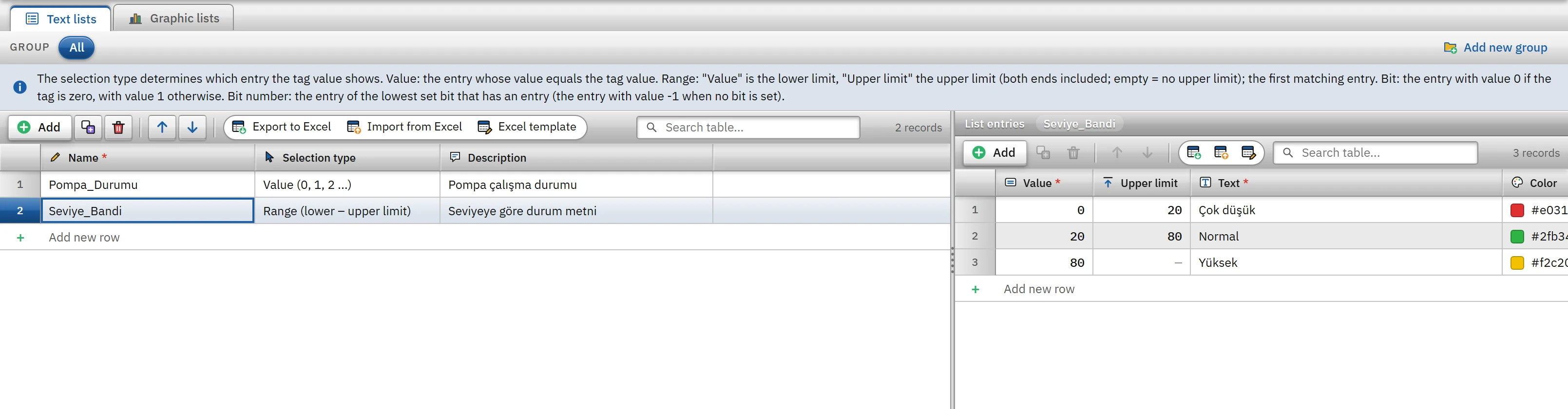 1234
1234Seviye_Bandi range list and its entries. (The sample lists have been added in memory.)- Selection type — value, range, bit or bit number.
- Value — the lower limit in the range list.
- Upper limit — only in the range list; empty = unlimited.
- Text — the text shown on the screen.
Selection types
| Selection type | How the entry is found | Value written to the tag when the operator selects the entry |
|---|---|---|
| Value (0, 1, 2 …) | The entry whose Value equals the tag value (exact equality). | Value of the entry. |
| Range (lower – upper limit) | Value is the lower limit and Upper limit is the upper limit (both inclusive; if the upper limit is empty, there is no upper limit). The first matching entry in list order is selected. | Lower limit of the entry. |
| Bit (0 / 1) | The entry with the value 0 if the tag is zero, the entry with the value 1 if it is non-zero. If there is no entry with the value 0 or 1, then in order: the first entry is 0, the second entry is 1. | 0 or 1. |
| Bit number (0 – 31) | The entry for the lowest set bit of the tag value that has an entry. When no bit is set, the entry with the value -1. | The value with only that bit set (2number); 0 for the -1 input. |
Where the list is used
| Object / function | What it does |
|---|---|
| Symbolic I/O field | Shows the text corresponding to the tag value (and the color of the entry); in input mode, clicking makes Live present the list in a selection window, and the value of the selected entry is written to the tag. If no entry is found, ? <değer> is shown. |
| Status indicator | If a graphic list is selected, the image corresponding to the value is displayed; if not, a light is drawn using color 0 – color 3. |
| List box, Option buttons | Shows the rows of the list; the selected row is determined from the tag value, and when the operator selects a row, a value is written to the tag according to the type of the list. |
| Event function: Look up text in a text list and write it to a tag (LookupText) | Writes the list text corresponding to the value of a tag to a String / WString tag. |
| 3D equivalents | The corresponding objects in 3D screens use the same parser. |
When the project language changes in Live, the list texts are used in their translated form (Languages and texts); the list itself has no translation field; the translation is done per text in the Project texts table. For object properties, see Controls.
Check rules
Check project (F7) checks the list entries:
- Error: the value is not a number (the input matches no value); in a range, the upper limit is smaller than the lower limit.
- Warning: the same value exists in more than one entry (the first is used); in a bit list the value is not 0 / 1; in a bit number list the value is not 0 – 31 or
-1; ranges overlap; the list has no entries but is used somewhere. - Information: the list is not used in any object or function.
Limitations and points to note
- In a range list the comparison is numeric; the list cannot be used for tags with text values. A tag whose value cannot be converted to a number finds no entry.
- The bit-number list is intended for 32-bit values; for values outside this range (for example a 64-bit tag), no entry is found.
- The images of a graphic list are embedded in the project file and are not exported to Excel; the graphic entries are selected in the table. Text list entries can be exported to Excel and imported back (Table editor).
- The texts and values of the entries are independent of the list name; renaming a list does not break the places where it is used (objects are bound to the ID of the list).