Skip to content

Drivers

Connectivity

8 protocols and a built-in simulator. Whichever driver you use, tags, alarms, archives and pages stay the same; only the connection and the address change.

Data flow

Devices

  • PLCs (Siemens, Allen-Bradley, Mitsubishi, Omron)
  • Modbus TCP devices and gateways
  • OPC UA and OPC DA servers
  • MQTT broker
  • Built-in simulator

Tags

Scaling, limits, quality, fallback value

Project

  • Pages
  • Alarms
  • Archive and trends
  • Recipes and reports
  • Tasks and scripts

Comparison

Protocol Transport Supported families Security
Siemens S7 S7 communication (PUT/GET) · TCP 102 Siemens S7-1500 · Siemens S7-1200 · Siemens S7-300 / 400 No security
Modbus TCP Modbus TCP Devices that are Modbus TCP servers No security
OPC UA (client) OPC UA client · opc.tcp Devices with an OPC UA server · The S7-1500’s built-in OPC UA server · Gateways and server software Secure mode available
Allen-Bradley EtherNet/IP EtherNet/IP (CIP) · TCP 44818 ControlLogix · CompactLogix · Micro800 No security
Mitsubishi MC Protocol MC protocol, 3E frame · TCP · binary / ASCII MELSEC-Q / L · MELSEC iQ-R · MELSEC iQ-F (FX5U) No security
Omron FINS FINS/TCP or FINS/UDP CJ · CS · CP · NJ No security
OPC DA (classic OPC) OPC DA 2.05a · COM / DCOM OPC DA 2.05a servers · Local or remote server (DCOM) Authentication
MQTT MQTT 3.1.1 · TCP 1883 / TLS 8883 MQTT 3.1.1 brokers Secure mode available
Simulator Inside Live · no network No PLC needed No network

Detailed manual topics for each driver

PLC protocols

Siemens S7, Allen-Bradley EtherNet/IP, Mitsubishi MC and Omron FINS connect to the controller directly with its own protocol; no middleware is needed.

Siemens S7

S7 communication (PUT/GET) · TCP 102

No security

The S7-1500, S7-1200 and S7-300 / 400 use the same protocol; tags are given by absolute address.

Supported families
  • Siemens S7-1500
  • Siemens S7-1200
  • Siemens S7-300 / 400
Data types
  • Bool
  • Byte
  • SInt
  • Int
  • UInt
  • DInt
  • UDInt
  • Real
  • LReal
  • String
  • WString
  • DateTime

S7-300 / 400 has no SInt, LReal or WString.

Default port
TCP 102 (rack and slot are set)
Security
PLC passwords and S7 secure communication are not supported; PUT/GET is plain TCP.
Address examples
 DB1.DBX0.0// Bool  DB1.DBB2// Byte, SInt  DB1.DBW4// Int, UInt  DB1.DBD12// DInt, UDInt, Real  MW20// memory (M) area, word  I0.0// input (I)  Q4.1// output (Q)  DB1.DBX16.0// LReal, String, WString, DateTime (start byte) 

Limits

  • Absolute addresses only: no symbolic addressing, optimized blocks, array or structure types; use the OPC UA driver for symbolic access
  • PUT/GET access must be allowed in the CPU and “Optimized block access” switched off in the data block
  • The CPU’s RUN / STOP state is not read; you only get connected or disconnected
Allen-Bradley EtherNet/IP

EtherNet/IP (CIP) · TCP 44818

No security

Talks to Logix-family controllers and Micro800 over explicit messaging. The address is the tag name from the PLC program; the driver learns the data type from the PLC on first read.

Supported families
  • ControlLogix
  • CompactLogix
  • Micro800
Data types
  • Bool
  • Byte
  • SInt
  • Int
  • UInt
  • DInt
  • UDInt
  • Real
  • LReal
  • String
Default port
TCP 44818
Security
No authentication or encryption.
Address examples
 Motor_Calisiyor// controller tag  Program:Ana.Start// program tag  Motor.Hiz// structure member  Dizi[3]// array element  Durum.5// bit 5 of an integer tag 

Limits

  • A whole structure or array cannot be read as one tag; use a member or element address
  • No connected (Forward Open) messaging and no fragmented reads
  • The tag’s External Access setting in the PLC must allow read (read / write for writes)

Mitsubishi MC Protocol

MC protocol, 3E frame · TCP · binary / ASCII

No security

Talks to MELSEC-Q / L, iQ-R and iQ-F (FX5U) PLCs over Ethernet. An address is a device letter plus a number; X and Y numbers are octal on iQ-F and hexadecimal on the others.

Supported families
  • MELSEC-Q / L
  • MELSEC iQ-R
  • MELSEC iQ-F (FX5U)
Data types
  • Bool
  • Int
  • UInt
  • DInt
  • UDInt
  • Real
  • LReal
  • String
Default port
TCP 5007 (must match the connection in the PLC)
Security
A PLC locked with a remote password cannot be reached.
Address examples
 D100// data register (word)  M100// internal relay (bit)  X1F// input, hexadecimal number  W1F// link register, hexadecimal  ZR1000// serial file register  D100.5// bit of a word device 

Limits

  • No serial (FX / A protocol) connection and no 1E or 4E frames
  • To write while the PLC is in RUN, “Enable online change” must be on in the PLC
  • The data code (binary or ASCII) must match the PLC setting

Omron FINS

FINS/TCP or FINS/UDP

No security

Reads and writes through the Ethernet unit of CJ, CS, CP and NJ series PLCs. An address is a memory area plus a number; node and network numbers are connection parameters.

Supported families
  • CJ
  • CS
  • CP
  • NJ
Data types
  • Bool
  • Int
  • UInt
  • DInt
  • UDInt
  • Real
  • LReal
  • String
Default port
9600 (TCP or UDP)
Security
The PLC can restrict connections by IP address.
Address examples
 D100// data memory (DM)  CIO100.00// CIO area, bit  W10.05// work area, bit  H0.15// holding area, bit  E0_100// extended memory, bank 0  T10// timer (counter: Cn) 

Limits

  • No Host Link (serial)
  • On FINS/TCP the PLC limits the number of simultaneous connections
  • Requests go to the PLC’s CPU unit; the source network number is always 0

Open protocols

Modbus TCP, OPC UA, OPC DA and MQTT: for devices without a protocol of their own, or when the data comes through a gateway, an OPC server or an MQTT broker.

Modbus TCP

Modbus TCP

No security

Connects to devices that are Modbus TCP servers: energy analysers, drives, gateways. Addresses use Modicon notation; for 32-bit values you choose the byte order (ABCD, CDAB, BADC, DCBA) and the unit ID.

Supported families
  • Devices that are Modbus TCP servers
Data types
  • Bool
  • Int
  • UInt
  • DInt
  • UDInt
  • Real
  • LReal
  • String
Default port
TCP 502
Security
No authentication or encryption.
Address examples
 00001// coil, Bool  10001// discrete input, cannot be written  30001// input register, cannot be written  40001// holding register  40001.0// bit of a register (0–15), Bool  400001// six-digit notation 

Limits

  • No serial line (RTU / ASCII); serial devices need a gateway that converts to Modbus TCP
  • No custom function codes and no array tags
  • If the device manual gives 0-based addresses, enter address + 1 in Studio

OPC UA (client)

OPC UA client · opc.tcp

Secure mode available

Connects to an OPC UA server as a client; the server can be inside a PLC, in a gateway or on another computer. It is also the way to reach Siemens data blocks with optimized access by symbolic name.

Supported families
  • Devices with an OPC UA server
  • The S7-1500’s built-in OPC UA server
  • Gateways and server software
Data types
  • Bool
  • Byte
  • SInt
  • Int
  • UInt
  • DInt
  • UDInt
  • Real
  • LReal
  • String
  • DateTime
Default port
4840 (or the port set on the server)
Security
Options: none, Basic256Sha256 signed, Basic256Sha256 signed and encrypted. Identity: anonymous or user name and password.
Address examples
 opc.tcp://192.168.0.5:4840/yol// connection address (can be pasted)  ns=3;s="DB_Motor"."Hiz"// S7-1500 data block variable  ns=2;s=Kanal1.Cihaz1.Tag1// string identifier  ns=4;i=1001// numeric identifier  nsu=http://ornek/ua;s=Ad// namespace by URI instead of number 

Limits

  • No subscriptions or node browsing: tags are polled with a bulk Read on every scan and the NodeId is typed by hand
  • No X.509 user certificates, no security policies other than Basic256Sha256 and no certificate management screen
  • Array and structure nodes cannot be read as a single tag

OPC DA (classic OPC)

OPC DA 2.05a · COM / DCOM

Authentication

Connects to a classic OPC server as an OPC DA 2.05a client; the server can be on this computer or on another computer on the network. If the server also offers OPC UA, prefer OPC UA.

Supported families
  • OPC DA 2.05a servers
  • Local or remote server (DCOM)
Data types
  • Bool
  • Byte
  • SInt
  • Int
  • UInt
  • DInt
  • UDInt
  • Real
  • LReal
  • String
  • DateTime
Default port
None (COM / DCOM); the server is chosen by its ProgID
Security
The Windows user running Live, or an explicit user name and password (DCOM); encryption depends on the Windows DCOM settings.
Address examples
 Random.Int4// item ID (defined by the server)  Kanal1.Cihaz1.Tag1// hierarchical item name 

Limits

  • No OPC HDA or OPC A&E, and it does not serve data as a server
  • OPC Core Components must be installed; Windows only
  • No array tags

MQTT

MQTT 3.1.1 · TCP 1883 / TLS 8883

Secure mode available

Makes Live an MQTT 3.1.1 client: it connects to the broker and subscribes to the topics of your tags. The latest message on a topic becomes the tag’s value; writing a tag publishes the value to the topic.

Supported families
  • MQTT 3.1.1 brokers
Data types
  • Bool
  • Byte
  • SInt
  • Int
  • UInt
  • DInt
  • UDInt
  • Real
  • LReal
  • String
  • DateTime
Default port
1883 · 8883 with TLS
Security
None, or TLS 1.2 (server certificate verified or not verified). Identity: anonymous or user name and password.
Address examples
 fabrika/hat1/sicaklik// the whole payload is the tag value  hat1/durum#motor.hiz// JSON path (separated by #)  hat1/olcumler#deger[2]// element of a JSON array  cihaz/role/durum|cihaz/role/komut// read topic | write topic 

Limits

  • No MQTT 5; clean sessions only
  • No client-certificate authentication and no wildcard (+, #) subscriptions
  • The payload is UTF-8 text limited to 1 MB

Built-in simulator

It runs inside Live and needs no network address; use it to try things without a PLC, and for training and presentations.

  • Signal function names (sinus, rampa, kare…) are typed into the address cell exactly as shown, whatever the interface language
  • The generated value counts as a raw value: if scaling is on for the tag, it is scaled
  • To move a project to a PLC, update the Connection and Address columns of the tags; for many tags, export the table to Excel, edit those two columns and import it back
  • The sample project produces its values with the simulator; its PLC connections are defined only as examples and are inactive

Simulator

Inside Live · no network

No network

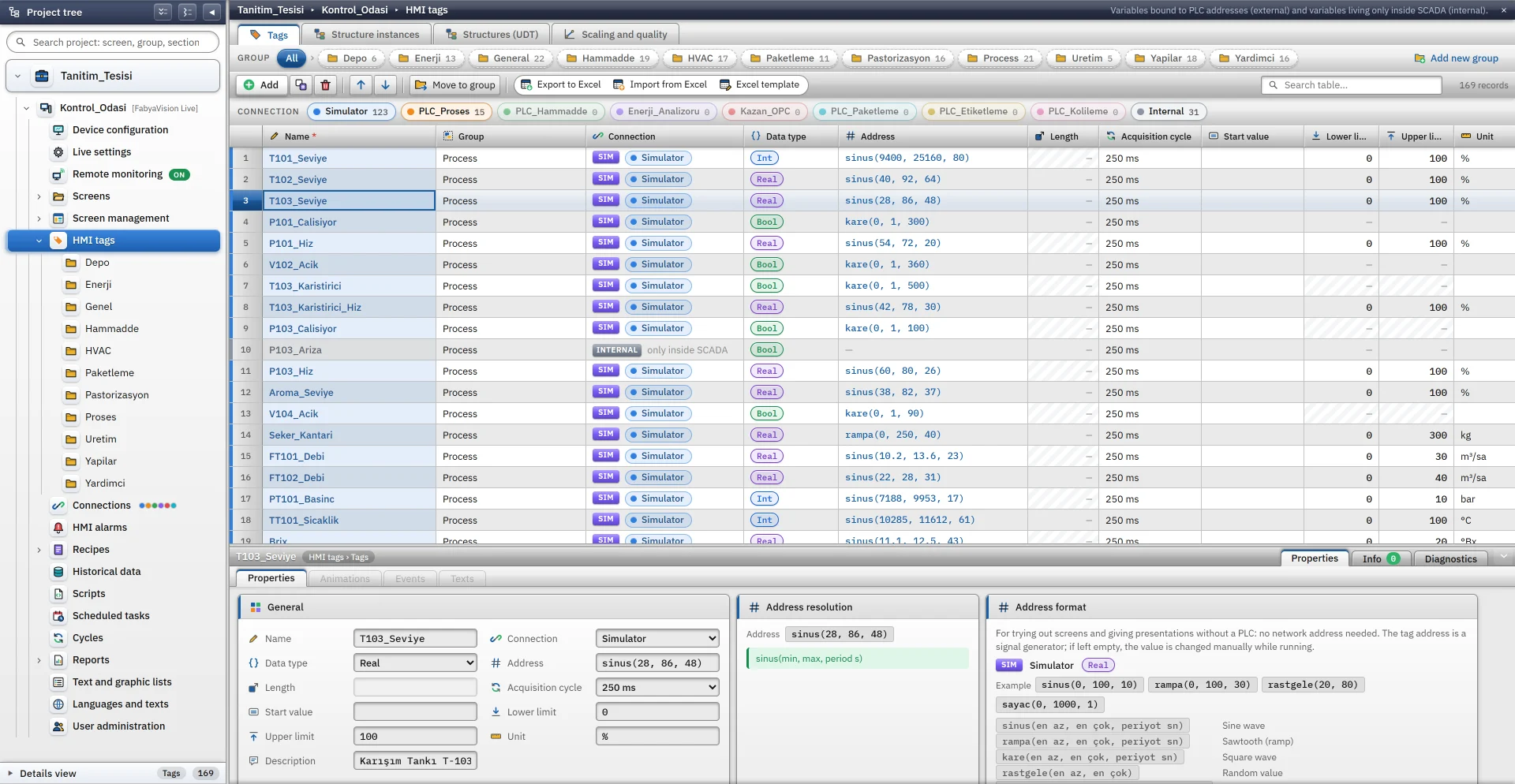
Works without a PLC: a tag’s address is a signal generator and the tag value follows it. Leave the address empty and the tag becomes a value you change by hand or from a script.

Supported families
  • No PLC needed
Data types
  • Bool
  • Byte
  • SInt
  • Int
  • UInt
  • DInt
  • UDInt
  • Real
  • LReal
Address examples
 sinus(40, 92, 64)// sine wave, 40–92, 64 s period  kare(0, 1, 300)// square wave, 0 / 1, 300 s period  rampa(20, 90, 120)// sawtooth, 20–90, 120 s period  rastgele(0, 50)// random value  sayac(0, 100, 1)// counter, +1 every second  sabit(42)// constant value 

Limits

  • The simulator does not run in browser monitoring: values come from Live
  • Writing a value to a tag with a signal stops the signal; it starts again when Live restarts

Setting up a connection

  1. Define the connection

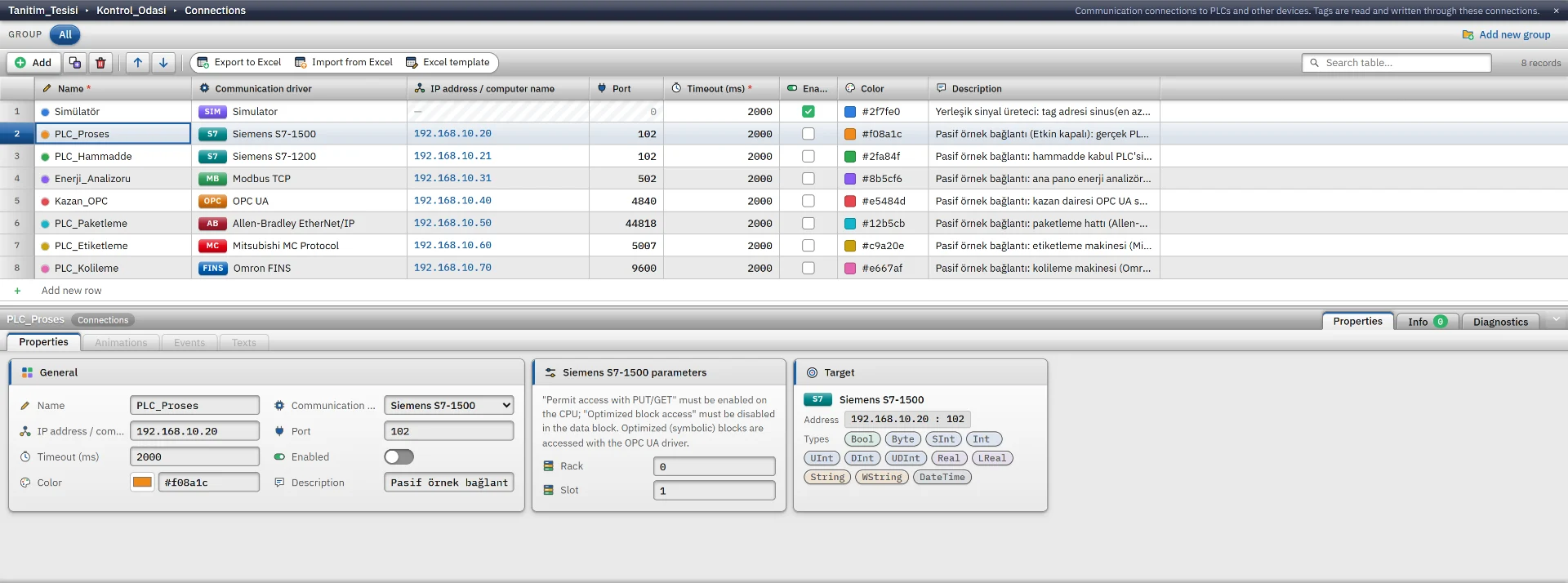
    In Studio add a row to the Connections table: pick the driver and type the device’s IP address. Port, timeout (100–60000 ms) and driver-specific parameters (rack and slot, unit ID, security…) come with the driver. After a change, save the project and load it into Live.

    Connections table
  2. Give a tag an address

    In the HMI Tags table bind the tag to the connection and type the address in the driver’s format. The address is checked against the driver and data type as you type; an address that does not fit is not accepted.

    Tag table
  3. Test and watch

    In Studio, Test connections shows that the port is open and F7 checks the project. The S7 session, PUT/GET permission, OPC UA security choice, password and whether an address exists can only be tried in Live. There, each connection’s state and last error appear in the system menu, and a PLC Connection Status control can be placed on a page.

    Check project

Common behaviour

Reconnects when it drops

If a connection cannot be made or drops, the driver retries after 1, 2 and 5 s, then every 10 s. Once it is back, all values are sent once more.

A separate scan per connection

Each connection runs on its own thread, so an unresponsive device does not slow the others. The scan cycle is applied at no less than 100 ms, and nearby addresses are read in one request.

Only changes are passed on

Changes reach pages, alarms and archives in batches, at most every 100 ms per connection. A NaN or infinite Real value reaches Live as 0.

Writes are queued and read back

A write is made between reads and the written tag is read back at once. A fractional value is rounded when written to an integer tag; a write is rejected if it exceeds the type’s range or the tag’s lower / upper limit, or while the connection is down.

An unreadable tag affects only itself

If a device rejects a block, its tags are read one by one. An unreadable tag gets bad quality and is retried every 30 s; the connection stays Connected, and an object bound to a bad-quality tag is drawn faded.

Status tag and event log

A Bool status tag named after the connection is created for each one; use it in animations, alarms and scripts. Connection established and connection lost events go to the event log.

Connection security

Passwords are not written to the project file

With OPC UA, MQTT and OPC DA the connection parameters hold only the user name. The password is entered in Live, from the system menu with the Settings permission; sharing, backing up or loading the project into Live does not carry it.

Stored as plain text on the Live computer

The password you enter sits unencrypted in the project’s data folder (<Project>.veri\depo\baglanti_sifreleri.json). Give only the Windows account that runs Live access to the folder; copying the data folder to another computer copies the passwords too.

S7, Modbus, EtherNet/IP, MC and FINS: no security

With these protocols anyone on the network can open the same connection, read and write. Put the devices on a separate control network, place a firewall or VPN between them and Live, and use OPC UA where secure communication is needed.

OPC UA and MQTT: encrypted channel

OPC UA: Basic256Sha256 signed, or signed and encrypted; the server certificate is trusted on first use, after which only the stored certificate is accepted. MQTT: TLS 1.2; the option that skips certificate verification is for closed networks only.

Ports to allow outbound in the firewall

Drivers open outgoing connections to the device; no inbound rule is needed on the Live computer.

  • Siemens S7: TCP 102
  • OPC UA: TCP 4840
  • Modbus TCP: TCP 502
  • EtherNet/IP: TCP 44818
  • Mitsubishi MC: TCP 5007 (the port opened in the PLC)
  • Omron FINS: TCP or UDP 9600
  • MQTT: TCP 1883 (TLS: 8883)
  • OPC DA (remote): DCOM / RPC ports

Not supported

  • An OPC UA server (only a client exists)
  • Modbus RTU / ASCII and other serial protocols
  • PROFIBUS and MPI
  • OPC HDA and OPC A&E
  • S7 secure communication and PLC passwords
  • OPC UA subscriptions and node browsing
  • MQTT 5 and client certificates
  • Automatic switchover to a standby (second) PLC
  • Opening and closing a connection from a script or a button while Live is running
  • A request trace tool, read-time and error counters

Try it with your own PLC

Download the demo; start with the simulator, then connect your own device.