Overview
The driver talks over TCP to devices that are Modbus TCP servers, such as an energy analyzer, a drive or a gateway. The default port is 502.
Addresses are written in Modicon notation: 40001 is the first holding register, and its address in the protocol is 0. Serial lines (RTU / ASCII, RS-232 / RS-485) are not supported. Serial devices need a gateway that converts to Modbus TCP.
What to set up in the device
-
Enable the Modbus TCP server
The Modbus TCP server must be enabled on the device. The default port is 502, and any firewall in between must allow it.
-
Find the unit ID and the address map
Each device behind a gateway is distinguished by its own unit ID. For a single device the unit ID is usually 1.
-
Check whether the address is 1-based or 0-based
Does the device documentation give a 1-based Modicon address (
40001) or a 0-based protocol address (0)? If it is the latter, enter the table digit and the documentation address + 1 in Studio: a holding register with protocol address 100 becomes40101.
Setting up the connection in Studio
-
Add a connection
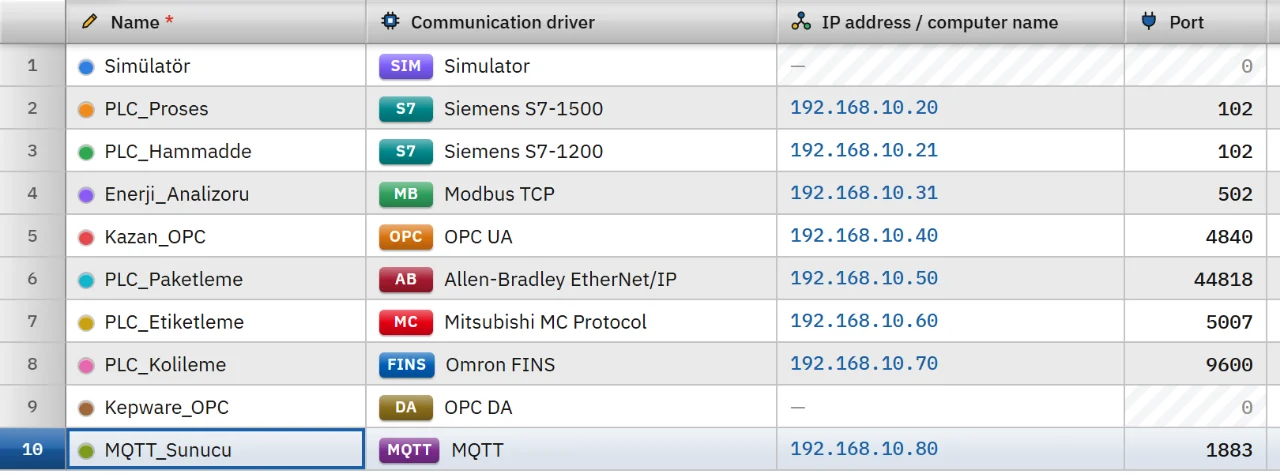
In the Connections section click Add and choose Modbus TCP as the communication driver.
-
Enter address and port
Type the IP address of the device in the IP address cell. The port is filled in as 502.
-
Choose the unit ID and the byte order
In the inspector fill in Unit ID (0 – 255, default 1) and 32-bit byte order. Byte order options:
ABCDbig-endian (default),CDABword-swapped,BADCbyte-swapped,DCBAlittle-endian. 16-bit values are always big-endian, as in the Modbus standard. -
Add tags
In the HMI Tags section create tags bound to this connection and type the Modicon address in the Address cell. The address is validated against the data type of the tag. See the HMI tags page for details.
-
Test the byte order
The device documentation tells in which order 32-bit values are held in the two registers. If the value of a Real or DInt tag is far from what you expect, change the byte order. Store a known value in the device (for example 1.0) and try the options until the correct value appears.
-
Test the connection
Online › Test connections only shows whether a TCP connection can be opened on the port of the device. The protocol itself and the existence of the address are tried in Live when a tag is read. After changing a setting, save the project and load it into Live.
Address format
00001 // Coil, Bool, writable 10001 // Discrete input, Bool, not writable 30001 // Input register, not writable 40001 // Holding register, writable 40001.5 // Bit of a register (0 – 15), Bool 400001 // Six-digit notation: 400001 – 465536 - The first digit gives the table; the remaining four or five digits give the sequence number (1 – 65536).
- No bit number is written in coil and discrete input addresses. If you give Bool a register address, the bit number is mandatory:
40001.0. - Coils and discrete inputs can only be read as Bool. For numeric types use a register address (
4xxxxor3xxxx).
Data types
- Bool
- Int
- UInt
- DInt
- UDInt
- Real
- LReal
- String
| Type | Registers occupied |
|---|---|
| Bool, Int, UInt | 1 |
| DInt, UDInt, Real | 2 (40001 and 40002)
|
| LReal | 4 |
| String | 2 characters per register: half the number of characters in the Length field, rounded up. Default length 32, maximum 254. |
The address of a tag is the first register it occupies. The Byte and SInt types do not exist in the Modbus driver.
Read and write behavior
- Nearby tags in the same table are read in one request: at most 125 registers or 2000 coils. Gaps of at most 8 registers (64 for coils) between them are merged. If the device rejects a read with gaps, the driver from then on merges only adjacent tags.
- If the device rejects a request, the tags in that block are read one by one; only the problematic tag gets an error.
- A write uses a write single coil request for a coil, a write single register request for a single register and a write multiple registers request for multi-register values. When a bit of a register is written, the register is read, the bit is changed and the register is written back.
- For many devices with the same structure use Structures (UDT). The base address (
40001) and the relative address of the member are added:40001+ 2 =40003. - A written tag is read back at once. If the connection drops, the driver retries after 1 s, 2 s and 5 s, then every 10 s. For the behavior common to all drivers see the communication drivers page.
Limits
- There is no serial Modbus, no custom function codes, no array tags and no 64-bit integer type.
- The Modbus protocol has no authentication or encryption. Where encrypted communication is needed, use the OPC UA server of the device.
Common errors
Connection messages appear in the Connections section of the system menu in Live. For tag errors during reading no message is shown; the tag only gets bad quality.
| Message | Cause and fix |
|---|---|
| Device did not respond within 2000 ms (192.168.0.20:502) | A network, port or device problem. For devices behind a gateway, increase the Timeout value. |
| The device has no such address (Modbus exception 02: invalid address) | The device does not recognize this register or coil. Check the address map and the 0-based / 1-based difference. |
| The device did not accept the value (Modbus exception 03: invalid value) | The value written is not within the range the device allows. |
| The gateway could not reach the target device (Modbus exception 0A) | The gateway cannot reach the device with the unit ID. Check the unit ID and the serial line. |
| Input register … cannot be written. · Discrete input … cannot be written. | 1xxxx and 3xxxx addresses cannot be written. Use 4xxxx for a value that has to be writable.
|
| For the Bool type the bit of the register must be given (e.g. 40001.0) or a coil address (0xxxx) must be used. | The address cell in Studio gives this message: a register address was given to a Bool tag without a bit number. |
Frequently asked
The device documentation gives address 100. What do I type in Studio?
If the address in the documentation is a 0-based protocol address, type the table digit and the address + 1: 40101 for a holding register. If the documentation gives a Modicon address such as 40101, type it as it is.
Related pages
Connections
The Connections table, driver selection, connection test, diagnostics, reconnection and password storage.
StudioHMI tags
External and internal tags, scaling, quality, structures (UDT) and bulk transfer with Excel.
ConnectivityOPC UA
Connects to an OPC UA server as a client, with symbolic addresses and signed, encrypted communication.
ConnectivitySimulator
The built-in driver that generates signals for trials, demos and training without a PLC.