Overview
The OPC UA driver connects as a client to an OPC UA server. The server can be inside a PLC (for example the OPC UA server of an S7-1500), in a gateway or on another computer. The tag address is the NodeId of the node on the server.
The driver is chosen for two jobs: reaching Siemens data blocks that have Optimized block access turned on by symbolic name, and communicating with signing or encryption. It is the only driver that offers signed and encrypted communication. FabyaVision contains no OPC UA server; it is a client only.
What to set up on the server
-
Start the server
The OPC UA server must be running. On an S7-1500 the server is enabled in the CPU settings. The port is usually 4840, and the endpoint path is empty on most PLCs.
-
Define security and authentication
The server must offer an endpoint that matches the Security setting you choose in the connection; the secure modes work only with the Basic256Sha256 policy. Anonymous login must be allowed, or a user must be defined.
-
Find the NodeIds
Studio has no node selection (browse) from the server. Find the NodeIds with an OPC UA client tool and type them in.
Setting up the connection in Studio
-
Add a connection
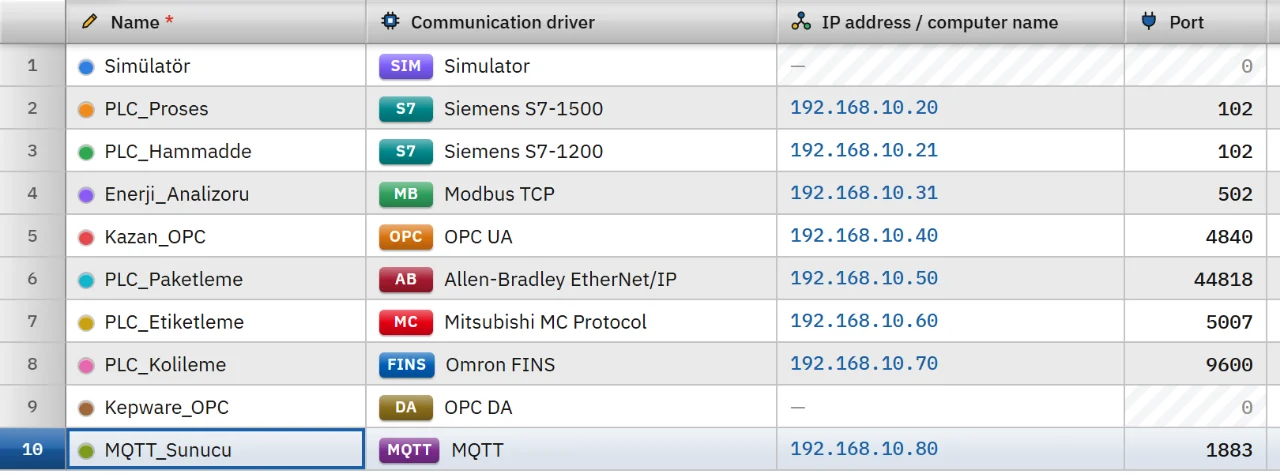
In the Connections section click Add and choose OPC UA as the communication driver. The port is filled in as 4840.
-
Type the address
Type the IP address or the computer name of the server in the IP address cell. If you paste it in the form
opc.tcp://192.168.0.5:4840/yol, the address, port and Endpoint path are placed in separate fields. -
Set the parameters
In the inspector fill in Endpoint path (the part after the port, empty on most PLCs), Security and Authentication. If User name and password is chosen for authentication, enter the User name.
-
Enter the password in Live
The password is not written to the project file. When Live starts, enter it with the Enter password button under Connections in the system menu; the Settings authorization is required. After the password is saved, communication restarts.
-
Add tags
In the HMI Tags section create tags and type the NodeId in the Address cell. See the HMI tags page for details.
Security and certificate trust
In secure mode (signed, or signed and encrypted) Live creates an application certificate for this computer: RSA 2048, SHA-256, self-signed, valid for about 20 years. It trusts the certificate of the server as follows:
- Trust on first use: on the first secure connection to a server (address and port), the certificate of the server is accepted and saved to the
%LOCALAPPDATA%\FabyaVision\OpcUa\sunucularfolder asadres_port.der. On later connections only this certificate is accepted. - If the certificate changes, the connection is rejected and the message gives the path of the file to delete. If the certificate was renewed on purpose, delete that file; the driver applies trust on first use again.
- Manual trust: certificates placed in the
%LOCALAPPDATA%\FabyaVision\OpcUa\pki\trustedfolder, and the certificates signed by them, are always trusted. - The server trusting Live: many servers reject a client they do not recognize. The certificate of this computer is in the
%LOCALAPPDATA%\FabyaVision\OpcUa\pki\own\certsfolder; add the.derfile to the list of trusted clients of the server.
With Security None and anonymous login, the certificate is not checked at all. If a user name and password are used with None, the password is sent encrypted with the certificate of the server, while the rest of the channel is unencrypted.
If you use a user name and password, choose the signed and encrypted security. Trust on first use does not verify the identity of the server at the first connection; make the first connection on a trusted network.
Address format
ns=3;s="DB_Motor"."Hiz" // S7-1500 data block variable ns=2;s=Kanal1.Cihaz1.Tag1 // Node with a string identifier ns=4;i=1001 // Node with a numeric identifier nsu=http://ornek/ua;s=Ad // Namespace given by its URI instead of its number i=2258 // No namespace, treated as 0 - Get the namespace number (
ns) from the server. The text identifier may contain;and=; everything afters=is the identifier. - Identifier types:
s=string,i=number,g=GUID,b=byte string. - The number of a namespace given with
nsu=is looked up on the server in every session.
Data types
- Bool
- Byte
- SInt
- Int
- UInt
- DInt
- UDInt
- Real
- LReal
- String
- DateTime
- WString is not supported; OPC UA strings are already Unicode, so use String.
- Array and structure nodes cannot be read as a single-value tag.
- The value read is converted to the tag type by rounding. If it does not fit the range of the type, the tag gets an error; the value is not clipped.
- When writing, the value is converted to the type of the node: an Int tag can be written to a Double node.
- If the server sends a UTC date, it is reflected in the DateTime tag in the local time of this computer.
Read and write behavior
- Subscriptions are not used. In every read cycle the tags are read with a bulk Read request.
- A write goes to a single node and the written tag is read back at once.
- If the connection drops, the driver retries after 1 s, 2 s and 5 s, then every 10 s. For the behavior common to all drivers see the communication drivers page.
Limits
- There is no node selection (browse) from the server, no X.509 user certificate, no security policy other than Basic256Sha256 and no certificate management screen.
- The password you enter is stored unencrypted in the
baglanti_sifreleri.jsonfile on the Live computer. Open the project data folder with Windows permissions only to the account that runs Live.
Common errors
Connection messages appear in the Connections section of the system menu in Live. For tag errors during reading no message is shown; the tag only gets bad quality.
| Message | Cause and fix |
|---|---|
| The server does not offer the … security option (options it offers: …) | This security policy is turned off on the server. Change the Security setting of the connection to match what the server offers, or turn the option on in the server. |
| The server does not allow anonymous login · The server does not accept login with user name and password in this security option | The authentication type does not match the permission on the server. Change the Authentication setting to Anonymous or User name and password. |
| The server did not accept the user name or password (no password has been entered for this connection) | The password has not been entered in Live or is wrong. Use the Enter password button in the system menu. |
| The server rejected the secure connection: most likely it does not trust the certificate of this computer. | Add the certificate of Live to the list of trusted clients of the server. |
| The certificate of the server has changed … connection rejected | The server certificate has changed. If it was renewed on purpose, delete the file whose path the message gives. |
| Node not on the server (NodeId not found) · Namespace not on the server | The NodeId or the namespace is wrong. Verify it with an OPC UA client tool. |
Frequently asked
How do I read an S7-1500 data block with optimized block access?
You read it by symbolic name with the OPC UA driver. Enable the OPC UA server in the CPU settings and write the NodeId in the form ns=3;s="DB_Motor"."Hiz".
Does FabyaVision offer data as an OPC UA server?
No. FabyaVision is an OPC UA client only; it reads and writes data from the OPC UA server of another system.
Related pages
Connections
The Connections table, driver selection, connection test, diagnostics, reconnection and password storage.
StudioHMI tags
External and internal tags, scaling, quality, structures (UDT) and bulk transfer with Excel.
ConnectivitySiemens S7
Connects to S7-1500, S7-1200 and S7-300 / 400 CPUs through PUT/GET.
ConnectivityOPC DA (classic OPC)
Connects as a client to classic OPC DA 2.05a servers over COM / DCOM.