
Four sources
| Source | When to use it | TIA Portal |
|---|---|---|
| Connect to a running TIA Portal | When the project is already open in TIA Portal. Convert reads the open project. | V20 required |
| Open from a project file | When the project is not open. Convert opens the file in an invisible TIA instance in the background. | V20 required |
| Export package | On a computer without TIA Portal. The package may have been prepared on another computer. | Not needed |
| From the project folder, without opening TIA | For a compiled WinCC Professional station. Only Professional can be read. | Not needed |
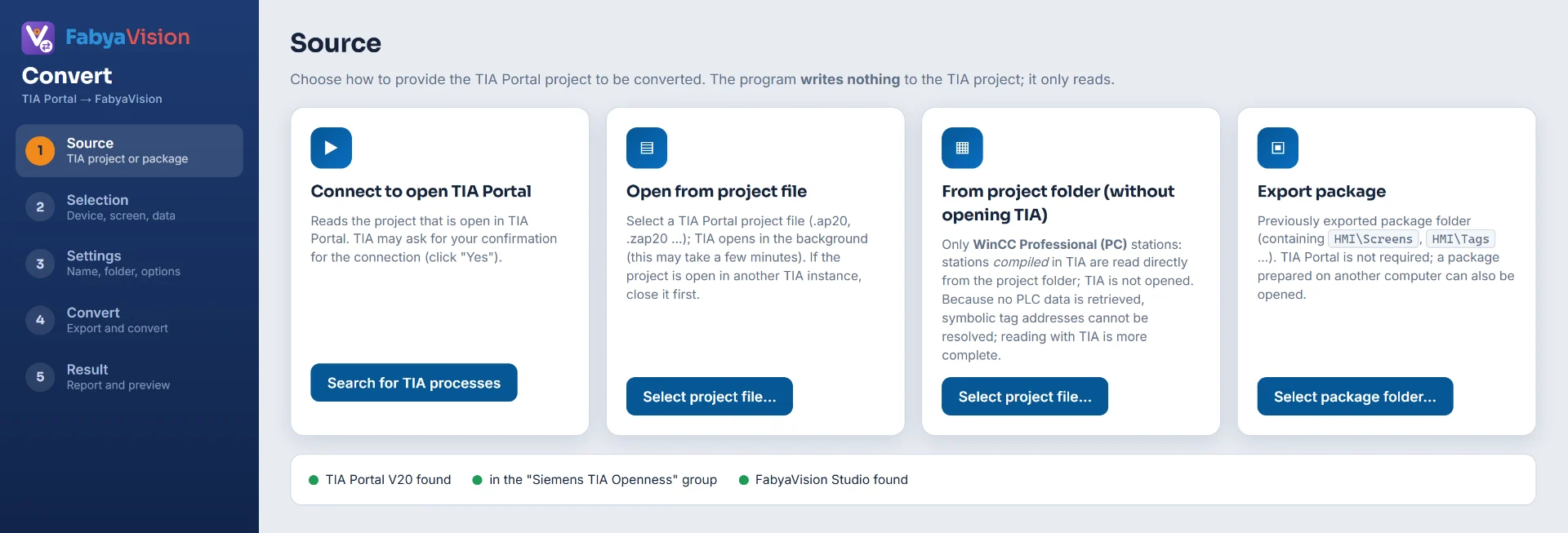
Connecting to a running TIA and opening a file
- Search for TIA processes lists the running TIA Portal instances and their open projects, and Connect reads the selected project. TIA may ask you to approve the connection; answer “Yes”.
- Select project file… lets you pick a project file (
.ap20,.ap15_1…). Convert opens the file in the background, which can take a few minutes. If the project is open in another TIA, close it first.
Reading from the project folder
This source does not open TIA Portal. Convert reads the data of a compiled station from the project folder and from the WinCC SQL instance, so it works only for WinCC Professional (PC) stations. Because no PLC data is taken, symbolic tag addresses cannot be resolved; tags with absolute addresses are not affected. Reading through TIA also takes the PLC data.
The details of the reader are on the WinCC Professional page.
Export package
A package is a folder that holds screens, tags and PLC data as files. Select package folder… opens the folder. If the root contains package.json or one of the folders HMI\, UNI\ or PRO\, the folder counts as one package; otherwise each subfolder is looked up as a separate HMI.
package.json // family (klasik, unified or professional), HMI name and categories HMI\Screens // classic HMI: screens; next to them folders such as Tags, TextLists and Scripts UNI\ // WinCC Unified PRO\ // WinCC Professional PLC\<plc>\Blocks // data blocks used by the HMI tags PLC\<plc>\Tags // PLC tag tables Requirements
- TIA Portal V20 must be installed; Convert reads TIA through V20.
- The Windows user must be in the local “Siemens TIA Openness” group. The lines under the Source step show the group membership; if TIA Portal is installed and you are not a member, the command appears on the screen.
- The Siemens components are not part of the package. Convert loads them from the TIA Portal installation on the computer.
- Convert does not write to the TIA project: it attaches to a running TIA, or opens the project in an invisible instance and closes it without saving.
net localgroup "Siemens TIA Openness" <user> /add // Run it in an administrator command prompt, then log off from Windows and log on again. Projects saved in older versions
V20 projects open directly. For a project saved in a version older than V20 (tested with V15.1), Convert reads the version from the extension of the project file (such as .ap15_1) and upgrades the project without touching the original files:
-
Temporary copy
The project folder is copied under
%TEMP%\FabyaVision_Convert\tia_kopya. -
Upgrade
The copy is upgraded and opened with TIA Portal V20.
-
Cleanup
The copy is deleted when the work is finished.
- This step takes longer on large projects: it took 6 – 8 minutes on a 1.2 GB example, and on large projects it can approach ten minutes.
- The temporary copy needs free disk space of about 2 times the project size plus 512 MB.
- A project saved in a version newer than V20 does not open; Convert reports this with an error message.
- Versions older than V15.1 have not been tried.
Related pages
Selection and settings
The five steps of the wizard, device and content selection, conversion options.
ConvertWinCC Professional
PDL screens, tags, VBS scripts and symbols of WinCC Professional (SCADA) stations.
ConvertTags and addresses
How tags and PLC addresses are carried over, symbolic address resolution, optimized blocks and connections.