Overview
The driver reads and writes through the Ethernet unit of Omron CJ, CS, CP and NJ series PLCs using FINS/TCP (default) or FINS/UDP. The default port is 9600. An address consists of the memory area and the word number. The serial line (Host Link) is not supported.
| Transport | Note |
|---|---|
| FINS / TCP | Default. The number of simultaneous connections of the PLC is limited; when the limit is reached, a new connection is rejected. |
| FINS / UDP | There is no concept of a connection. When connecting, the driver sends a trial request that reads CIO 0; if no response arrives, the connection is considered not established.
|
What to set up in the PLC
-
Enable FINS
FINS/TCP (or FINS/UDP) must be enabled in the Ethernet unit of the PLC, and port 9600 (or the port you use) must be open. Any firewall in between must allow TCP or UDP 9600.
-
Find the node and network numbers
Find the node number (FINS node) and the network number of the PLC. In a common installation, the node number is the last part of the IP address.
-
Check the IP restriction
If the PLC allows only specific IP addresses, the address of the Live computer must be in that list.
Setting up the connection in Studio
-
Add a connection
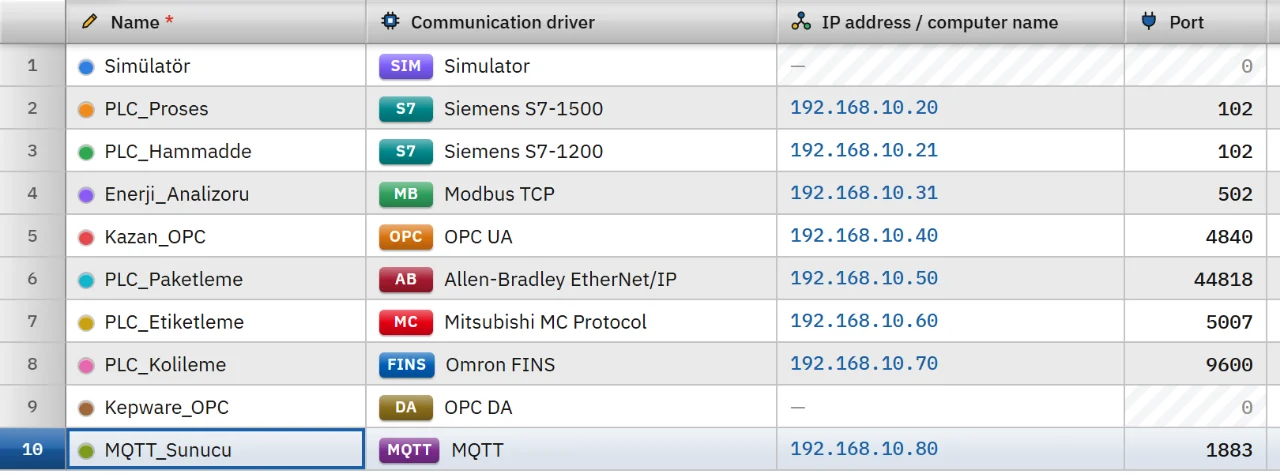
In the Connections section click Add and choose Omron FINS as the communication driver. Type the address of the PLC in the IP address cell; the port is filled in as 9600.
-
Set the transport and the nodes
In the inspector choose FINS / TCP (default) or FINS / UDP as the Conveying type, then enter the node and network numbers. The range of each field and the meaning of the value 0 are in the table below.
-
Add tags
In the HMI Tags section create tags and type the memory area and the number in the Address cell. See the HMI tags page for details.
-
Watch the status
After changing a setting, save the project and load it into Live. The state of the connection and its last error message appear in the Connections section of the system menu in Live.
| Field | Range | When 0 |
|---|---|---|
| PLC node no. (DA1) | 0 – 254 | On TCP the number the PLC reports in the handshake is used; on UDP the last part of the PLC IP address. |
| Computer node no. (SA1) | 0 – 254 | On TCP the number assigned by the PLC; on UDP the last part of the IP address of this computer. |
| Network number (DNA) | 0 – 127 | The local network. |
Address format
D100 // Data memory, word (DM100 can also be written) D100.03 // Bit of a word (00 – 15), Bool CIO100.00 // Bit in the CIO area, Bool CIO200 // Word in the CIO area (just 200 can also be written) W10.05 // Bit in the work area H0.15 // Bit in the holding area E0_100 // Extended memory, bank 0 T10 // Timer | Area | Address | Number range |
|---|---|---|
| CIO | CIO100 or just 100
| 0 – 6143 |
| Work (W) | W10
| 0 – 511 |
| Holding (H) | H10
| 0 – 1535 |
| Auxiliary (A) | A10
| 0 – 11535 |
| Data memory (DM) | D100
| 0 – 32767 |
| Extended memory (EM) | E100 (current bank) or E0_100 (bank 0 – C)
| 0 – 32767 |
| Timer (T) | T10
| 0 – 4095 |
| Counter (C) | C10
| 0 – 4095 |
- A Bool tag needs a word bit. No bit number is written for timers and counters.
- At
T10andC10addresses a Bool tag reads the done flag, and an Int or UInt tag reads the current value; no other type is accepted.
Data types
- Bool
- Int
- UInt
- DInt
- UDInt
- Real
- LReal
- String
| Type | Space occupied |
|---|---|
| Int, UInt | 1 word |
| DInt, UDInt, Real | 2 words, low word first |
| LReal | 4 words |
| String | 2 characters per word, and the high byte of the word is the first character. Default length 32, maximum 254. |
The Byte, SInt, WString and DateTime types do not exist.
Read and write behavior
- Nearby tags in the same area are read in one request: at most 480 words. Gaps of at most 16 words between them are merged. If the PLC rejects a block, the block is read tag by tag.
- Words are written with the word area code. A bit of a word is written with the bit area code, so only that bit changes in the PLC.
- Requests go to the CPU unit of the PLC; the source network number is always 0.
- A written tag is read back at once. If the connection drops, the driver retries after 1 s, 2 s and 5 s, then every 10 s. For the behavior common to all drivers see the communication drivers page.
Limits
- There is no Host Link (serial).
- The FINS protocol has no authentication or encryption. The PLC can restrict the connection by IP address.
Common errors
Connection messages appear in the Connections section of the system menu in Live. For tag errors during reading no message is shown; the tag only gets bad quality.
| Message | Cause and fix |
|---|---|
| The device did not respond to the FINS/TCP handshake (timeout) | The port is wrong, or FINS/TCP is turned off in the PLC. |
| The PLC did not respond to the FINS request (timeout) | The transport type or the node numbers do not match. Check the port, the transport type (TCP / UDP) and the node numbers. |
| All FINS/TCP connections of the PLC are in use (FINS/TCP error code 20) | The PLC is using all the connections reserved for clients. |
| A client is already connected to the PLC with this computer node number (SA1) (FINS/TCP error code 21) | Another client is connected with the same SA1. Change the Computer node no. value. |
| The PLC does not allow connections from the IP address of this computer (FINS/TCP error code 22) | The PLC allows only specific IP addresses. |
| The target node is not on the network (FINS end code 0201) | PLC node no. (DA1) is wrong. |
| This memory area does not exist in the PLC (FINS end code 1101) · The address is outside the area in the PLC (FINS end code 1103) | The area does not exist in this CPU, or the number is outside the area. |
| The PLC cannot execute the request in this operating mode (FINS end code 22xx) | The operating mode of the PLC does not allow writing. Writing to an area that cannot be written returns end code 2101. |
| Routing error (FINS end code 05xx) | When going to a PLC on another network, Network number (DNA) or the routing table of the PLC is wrong. |
Frequently asked
Should I choose FINS/TCP or FINS/UDP?
Choose whichever is enabled in the Ethernet unit of the PLC. The default is FINS/TCP. Because FINS/UDP has no concept of a connection, the driver sends a trial request when connecting.
Related pages
Connections
The Connections table, driver selection, connection test, diagnostics, reconnection and password storage.
StudioHMI tags
External and internal tags, scaling, quality, structures (UDT) and bulk transfer with Excel.
ConnectivityMitsubishi MC Protocol
Connects to MELSEC-Q / L, iQ-R and iQ-F (FX5U) PLCs with the MC Protocol 3E frame.
ConnectivitySimulator
The built-in driver that generates signals for trials, demos and training without a PLC.