Reading
TIA Portal V20 has no export for Unified screens. Convert reads the screens, screen objects, dynamizations and event handlers one by one through Openness remote calls, so reading can take 6 – 12 minutes. Tag tables, connections and runtime settings are always taken, whatever the selection.
Objects
| Screen object | How it is converted |
|---|---|
| Shapes | Rectangle, ellipse, arc, line, polyline and polygon. A touch area becomes a rectangle. |
| Text and I/O | Text and text box, I/O field (format, decimals, unit), symbolic I/O field. |
| Controls | Button, switch, slider, bar, gauge, analog clock, list box, option buttons and check box. |
| Views and window | Screen window, alarm view, trend view and HTML browser. System diagnostics becomes the PLC connection status view (approximate). |
| Graphic view | A project graphic (PNG, JPG) becomes an image; an EMF graphic is converted to PNG in the reader. An object without a graphic becomes a filled rectangle. |
Dynamizations and events
- Tag dynamizations are converted to animation links: links without a mapping become direct, range mappings become a range table, and bit mappings become a table over a bit tag. Blinking entries go to the blink property.
- Visibility, opacity, position, size and rotation angle dynamizations are bound to the matching object property. Color, value and text properties are mapped according to the object type.
- Dynamizations bound to a text list go to the symbolic I/O field, and those bound to a graphic list go to the status indicator.
The click, press, release, key, activate and change events are carried over; the load and unload events of a screen become page events. Event scripts are split into statements: set, reset and invert bit in a tag, write a value, increase and decrease, change screen, change the content of a screen window, close the program, log on and log off, acknowledge alarm. Value assignments that contain GetTagValue and the Read() / Write() pattern become a JavaScript function script. For code that is not recognized, no event is added and the report says so.
Alarms, lists and connections
- Alarm classes (color, acknowledgment, blinking), discrete alarms and analog alarms are converted. The column settings of the alarm view are not transferred. In Studio the alarms are under HMI alarms.
- Text lists and the start screen are transferred.
- Connections are created from the information TIA provides. A connection defined with a non-S7 driver is created, but because addresses cannot be derived from symbolic names, its tags stay without an address and the report says so.
JavaScript modules
Unified script modules are added to the project as source and are not executed: the Unified runtime API does not exist in FabyaVision. The source stays as a comment in the scripts section of Studio. You rewrite the functions with Studio’s JavaScript objects (Tag.oku, Tag.yaz, Sayfa.ac).
What is not converted
- Graphic lists and the graphic library do not exist in Openness. The colors of a status indicator are estimated from the color words in the list name; correct them in Studio.
Enabled, script or expression dynamization, multi-bit mapping, fill level (FillLevel), threshold colors, gradient fills and object authorization are not transferred. Pattern fills become a flat color, and blinking between colors becomes a fixed color.- Trend curves are not transferred; the Trend view object comes across.
- Faceplates and custom controls (
FaceplateContainer,ProcessControl,CustomWidget…) become a placeholder with a dashed red outline. - Tags with an indirect address or in an optimized data block stay without an address; see tags and addresses.
- Vector graphic formats other than EMF are not taken.
Related pages
Tags and addresses
How tags and PLC addresses are carried over, symbolic address resolution, optimized blocks and connections.
ConvertConversion report
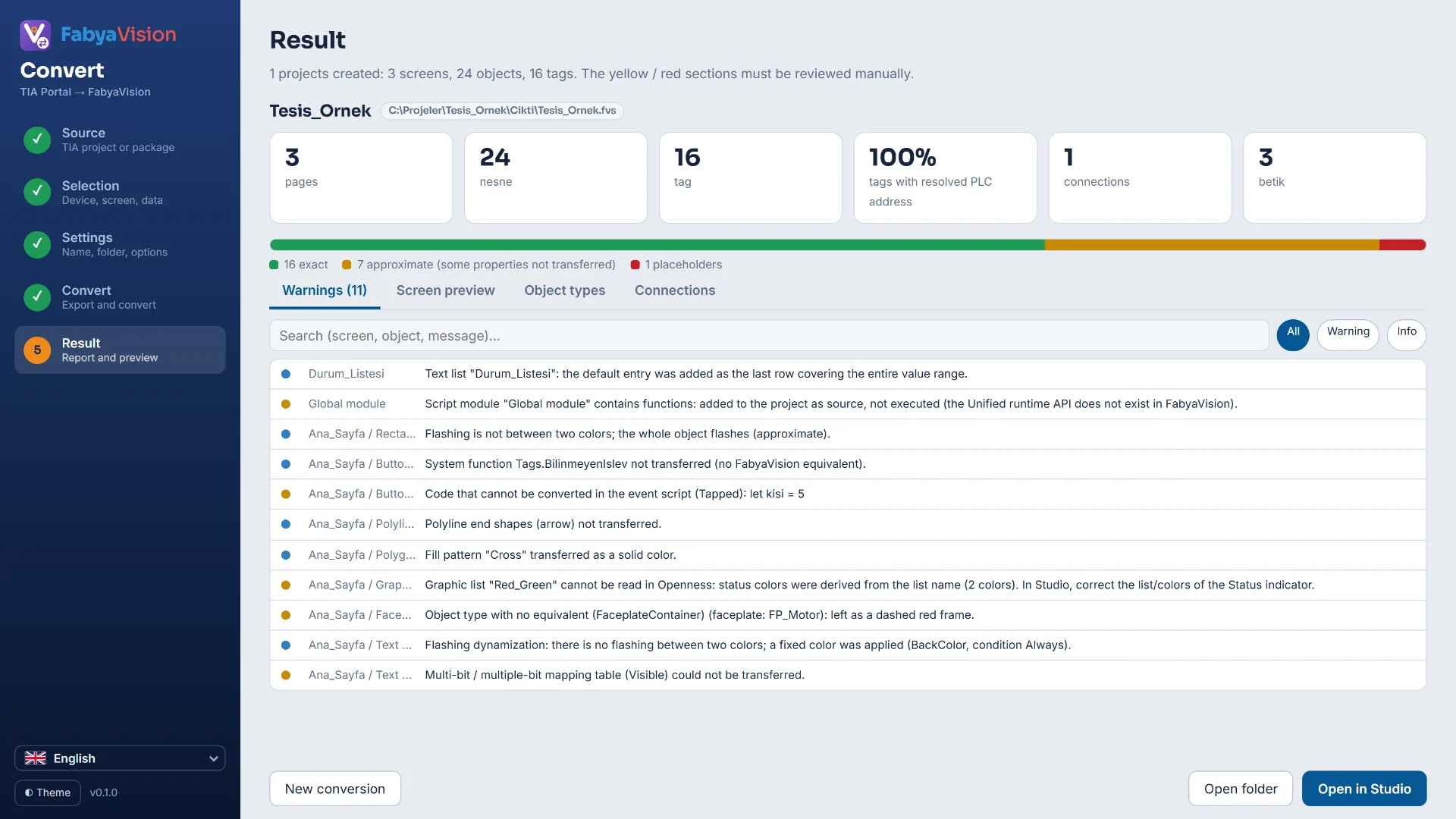
Objects reported as exact, approximate or placeholder, the Warnings list and the preview.
StudioAlarms
Discrete and analog alarms, alarm classes, priority, hysteresis, delay, acknowledgment tag and the Alarm view.
StudioScripts
VBScript, JavaScript, C and Python; editor, compile, sample gallery and permissions that are off by default.